Best 4K Digital Signage Players for Businesses
The market for 4K digital signage players offers a wide range of options for business displays, from simple USB-driven solutions to cloud-managed sticks that auto-run content. This guide highlights five capable models that balance ease of use, reliable playback, and scalable management. Each option is suitable for retail, hospitality, offices, and public information displays, with features like CMS compatibility, remote management, and 4K streaming. Read on to compare core capabilities and choose the best fit for your signage needs.
| Product | Brand | Key Feature |
|---|---|---|
| Amazon Signage Stick | Amazon | CMS integration; kiosk mode; mobile app setup |
| OptiSigns OptiStick | OptiSigns | Android-based; 4K UHD; remote management |
| Micca 4K Ultra-HD Player | Micca | USB/MicroSD media playback; supports 4K |
| EZ AD TV Stick | EZ-AD | Cloud control; PowerPoint uploads; AI image enhancer |
| NEUMI Atom 4K Lite | NEUMITECH | Automatic playback; loop; USB/SD support |
When evaluating these players, consider your display environment—whether you need self-running content in kiosk mode, cloud-based content management, or offline playback. The following sections summarize five strong options, followed by a practical buying guide to help you decide which model best fits your business goals.
Amazon Signage Stick

The Amazon Signage Stick is designed for unattended operation by auto-launching a CMS in kiosk mode. It supports easy setup via the free Amazon Signage app, allowing management of one or multiple sticks. The device emphasizes compatibility with leading CMS providers, enabling seamless content delivery across networks. This model is suited for storefronts, lobbies, and digital menus where hands-off operation and CMS integration are priorities. It is built to reduce IT overhead while maintaining reliable 24/7 signage performance.
OptiSigns OptiStick Digital Signage Player

OptiStick is an Android-based 4K UHD HDMI stick designed for digital signage with a quad-core processor. It includes WiFi and Ethernet connectivity and supports remote screen management via the OptiSigns portal or Admin app. The device ships with a pre-installed OptiSigns Player and offers extensive integrations across 160+ apps, making it easy to deploy curated content, apps, and playlists across multiple displays. Ideal for venues that require centralized control with flexible app integration and broad compatibility with OptiSigns features.
Micca 4K Ultra-HD Digital Media Player

The Micca 4K Ultra-HD player enables TV-based digital signage by rendering media from USB drives or MicroSD cards. It supports 4K playback up to 4096×2304@30fps via HDMI and includes analog AV output for compatibility with older displays or external audio systems. With dual USB and microSD readers supporting large drives, it is suitable for environments where local media libraries are preferred and where compact, affordable players are needed. It offers simple plug-and-play operation and broad file support for a straightforward signage setup.
4K HD Digital Media Player by fnetic
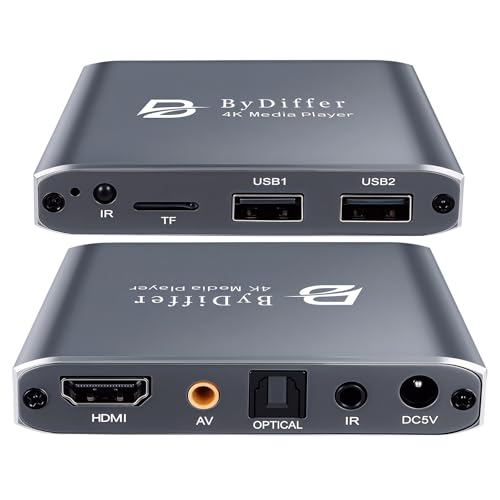
This 4K HD media player is designed to play videos, music, and photos from USB drives or microSD cards on any TV via HDMI. It highlights H.265/HEVC decoding for efficient 4K@30Hz playback and supports USB drives up to 8TB, with FAT32, exFAT, and NTFS compatibility. Dual USB 2.0 ports support connecting peripherals, though only one drive is read at a time. The device is suitable for retailers or venues seeking a simple, offline-capable 4K signage solution with broad multimedia compatibility.
NEUMI Atom 4K Lite Digital Media Player

The NEUMI Atom 4K Lite offers a compact, power-efficient solution for USB/SD-based signage. It supports 4K/UHD video up to 2160p/60Hz with HEVC decoding and provides both HDMI and analog AV outputs to maximize display compatibility. Automatic playback, looping, and resume features help ensure continuous, hands-off signage experiences. It reads USB drives up to 8TB and SD cards up to 1TB, with straightforward setup for small-to-medium display networks where offline playback is important.
Buying Guide: Key Purchase Considerations
- Content management and control: If you need centralized CMS control, prioritize devices with cloud management, kiosk mode, and app ecosystems (e.g., OptiSigns and Amazon Signage Stick). For simple offline playback, USB/SD-based players like Micca or NEUMI Atom can be efficient.
- Playback formats and codecs: Look for 4K support, HEVC/H.265 decoding, and broad media format compatibility (MP4, MKV, MP3, JPG). Ensure the device handles your file sizes and bitrates without buffering.
- Connectivity and deployment: Consider whether you require WiFi, Ethernet, or both. Cloud-enabled devices suit widespread deployments, while offline players benefit from straightforward setup and local media deployment.
- Kiosk and auto-play capabilities: Kiosk-mode readiness reduces IT overhead by launching content automatically without user interaction. Check if automatic updates and scheduling are supported.
- CMS compatibility and subscription costs: Some devices come with built-in CMS integrations or require separate CMS subscriptions. Evaluate long-term costs and vendor support.
- Display and content scale: For multiple screens, prioritize solutions that offer centralized monitoring, remote updates, and straightforward content templating to maintain brand consistency.
- Security and reliability: Ensure firmware updates, user permissions, and secure connections to prevent unauthorized access across a signage network.
- Budget and total cost of ownership: Balance initial hardware cost with ongoing CMS, cloud, and support fees. Consider whether a cloud-managed stick reduces IT maintenance versus a standalone player.
All five options cover common signage needs, from cloud-managed deployments to offline, content-rich playback. Your choice should align with display scale, content cadence, and whether remote administration or local media libraries best support your business operations.