Best Portable DVD Accessory for Computers: Top External Drives for Quick Disk Access
If you’re looking to expand a computer’s optical capabilities without upgrading internal components, a portable DVD drive is a practical solution. These compact, plug-and-play devices work with Windows, macOS, and Linux systems, letting you read and burn CDs and DVDs on the go. The following picks emphasize compatibility, speed, and ease of use to help you find a reliable companion for laptops, desktops, and workstations that lack an internal optical drive. The list focuses on models that balance portability with robust performance for everyday tasks like software installation, media playback, and file backups.
Choosing the right external drive hinges on several factors: connection interfaces (USB 3.0 and USB-C for fast data transfer), maximum read/write speeds, compatibility with different disc formats (+/-R, RW), power needs, and how portable the unit is. To help you compare quickly, here is quick insight into five strong options that are well-suited for a computer-centric workflow:
| Product | Brand | Key Strength | Connectivity |
|---|---|---|---|
| Amicool External DVD Drive | Amicool | Plug-and-play with wide OS compatibility | USB 3.0 / Type-C |
| BOIFUN 15.6″ Portable DVD Player | BOIFUN | Large screen for onboard viewing | Built-in battery; supports USB/SD |
| Rioddas External CD/DVD Drive | Rioddas | Reliable, universal plug-and-play | USB 3.0 / USB 2.0 |
| DBPOWER 11.5″ Portable DVD Player | DBPOWER | Long battery life for travel | Rechargeable battery; car/AC power options |
| ORIGBELIE External CD/DVD Drive | ORIGBELIE | Slim profile, broad OS compatibility | USB 3.0 / Type-C |
Amicool External DVD Drive

The Amicool external drive is designed for simple, driver-free operation. It connects via USB or Type-C and is recognized automatically by most operating systems, making it ideal for laptops or desktops without an internal optical drive. It supports a range of formats including DVD+R, DVD, DVD-R, CD-ROM, CD-R, and CD-RW, with read speeds up to 8x for DVDs and 24x for CDs. Dual interfaces (USB 3.0 and Type-C) deliver up to 5 Gbps data transfer, balancing speed with broad compatibility across Windows, macOS, and Linux. This model is particularly well-suited for quick software installations or media playback on modern machines that emphasize plug-and-play convenience.
Features include plug-and-play operation, broad OS compatibility, and a focus on reliable data transmission. The compact form factor makes it easy to carry between home, office, or classrooms. Note that it is intended for laptops and desktops, not for TVs, tablets, Chromebooks, or car entertainment systems.
BOIFUN 15.6″ Portable DVD Player
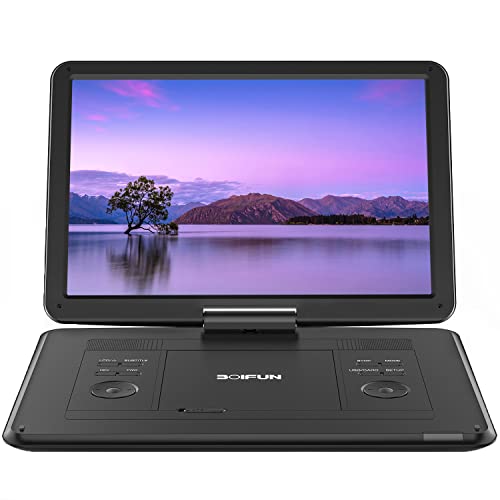
Boifun’s 15.6-inch portable DVD player emphasizes an expansive screen and long playback time. The HD 1280×800 display, with 270-degree rotation and 180-degree flip, supports easy viewing from different angles. It ships with a 5000 mAh battery that allows up to six hours of continuous playback and includes AC and car adapters. In addition to direct disc playback, it supports USB and SD card inputs (up to 32 GB) for playing multimedia files such as MP4, AVI, and JPEG. While primarily a standalone player, it complements a computer-centric setup by serving as a supplementary display for on-the-go entertainment or training sessions that require a larger viewing surface along with portable disk access for content stored on USB or SD cards.
Note that this model is best used as a standalone DVD player for viewing discs or media on the go, rather than a primary external drive for a computer. Its emphasis on a large screen makes it a strong companion for demonstrations or travel, rather than a direct replacement for a computer’s optical drive.
Rioddas External CD/DVD Drive

The Rioddas external drive focuses on dependable plug-and-play operation. Powered by USB, it requires no separate power adapter and is designed for straightforward use on desktops, laptops, or other compatible devices. It supports USB 3.0 (backward compatible with USB 2.0) and delivers up to 5 Gbps data transfer speeds. A standout feature is its physical eject button, which safely releases discs even if the host computer fails to recognize the drive. The drive is engineered with stable data transmission and robust fault tolerance through copper mesh technology, reducing freezes, skipping, and errors during disc playback or burning. This model is well-suited for users seeking dependable performance with simple setup and reliable data handling.
It requires a compatible USB port for power and operation and is best paired with systems that provide access to high-power USB ports for optimal speed and stability. Not all configurations are compatible with every system, so checking OS support and USB ports is advised.
DBPOWER 11.5″ Portable DVD Player

DBPOWER’s portable DVD player combines mobility with media versatility. Its 11.5-inch display offers a swivel design that supports a 270-degree rotation and 180-degree flip, enabling flexible viewing for passengers or collaborative work sessions. A built-in 2500 mAh battery provides up to five hours of continuous playback, complemented by multiple power sources, including a car charger and AC adapter. In addition to disc playback, it accepts USB drives and SD cards (up to 32 GB) and supports formats such as MP3, WMA, JPEG, and MPEG2/AVI/DIVX. The device is region-free for discs, which adds cross-region compatibility for broader media access. While it functions as a standalone player, it can serve in environments where a computer’s internal drive is unavailable or inconvenient to access.
The emphasis on battery life and a flexible screen makes this model an attractive choice for road trips, classrooms, or temporary setups where a computer-based optical drive is absent. It should be noted that this is primarily a portable player rather than a USB-connected external drive, so use cases differ slightly from the other entries.
Alronly External CD/DVD Drive

The Alronly external drive offers a high-speed performance with up to 8x DVD read/write and 24x CD read/write speeds. It uses dual USB-C and USB 3.0 interfaces, delivering up to 5 Gbps data transfer rates. The plug-and-play design requires no driver installation, simplifying use on Windows, macOS, and Linux systems. The device is compatible with a wide range of operating systems, including various Windows versions and Mac OS, and is designed to work with many laptops and desktops. It emphasizes broad compatibility, efficient data transfer, and straightforward operation for users who need reliable disc reading and burning capabilities without complex setup steps.
Power considerations and desktop connectivity are important with this model, as desktop users should connect to motherboard USB ports to avoid power shortages. It is not compatible with Chromebooks or certain devices, so verify OS compatibility before purchase.
ORIGBELIE External CD DVD Drive

The ORIGBELIE drive is a slim, ultra-portable option featuring USB 3.0 and Type-C connectivity. It supports USB 3.0/2.0 backward compatibility and offers up to 8x read/write speeds for DVDs and 24x for CDs. The drive is designed for broad compatibility across Windows, macOS, and Linux, with caveats for specific devices and OS versions noted in its product description. Its slim profile makes it a practical companion for travelers or students who need affordable, compact optical drive functionality with quick setup and simple plug-and-play operation.
As with other external drives, power delivery and correct USB port selection can influence performance. Potential buyers should confirm device compatibility with their specific OS version and hardware configuration to ensure a smooth experience.
Buying Guide: Key Purchase Considerations
- Interface and speed: Prefer USB 3.0 or USB-C for faster transfer rates (up to 5 Gbps). Dual-interface models offer flexibility across devices that may lack USB-C ports.
- Compatibility: Check supported formats (DVD±R/RW, CD-R/RW) and OS compatibility (Windows, macOS, Linux). Some drives list broad OS support but exclude certain newer or older versions; verify your exact version beforehand.
- Power and portability: If you require mobility, consider bus-powered drives that run off USB power. For desktop setups, ensure the USB port can deliver sufficient power on your motherboard or consider a powered hub if needed.
- Build and reliability: Look for a compact, durable chassis with a dependable eject mechanism and recognized disc handling stability. Copper mesh or similar technology can improve data integrity during transfers and burns.
- Use case alignment: If you primarily need to install software or access media on a computer, a standard external drive may be more appropriate. If you want a standalone viewing option for travel, a portable DVD player with a built-in screen may be advantageous.
- Car and travel considerations: Some portable players include car adapters and batteries, making them ideal for long trips but less suitable for frequent desktop use. Consider your typical environment when selecting a model.
When evaluating options, balance the need for speed and reliability with compatibility and portability. For users who seldom burn discs but require quick, reliable reading, a high-quality USB 3.0/Type-C external drive offers the best performance. For those prioritizing on-the-go viewing or demonstrations, a portable DVD player with a built-in display provides a more immersive experience, albeit with a different set of power and connectivity considerations. Always confirm the exact OS version and hardware configuration to ensure seamless operation.