Best Super 8 Film Player and Digitizer to Save Your Classics
Discover top devices and film solutions that help you digitize and enjoy your Super 8 moments. This guide highlights reliable film digitizers and related stock, with objective criteria to compare options. Each pick is chosen for ease of use, output quality, and compatibility with standard SD storage and modern viewing devices.
| Product | Brand | Best For | Key Feature |
|---|---|---|---|
| Wolverine 8mm & Super 8 Reels to Digital MovieMaker Pro Film Digitizer | Wolverine | Standalone digitizing | Frame-by-frame 1080P MP4 without a computer |
| KODAK REELS 8mm & Super 8 Films Digitizer | KODAK | On-device scanning | 5″ onboard LCD, frame-by-frame, SD card save |
| Magnasonic Super 8/8mm Film Scanner (FS81) | Magnasonic | 3″, 5″, 7″ reels viewing | Built-in LCD, SD card save |
| Kodak Super 8 Color Negative VISION3 500T 7219 | KODAK | Film stock purchase | 8mm film stock for high-quality negative color |
| Super 8 Movie Film Reel – 7 Inch, 400 ft | Taylor | Film capture/archiving | 70–80 seconds per reel at typical speeds |
Wolverine 8mm & Super 8 Reels to Digital MovieMaker Pro
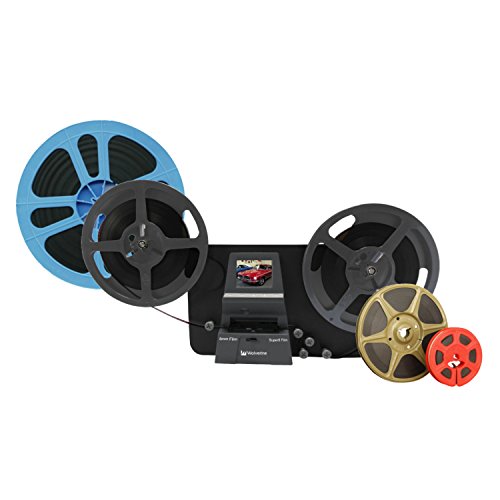
The Wolverine MM100PRO offers a fully automated setup designed for 8mm and Super 8 reels lacking sound. It provides frame-by-frame digitizing and stores directly to SD/SDHC cards up to 32GB. The device is standalone, meaning no computer or drivers are required, and it outputs 1080p MP4 files for easy viewing and sharing.
KODAK REELS 8mm & Super 8 Films Digitizer

The Kodak REELS digitizer combines a large onboard LCD with frame-by-frame scanning to convert film strips into MP4 video files. It supports a range of reel sizes, is designed for easy operation, and transfers data via USB to modern displays and devices for big-screen viewing.
Magnasonic Super 8/8mm Film Scanner (FS81)

Magnasonic’s FS81 allows automatic digitization of 3″, 5″, and 7″ reels into MP4 files. It provides a built-in 2.3-inch LCD for immediate playback and offers RCA outputs for viewing on larger screens. An SD card (up to 32GB) is supported for direct storage of scans.
Super 8 Movie Film Reel – 7 Inch, 400 ft

This 7-inch reel serves as a classic archival option for Super 8 footage. While not a digitizer itself, it represents standard reel sizes often paired with a dedicated scanner or player for later transfer to digital formats.
Buying Guide
Key purchase considerations when selecting a Super 8 film player or digitizer:
- Standalone vs. computer-dependent: If you want a plug-and-play experience, choose a stand-alone device like the Wolverine MM100PRO or Kodak REELS that saves directly to SD cards without software.
- Output format and quality: Look for devices that deliver 1080p MP4 or higher with frame-by-frame control. Consider sensors and color handling for accurate restoration if your reels have faded tones.
- Reel compatibility: Check supported reel sizes (3″, 5″, 7″, 8″, 9″) and whether the device supports both 8mm and Super 8 formats. Some units focus on one format; others support multiple sizes.
- Storage options: SD card capacity matters. If you have long reels, ensure the device supports larger cards or plan for multiple cards.
- Playback and viewing: Built-in LCD screens simplify quick checks, while RCA or HDMI outputs offer big-screen experiences on TVs and monitors.
- Software-free workflows: For minimal setup, prioritize devices that don’t require drivers or a computer, reducing compatibility hurdles for different operating systems.
- Film stock considerations: If you’re archiving film stock (like Vision3 color negative or Tri-X reversal), understand that dedicated digitizers primarily handle scanning of frames; film stock choice affects future processing and storage decisions.
- Preservation goals: For high-fidelity restoration, assess devices that offer frame-by-frame grabbing, color accuracy, and digital stabilization features to mitigate age-related color shifts.
In sum, the best choice depends on how you plan to view and share your footage. Standalone digitizers provide quick conversion with straightforward saving, while models with larger onboard displays or multiple viewing options can simplify inspection and editing workflows before sharing on social media or preserving in long-term archives.