Best HDMI Output DVD Players for TV
Explore top DVD players that deliver sharp HDMI output, region-free playback, and broad format support. This guide highlights five reliable models with easy setup, upscaling, and remote control features to fit modern home theaters. Each option is evaluated for HDMI performance, regional compatibility, and file compatibility to help you pick the right model for your TV and audio system.
| Product | Brand | Key HDMI Features | Region & Formats |
|---|---|---|---|
| MEGATEK Region-Free HDMI DVD Player | MEGATEK | 1080p HDMI Upscaling; HDMI output | All regions; DVD/DVD+R/RW, CD, MP3, JPEG |
| Sony DVPSR510H | Sony | HDMI output; 1080p Upscale | Region 1; DVD/CD MP3; JPEG |
| Mini DESOBRY DVD Player | Desobry | HDMI / AV outputs; 1080p upscaling | All regions; DVDs/CDs/USB |
| LONPOO HD Blu-Ray Disc Player | LONPOO | HDMI + AV + Coaxial outputs; 1080p upscaling | Region A/1; Blu-ray/DVD |
| MAITE DVD Player | MAITE | HDMI output; USB playback | All regions; DVD/CD/VCD/MP3 |
Note: All product links open in a new tab for quick reference. The buying guide below compares common considerations such as HDMI output quality, regional compatibility, and disk and file format support to help you decide which model best fits your home entertainment setup.
MEGATEK Region-Free HDMI DVD Player

MEGATEK offers a compact, metal-housing DVD player with 1080p HDMI upscaling and multi-region playback. It supports a wide range of formats including DVD, DVD±R/R DL, DVD±RW, SVCD, VCD, CDs, MP3, WMA, and JPEG. The device is designed for home theater setups, delivering enhanced image clarity through advanced picture enhancement and progressive scan technology. It includes HDMI and RCA cables and a remote for convenient operation, making it a versatile choice for users seeking broad compatibility without Blu-ray support.
Sony DVPSR510H DVD Player

Sony’s DVPSR510H features a slim, mid-size chassis with HDMI output and 1080p upscaling to improve standard-definition content. It also supports JPEG and MP3 playback, has multi-disc resume, and includes a TV remote compatible with various regions. The player emphasizes energy efficiency with an Energy Star designation and comes with a one-year parts warranty plus 90-day labor coverage, offering solid reliability for everyday DVD viewing on a modern HDTV.
Electcom Pro DVD Player With HDMI Output
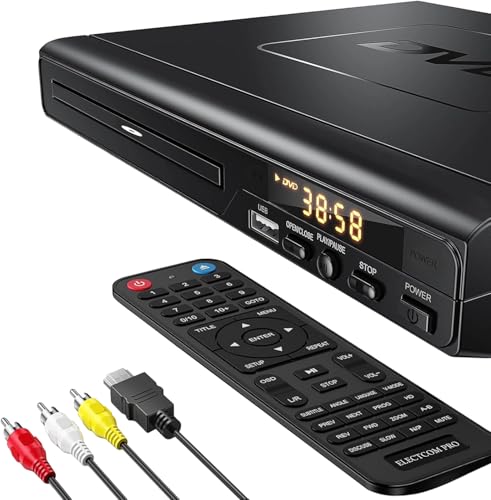
Electcom Pro presents a region-free HDMI DVD player that doubles as a CD player and supports a range of formats including DVD, DVD±R, DVD±RW, CD, MP3, and USB file playback. It emphasizes broad compatibility and multiple video outputs for flexible home theater integration. The product notes caution about Blu-ray incompatibility, focusing instead on standard DVDs and audio CD playback with HDMI for modern TVs. A convenient HDMI and RCA cable bundle is included to simplify setup.
Mini DESOBRY HDMI DVD Player

DESOBRY’s compact unit highlights space-saving design with 6.1 by 5.9 by 1.2 inches footprint and light weight, making it easy to place in small media setups. It offers an upgraded drive with quick disc reading, breakpoint memory, and anti-shock protection for uninterrupted viewing. HDMI output, along with an AV option, delivers 1080p upscaling for TVs and projectors. The kit includes a remote and all necessary cables, ensuring straightforward connection to modern display devices.
MAITE DVD Player With HDMI Output

MAITE’s HDMI-equipped DVD player supports all regions and offers multiple playback formats, including DVD, CD, VCD, MP3, and USB media. It provides HDMI as well as RCA outputs for compatibility with a wide range of TVs and AV receivers. The device emphasizes a simple control experience with a remote and supports region-free playback, making it a practical choice for households with diverse disc collections and legacy media.
Buying Guide: Key Purchase Considerations
- HDMI Output Quality: Look for players that explicitly offer 1080p upscaling or better. HDMI ensures compatibility with modern TVs and audio systems, and upscaling helps older DVDs look crisper on large displays.
- Region and Disc Formats: If you own DVDs from multiple regions, choose a region-free player. Check the supported formats (DVD, CD, VCD, MP3, JPEG) to ensure your media library plays without issue.
- File Playback and USB: Some models support USB playback for media files. Verify the supported file types and any formatting requirements to avoid compatibility problems.
- Connectivity: In addition to HDMI, many players include AV outputs, coaxial or optical audio out, and sometimes USB or microSD inputs. Decide which connections your home theater setup requires.
- Remote and Usability: A responsive remote and straightforward menu system improve daily use, especially for households with varied ages. Check for universal remote compatibility if you already own a separate remote ecosystem.
- Form Factor and Power: Compact players save space, but ensure ventilation and build quality for reliable long-term use. If you frequently move equipment, a lightweight model can be advantageous.
- Warranty and Support: A solid warranty (parts and labor) can provide peace of mind for ongoing HDMI performance and disc compatibility.
- Limitations: Some players may not support Blu-ray discs despite strong DVD performance. If you need Blu-ray, choose a model explicitly marketed for Blu-ray compatibility.