Best WiFi Digital Signage Player Options for Businesses
Finding a reliable WiFi digital signage player involves balancing ease of setup, content management options, and performance. The following selections emphasize wireless connectivity, cloud control, and robust content support to help organizations display timely, engaging content across screens. This article highlights five top options with diverse features, from Android-based players to cloud-managed systems, to fit a range of business needs.
| Product | Brand | Key Benefit | Content Management |
|---|---|---|---|
| OptiSigns OptiStick Digital Signage Player | OptiSigns | 4K UHD Android-based stick with broad app integrations | OptiSigns Portal / Admin App |
| Amazon Signage Stick | Amazon | Professional 4K signage with kiosk-mode CMS auto-launch | Free mobile app, CMS compatibility |
| EZ AD TV Digital Signage Player | EZ-AD | Powerful 4K player with extensive content library | Template Builder, YouTube Loader, Mobile App |
| XOGO Mini Max | XOGO | Cloud-powered 4K playback with scheduled playlists | XOGO Manager |
| Geniatech Android 11 Smart Box | Geniatech | 4K playback with AI-ready performance for industrial displays | WiFi, Ethernet, multiple outputs |
OptiSigns OptiStick Digital Signage Player

The OptiStick is an Android-based 4K UHD signage stick designed for simple, scalable deployments. It offers WiFi and Ethernet connectivity and ships with pre-installed OptiSigns Player software, enabling remote screen management via the OptiSigns portal or Admin app. The device emphasizes compatibility with a broad ecosystem of apps and integrations, providing 160+ options to quickly populate screens with engaging content. This makes it well-suited for retail locations, corporate lobbies, and venues needing reliable, 4K playback from a compact form factor.
Amazon Signage Stick – Professional Digital Signage 4K

The Amazon Signage Stick is a professional 4K media player designed for unattended operation in kiosk mode. It is quick to set up via the free Amazon Signage app and supports integration with major CMS providers. The device is intended for businesses of all sizes, offering seamless CMS compatibility and the ability to deploy multiple sticks efficiently. Its streamlined workflow is ideal for retailers, restaurants, and corporate environments that require scalable, plug-and-play digital signage with reliable CMS control.
EZ AD TV Digital Signage Player

The EZ-AD TV digital signage player emphasizes power and content flexibility. It delivers 4K playback with access to a vast video gallery and offers a free plan to start, with premium plans for additional features. Content creation tools include a Template Builder and Video Studio, while the YouTube Loader and mobile app enable on-the-go management. This makes EZ AD a strong option for venues that require rich media templates, rapid publishing, and scalable content management without upfront licensing complexity.
XOGO Mini Max | Digital Signage Media Player
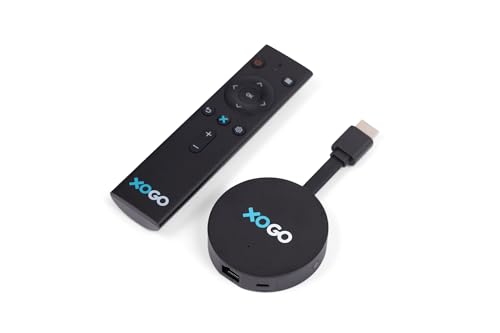
The XOGO Mini Max focuses on cloud-powered playback with 4K video support. It allows you to schedule playlists from XOGO Manager, including videos, images, URLs, and content widgets. Content resides in the XOGO cloud and caches for offline reliability, ensuring continuous playback during connectivity interruptions. It’s designed for simple setup and operation, pairing well with a free XOGO Manager app for straightforward content management and screen connections.
Geniatech Android 11 Smart TV Box 4K

The Geniatech Android 11 Smart TV Box is built for demanding commercial environments with 2GB RAM and 8GB ROM, supporting 4K HEVC over HDMI, Ethernet, and dual-band WiFi. Its upgrading hardware, including an Amlogic S905X4 quad-core processor, provides robust decoding and potential for multiple outputs via HDMI and USB. The device accommodates industrial communication needs through RS232 compatibility, enabling integration with older equipment and networked devices in signage deployments.
Buying Guide
Key considerations when choosing a WiFi digital signage player:
- Content management: Evaluate whether you prefer a cloud-based dashboard, local CMS compatibility, or a vendor-specific portal. Consider how easy it is to schedule, update, and publish content across multiple screens.
- Video and image support: Ensure 4K playback capability if your screens require high resolution. Confirm supported formats for images, video, and streaming services you depend on.
- Connectivity: Look for reliable WiFi with Ethernet options, and consider dual-band or enterprise-grade network features for stable playback across locations.
- Hardware and form factor: Choose between stick/box form factors for space constraints, heat dissipation considerations, and ease of mounting or deployment behind displays.
- App ecosystem and integrations: A wide app library or CMS integrations help tailor content workflows, such as templates, widgets, or feeds.
- Remote management: Assess how easily you can monitor device status, push updates, and troubleshoot remotely to minimize on-site visits.
- Cost structure: Compare free plans versus premium features, subscription models, and potential add-ons like AI tools or advanced templates.
- Security and updates: Check for regular firmware updates, secure authentication, and data privacy considerations to protect signage networks.
- Hardware reliability: Look for devices with good heat management, robust warranty, and reputable customer support for business continuity.
In multi-site deployments, balance between a centralized management platform and individual device flexibility. For storefronts and hospitality venues, prioritize 4K playback, easy uploading workflows, and stable remote management. For industrial or back-office displays, consider connectivity options like RS232 support and robust hardware specs to handle long operating hours. Always verify compatibility with your existing CMS and confirm that the chosen device aligns with your network infrastructure and content strategy.