Best Digital Media Player Signage for Businesses: 5 Top Picks for 4K Clarity and Easy Management
Digital signage players are the brains behind modern business displays, delivering 4K content with automatic playback, cloud control, and simple app-based management. Below are five leading options that cover varied needs—from turnkey CMS integrations to flexible local playback. Each product is evaluated on ease of setup, content management compatibility, and overall performance for signage deployments.
| Product | Brand | Key Benefit | CMS/Cloud Support |
|---|---|---|---|
| Amazon Signage Stick | Amazon | Unattended kiosk-mode operation; simple multi-device setup | CMS compatibility with CMS subscription |
| OptiSigns OptiStick | OptiSigns | Android-based 4K with remote management | OptiSigns portal and apps; 160+ app integrations |
| 4K HD Digital Media Player (fnetic) | fnetic | High-clarity 4K playback from USB/SD; broad file support | Local playback; cloud not required |
| EZ AD TV Stick Digital Signage Player 4K | EZ-AD | Content automation; free plan and mobile app | Cloud control; template library |
| Micca 4K Ultra-HD Media Player | Micca | Compact, versatile for USB/SD-based signage | Local playback; supports 4K/60Hz |
The following sections provide deeper product-by-product details, followed by a practical buying guide to help you choose the right unit for your signage network.
Amazon Signage Stick — 4K Signage Player

The Amazon Signage Stick is designed for professional digital signage with unattended operation. It auto-launches your CMS in kiosk mode to keep content playing without manual intervention. Setup is streamlined: use the free Amazon Signage app to configure one or multiple sticks, and integrate with your preferred CMS provider (CMS subscription required). This solution is ideal for small to medium deployments needing reliable, plug-and-play signage management.
OptiSigns OptiStick Digital Signage Player

OptiStick is an Android-based 4K UHD HDMI stick designed specifically for signage. It offers remote screen management and easy setup, with pre-installed OptiSigns Player and access to the OptiSigns portal or Admin app. The device supports a wide ecosystem through 160+ apps, enabling quick content deployment and centralized control for multiple displays across locations.
4K HD Digital Media Player (fnetic)
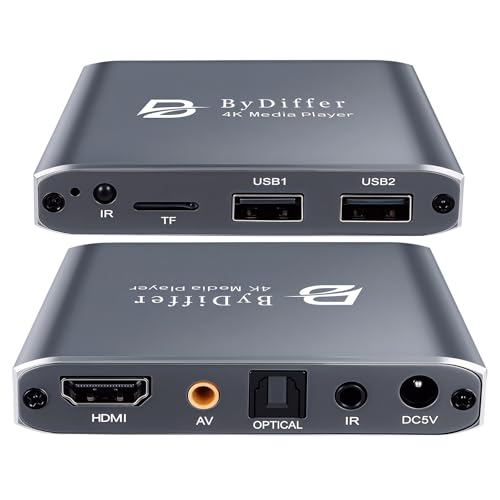
fnetic’s 4K HD Media Player focuses on local playback from USB drives or microSD cards. It supports up to 7.1-channel surround sound via Optical output and uses H.265/HEVC for efficient streaming. The unit reads USB drives and microSD cards up to large capacities and is compatible with FAT32, exFAT, and NTFS. It’s ideal for self-contained displays where network access is limited or unnecessary.
Micca 4K Ultra-HD Signage Player

The Micca 4K Ultra-HD player is designed to elevate televisions with USB/SD-based playback. It supports 4K upscaling and playback via HDMI and offers analog AV outputs for legacy displays. Dual USB ports and microSD readers enable flexible content sources, including compatibility with wireless remotes. Auto play and resume features simplify signage operations across multiple screens.
EZ AD TV Digital Signage Player — 4K Kit

The EZ-AD 4K signage solution emphasizes content automation with a large media library and multiple content formats. It offers cloud-based control, a mobile app for on-the-go content management, and a free plan that supports image and video formats with up to 50 slides per device. Premium plans unlock broader features and templates for professional signage networks.
EZ AD TV Stick Digital Signage Player 4K

The EZ-AD TV Stick supports 4K content display with cloud control and PowerPoint upload capabilities. Its AI Image Enhancer helps adjust visuals to fit non-standard screen sizes, ensuring professional signage layouts. Instant 4K playback and seamless updates make it suitable for dynamic environments where content changes frequently.
NEUMI Atom 4K Lite

NEUMI Atom 4K Lite focuses on simple, compact playback from USB drives and SD cards. It handles 4K/UHD video with HEVC decoding and provides automatic playback with looping and resume features. It supports drives up to 8TB and cards up to 1TB, with compatibility across FAT32, exFAT, and NTFS file systems, making it versatile for signage needs where local content is primary.
Buying Guide
Key considerations when choosing a digital signage player:
- Content delivery model: Decide between cloud-based CMS control (for centralized updates) versus local playback (for standalone reliability with limited network access).
- Resolution and media formats: Ensure 4K support if high clarity is required; verify codec support (H.265/HEVC, H.264), and the types of files you’ll publish (video, images, slideshows).
- Source options: USB, SD card, or network streams; consider devices that support multiple sources for redundancy.
- CMS compatibility: If you rely on a CMS, confirm compatibility and whether a subscription is needed; some devices offer built-in templates and app ecosystems.
- Ease of deployment: Look for kiosk mode, remote management, and mobile app control to reduce onsite maintenance.
- Connectivity: Wi-Fi vs Ethernet, Bluetooth peripherals, and whether the device supports remote updates and scheduling.
- Scalability: For networks with many displays, select a platform with centralized management, batch provisioning, and role-based access.
- Support and firmware updates: Active manufacturer support and regular firmware improvements help maintain security and performance.
In practice, a CMS-integrated solution like the Amazon Signage Stick or OptiSigns OptiStick can simplify multi-screen deployments, while devices such as the Micca or fnetic players provide robust local playback for areas with limited or unstable connectivity. EZ-AD options balance automation with accessible cloud features and templates, useful for dynamic business environments. Consider your display count, location, and network capabilities to choose the best fit for your signage strategy.