Best Noise-Canceling Headset for Clear Calls
Direct answer: If you need a headset that blocks background noise for better calls, choose models with active or effective passive noise reduction, a clear mic, and comfortable all-day wear. The top picks here are suited for office work, remote learning, customer support, or video conferencing in noisy environments. Each product is evaluated for comfort, mic clarity, and noise suppression, so you can select the best fit for your situation.
Summary at a glance: the following 5 headsets are highlighted for blocking background noise and delivering clear audio. Use this quick table to compare who each is best for, plus key strengths and a noted limitation.
| Product | |||
|---|---|---|---|
| awatrue EH05-U | Remote workers and students | Stable wired connection with noise-canceling mic | Wired only |
| Lenovo USB-A Wired Headset Gen 2 | Teams/Zoom heavy users | AI noise cancel via app, lightweight | Requires software for best noise control |
| AOC USB Headset | Busy environments | 40mm drivers, rotatable mic | Requires USB-A port |
| Blucalm Wired Headset | Calls in variable noise | 3-mic array for noise reduction | Busylight not all platforms |
| Leitner LH230 | Home office and calls | Effective noise-blocking mic, easy USB | Single-ear design may be less immersive |
awatrue EH05-U Wired USB Headset
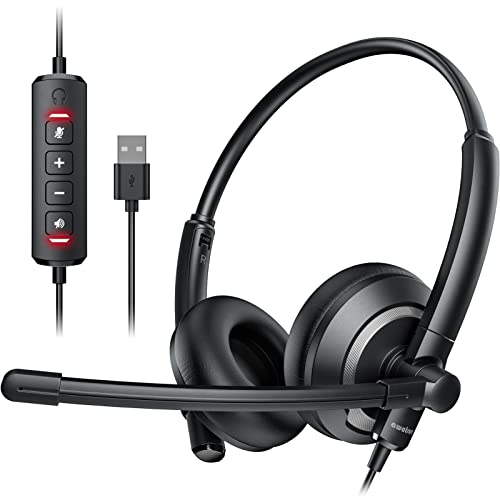
The awatrue EH05-U is a wired USB headset designed for clear voice capture and a comfortable fit. Its noise-canceling mic aims to reduce surrounding chatter, making it suitable for online courses, webinars, and remote work. The inline controls include mic mute and volume, which helps keep calls focused.
- Best for: students and professionals who want reliable voice pickup in busy environments.
- Why selected: stable wired connection reduces dropouts, and the mic mute feature adds practical call management.
- Limitation: purely wired—no wireless flexibility if you move around.
Lenovo USB-A Wired Stereo Headset Gen 2

This Lenovo headset emphasizes call clarity with AI noise cancellation via Lenovo Accessories and Device Manager software. It also features an intuitive control box for quick access to call, volume, and mute, making it practical for long sessions on Teams or Zoom.
- Best for: professionals who value software-enhanced noise control and simple on-headset controls.
- Why selected: lightweight at about 140 g supports all-day wear; easy to use with major conferencing apps.
- Limitation: software optimization is needed to tap the full noise-canceling potential.
AOC USB Headset With Noise-Canceling Mic
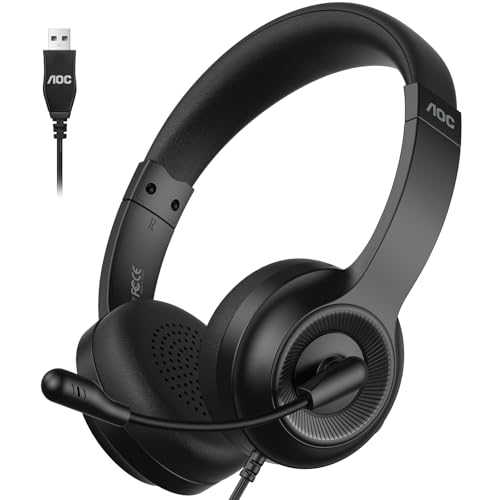
The AOC USB headset combines 40mm drivers with a highly directional 270° rotatable mic to focus on your voice while suppressing ambient noise. It is designed for professional use in meetings and calls, offering clear speech transmission in Zoom, Teams, and other platforms.
- Best for: call-heavy days in open offices or crowded spaces.
- Why selected: robust mic directionality helps keep voice consistent even with background noise.
- Limitation: relies on USB-A connection; may require adapter on newer machines.
Blucalm Wired Headset

The Blucalm headset offers a three-microphone array designed to reduce noise with AENC Voice Protection. It includes a Busylight to signal focus status and works with USB-A, making it a solid choice for teams and call centers.
- Best for: environments with interruptions where clear speaking is critical.
- Why selected: explicit noise cancellation through multiple mics improves voice clarity.
- Limitation: Busylight functionality may be platform-specific for some services.
Leitner LH230 Corded Single-Ear USB Headset

The Leitner LH230 is a single-ear USB headset designed for straightforward, day-long use. It emphasizes background-noise blocking and provides inline call controls for quick management. The moldable headband supports comfortable wear across different head shapes.
- Best for: office workers who need a simple, reliable headset without needing a full two-ear setup.
- Why selected: easy USB plug-and-play and effective noise blocking for calls.
- Limitation: single-ear design may reduce overall immersion in some tasks.
Buying Guide
What to look for in a noise-blocking headset
Key features to evaluate: microphone directionality, noise-canceling capabilities (active or passive), connectivity (USB-A vs USB-C, wired vs wireless), and wearing comfort for long sessions. A headset with a trim profile and lightweight design reduces fatigue during extended calls.
Which mic technology matters most
Microphone arrays with multiple mics or a highly directional boom mic typically perform better in noisy environments. Look for mics advertised as noise-canceling, noise reduction, or AI-based suppression for ongoing calls.
Wired vs wireless considerations
Wired headsets offer stable connections and no battery concerns, ideal for fixed desks. Wireless headsets provide mobility but may introduce latency or pairing issues. For heavy conferencing, a reliable wired option is often best.
Comfort and build quality
Ergonomic padding, adjustable headbands, and lightweight materials help with prolonged use. Replaceable ear cushions and durable frames add long-term value in a busy workday.
Platform compatibility and controls
Ensure the headset supports your primary apps (Teams, Zoom, Webex). Inline controls or a dedicated control box can simplify muting, volume, and answering calls without interrupting workflow.
Quick decision tips
- Choose a model with a dedicated mute button and easy volume control for fast call adjustments.
- Prefer headphones with a rotatable or adjustable mic to optimize voice pickup.
- Consider software-based noise cancellation only if you operate in highly variable environments.
FAQ
- What headsets are best for noisy environments?
Headsets with multiple mics and directional mics, like those in the Blucalm or Leitner lines, tend to perform well in noisy settings. - Are wired headsets better than wireless for calls?
Generally, yes for stability and consistent audio, especially in busy workspaces. - Do noise-canceling mics really improve call clarity?
Yes, they reduce ambient background sounds, allowing your voice to come through more clearly. - Can I use these headsets with USB-C devices?
Some models are USB-A only; if you need USB-C, check for a compatible version or adapter compatibility. - Is it worth software noise cancellation?
It can help in variable environments, but hardware-based mic controls often deliver reliable results without extra setup. - What is the best headset for long Zoom meetings?
A lightweight, comfortable headset with clear mic pickup and easy inline controls is ideal, such as the Lenovo Gen 2 or AOC models listed above.