Best USB Speakers for PC: Clear Sound on Any Desk
If you’re seeking simple, plug-and-play computer audio, USB-powered speakers are often the easiest route. These options work with Windows, macOS, Linux, and Chrome OS, and many require no drivers. This guide highlights five top USB PC speakers, suited for quick desk setups, students, remote workers, or casual PC users who want better sound without clutter.
Overview: the buyer profile for each top pick tends to fall into these categories.
– LIELONGREN Upgraded USB Computer Speaker: best for broad Windows compatibility and easy plug‑and‑play use.
– Amazon Basics USB-Powered Computer Speakers: best for portable, compact, budget-friendly needs.
– Logitech S150: best for simple, reliable basic stereo sound with quick USB connection.
– Cyber Acoustics CA-2890: best for monitor-mount setups and convenient on-speaker controls.
– Creative Pebble V2: best for compact desk spaces with a stylish, modern look.
| Product | Best For | Key Benefit |
|---|---|---|
| LIELONGREN Upgraded USB Computer Speaker | Windows users, plug‑and‑play lovers | Broad compatibility and simple setup |
| Amazon Basics USB-Powered Speakers | Minimalists, portable desks | Compact, easy, budget-friendly |
| Logitech S150 | Quick, basic desktop audio | Simple USB connection and front controls |
| Cyber Acoustics CA-2890 | Monitor-mount setups | Clip-on design with on-speaker controls |
| Creative Pebble V2 | Small desks, modern aesthetics | Stylish look with solid sound |
LIELONGREN Upgraded USB Computer Speaker

Best for Windows-heavy setups and quick plug‑and‑play. This speaker supports Windows, macOS, Linux, and Chrome OS with easy USB connectivity. Its plug‑n‑play workflow lets users select the USB device in the sound settings and start listening without drivers. The build emphasizes broad compatibility and straightforward use, making it a reliable option for mixed-device environments. Caution: practical performance depends on your PC’s audio driver support and USB port power.
XKX Computer Speakers for Desktop PC

Best for users needing USB-C compatibility and a compact footprint. The XKX speakers offer USB and USB-C adaptability, supporting Windows, macOS, ChromeOS, and Linux. They advertise dual drivers and passive radiators for a fuller stereo image, which helps with movies and music. Caution: listen volume should be moderated to avoid distortion at high bass settings on small enclosures.
Amazon Basics USB-Powered Computer Speakers

Best for budget-conscious buyers who want portable, plug‑and‑play audio. These USB-powered speakers connect directly to a computer and feature front-volume controls plus a 3.5mm headphone jack for private listening. They are compact and easy to move between devices. Limitation: audio quality is basic compared to higher-end models, and bass depth is modest in small speakers.
Logitech S150 USB Speakers

Best for straightforward, reliable stereo sound with easy USB connectivity. The S150 provides balanced audio with a clean front panel for volume and mute. It’s suited for everyday computing, video calls, and light media consumption. Caution: lacks advanced audio features found in higher-end options and may not satisfy audiophiles seeking deep bass.
Cyber Acoustics CA-2890 USB Speaker Bar

Best for monitor-mounted setups and clutter-free desks. This USB-powered speaker bar attaches under most monitors, freeing desk space while delivering clear stereo sound. On‑speaker volume and mute controls provide quick adjustments during work or streaming. Caution: mounting may be limited by monitor thickness and compatibility with certain VESA setups.
Creative Pebble V2 2-Channel USB Speakers
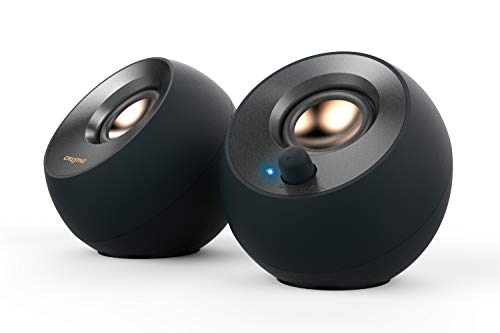
Best for compact desks needing stylish, modern audio. Pebble V2 uses USB power and 3.5mm input, delivering stereo sound with a simple, minimal footprint. Its raised, angled design helps direct sound toward the listener. Caution: bass response is present, but not as powerful as larger desktop systems; ideal for spoken word and casual media.
Buying Guide: Key Purchase Considerations
- Connectivity: Most options are USB-powered with optional 3.5mm jacks. Consider USB-C compatibility if your devices lack standard USB-A ports.
- Driver and Compatibility: Ensure the speaker supports Windows, macOS, ChromeOS, and Linux if you switch devices often.
- Size and Desk Space: For crowded desks, monitor-mount or compact sizes help maintain a clean setup.
- Sound Quality vs. Budget: Small speakers improve over built-in laptop speakers, but expect diminishing returns at higher price points—consider a model with passive radiators or dual drivers for richer audio.
- Controls and Convenience: Front-panel volume, mute, and power indicators simplify daily use; detachability or clip-on mounting can be a benefit for multi-monitor rigs.
FAQ
- Q: Do USB speakers require drivers? A: Most plug‑and‑play USB speakers do not require drivers; they install as a generic audio device automatically.
- Q: Can USB speakers power headphones through the 3.5mm jack? A: The 3.5mm jack is typically for headphones output, not power to the speakers.
- Q: Are USB-C only devices compatible with these speakers? A: Many models include a USB-C adapter or USB‑C compatibility, but verify the product features to ensure your devices are supported.
- Q: Is there a noticeable difference between 2.0 and 2.1 USB speaker systems? A: 2.1 systems include a dedicated subwoofer for deeper bass, whereas 2.0 systems rely on dual drivers or passive radiators in the main enclosure.
- Q: Are these suitable for gaming or voice calls? A: For basic gaming and voice calls, most options provide clear dialogue and decent spatial detail; for competitive gaming or high-end voice work, consider higher-fidelity models with larger drivers.
- Q: Do these speakers work with laptops and desktops alike? A: Yes, most listed speakers are designed for both laptops and desktops via USB power and universal compatibility.