Best USB to Line in Adapters for Clear, Flexible Audio
Answering the question: a USB to line-in adapter is ideal for users who want easy-to-use audio capture or playback from computers, laptops, gaming consoles, or mobile setups without a traditional sound card. The top picks here suit: content creators needing USB sound input, gamers seeking improved mic/audio, and casual listeners upgrading legacy devices. The following reviews highlight who each product fits best and why it was selected, with practical notes you can act on today.
| Product | Best For | Key Benefit |
|---|---|---|
| MOSWAG USB to 3.5mm Jack Audio Adapter | Windows, Mac, Linux users needing combo mic and audio | Stable 16-bit/48kHz with noise reduction |
| Cubilux USB C to 3.5mm Adapter | Laptop users with USB-C needing mic/line input | Recording-friendly USB-C solution |
| UGREEN USB to Audio Jack Sound Card | Desktop or laptop users upgrading audio | High-resolution DAC for clear sound |
| Cubilux CB5 USB Audio Interface | Home studios and streaming setups | Multi-port hub for mics, line, and headphones |
| ANDTOBO USB to Aux Audio Adapter | Car audio systems and simple music playback | Easy USB to car AUX connection |
MOSWAG USB To 3.5mm Jack Audio Adapter

MOSWAG offers a USB external sound card that provides both audio out and microphone input via a single USB connection. It supports CTIA and OMTP headphone standards, delivering stable 16-bit/48kHz audio with noise reduction. It is best for users who need an inexpensive, plug-and-play solution for Windows, Mac, Linux, or PS4/PS5 environments. The 3.5mm mic jack does not support TS or TRS connectors, which is a limitation to note for non-standard headsets.
Who this is best for: content creators, students, and casual users needing a simple USB sound card with mic-in for calls or recordings. Why selected: broad compatibility, integrated microphone and audio interface, and straightforward setup.
Limitations to consider: Some headsets using non-TRRS connectors may require adapters; the mic jack compatibility is limited to TRRS-compatible devices.
Cubilux USB C To 3.5mm Adapter

This USB-C to 3.5mm adapter targets recording on USB-C laptops and devices, enabling mic-in and line-in capture for live streaming or studio work. It is positioned as ideal for musicians and creators who work with USB-C laptops and want a straightforward recording path. The description notes it supports line-in and mic-in for external audio sources, making it suitable for home studios and on-the-go recordings.
Who this is best for: musicians and creators using USB-C laptops/desktops who need a compact recording adapter. Why selected: dedicated USB-C input for recording workflows without extra drivers.
Limitations to consider: Not explicitly stated for use with all operating systems beyond the USB-C device class; check device compatibility before purchase.
UGREEN USB To Audio Jack Sound Card

UGREEN’s USB to 3.5mm sound card emphasizes upgrading sound quality with a high-resolution DAC and noise reduction up to 16bit/48kHz. It supports both headphone and microphone on a single USB connection, delivering crystal-clear output for gaming, watching movies, or music. It is plug-and-play, requiring no extra drivers or power, which makes it convenient for quick setups on laptops, desktops, PS5, Nintendo Switch, and other platforms.
Who this is best for: users seeking a simple, driver-free upgrade for better overall audio quality on computers. Why selected: straightforward upgrade with a clear focus on listening quality and mic support.
Limitations to consider: Might not be necessary for users with built-in audio improvements already; ensure your system supports USB audio devices without conflicts.
Cubilux CB5 USB Audio Interface

The CB5 model acts as a compact 5-in-1 audio hub. It converts a USB port into two stereo microphone jacks, a line-in, a line-out, and a headphone jack. This setup supports multi-track recording by naming devices independently, with professional-sounding capture up to 96 KHz/24-bit. It’s well-suited for streamers, podcasters, and small home studios needing multiple inputs and monitor output.
Who this is best for: creators who need separate mic channels, line-in for instruments, and headphone monitoring. Why selected: multi-port capability and higher-resolution recording for clearer, multi-source content.
Limitations to consider: Line-out and output jacks may not be usable simultaneously; plan routing accordingly.
ANDTOBO USB To Aux Audio Adapter
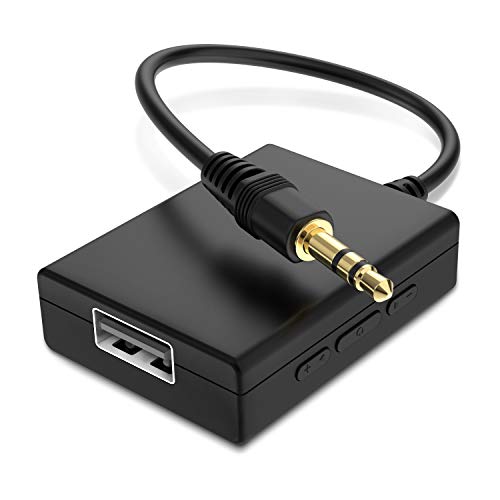
ANDTOBO’s adapter targets car audio systems, converting USB power into a 3.5mm AUX connection for music playback. It emphasizes a simple, unidirectional audio flow suitable for older car stereos or AUX-enabled speakers. Important notes include the device needing a power source and not functioning as a USB charger or a general signal converter. This makes it best for basic car-based listening rather than computer recording or gaming.
Who this is best for: drivers seeking a straightforward USB-to-car-AUX solution. Why selected: compact, easy-to-use option for integrating USB music into car audio without complex setup.
Limitations to consider: Not compatible with USB headphones, laptops, or devices requiring decoding; it is a one-way audio adapter meant for car systems only.
Buying Guide
What to consider when choosing a USB to line-in adapter:
- Check operating systems (Windows, Mac, Linux) and device types (laptops, desktops, consoles, cars) to ensure the adapter supports your gear.
- Decide if you need mic-in, line-in, or both. If you require multi-port audio (mic, line, headphone), an interface like the Cubilux CB5 offers more versatility.
- Look for devices with a built-in DAC and support for 16-bit/48kHz or higher. This impact on clarity can be crucial for streaming and recording.
- Prefer plug-and-play devices that require no extra drivers. Some USB-C adapters may work best with modern laptops; confirm driver support if necessary.
- For mobile or car use, smaller dongles may suffice, while home studios benefit from multi-port interfaces.
- Ensure TRRS compatibility if you plan to use headsets with combined mic and audio jacks.
Frequently Asked Questions
- Do USB to line-in adapters require drivers? Most modern adapters are plug-and-play and do not require drivers for Windows, macOS, or Linux, but some may need vendor-specific software on certain systems.
- Can I use a USB to 3.5mm adapter for gaming headsets? Yes, if the headset uses a TRRS connector compatible with the adapter’s mic and audio jacks. Check device compatibility before purchasing.
- Will these adapters improve microphone quality? Many adapters improve signal routing and noise reduction, but the improvement depends on the microphone and environment.
- Are USB-C to 3.5mm adapters universal for recording? USB-C adapters can support recording, but ensure your device supports USB audio input and the adapter specifies line-in/mic-in capability.
- Is a multi-port USB audio interface better than a simple USB to 3.5mm dongle? For multi-mic or multi-source setups, a multi-port interface offers more control, higher-quality routing, and independent inputs.