Best USB-C Headset With Mic for Clear Calls and Wide Compatibility
If you need a USB-C headset with a mic for work calls, online meetings, or casual listening, you’ve found the right guide. This article compares five solid options that connect via USB-C, USB-A, or both, and highlights who each headset is best for. The list prioritizes comfort, microphone clarity, and easy inline controls, making it simple to pick a model that fits your setup—whether you’re on a laptop, desktop, or a mobile device.
| Product | Best For | Key Benefit |
|---|---|---|
| Logitech H391 | Office workers and students | Rotating noise-canceling mic and inline controls |
| REBOCOON USB Headset | All-day calls and multi-device users | 290° rotating mic and lightweight design |
| POLY Blackwire 3220 | Remote teams and busy environments | Comfortable, noise-canceling mic with simple connectivity |
| Acer USB Headset | Zoom/Meetings and travel-friendly use | ENC noise cancellation with universal USB-C/USB-A |
| Lenovo 115 USB | People needing simple plug-and-play | Unified design with in-line controls |
Table notes: All models support USB-C or USB-A connections, with some offering dual connectors or adapters. When choosing, consider compatibility with your devices, comfort for long calls, and mic performance in noisy environments.
Logitech H391 Wired USB-C Headset

Logitech H391 is designed for PC and laptop use with a USB-C connection. It delivers digital stereo sound and uses a rotating, noise-canceling microphone to minimize background noise during calls. Inline controls on the headset cable allow quick volume adjustments and mute access without interrupting your conversation. This headset is best for individuals who need reliable call clarity in a traditional office or classroom setting and want a straightforward, plug-and-play option.
Who it’s best for: Students, remote workers, and professionals who need a comfortable, wired solution with clear mic performance for daily meetings. Caution: Works best with devices that support USB-C audio; check compatibility with older hardware if necessary.
REBOCOON USB Headset With 290° Mic

REBOCOON offers a versatile headset with a 290° rotating microphone designed for optimal single-source voice capture. It supports USB-A, USB-C, and 3.5mm wired connections, making it suitable for desks with multiple devices. The headset prioritizes lightweight comfort with soft earpads and an adjustable headband, targeting long work sessions without pressure. The 40mm drivers deliver clear audio for calls, music, and light media consumption.
Who it’s best for: Multi-device users who switch between laptops, desktops, and phones. Caution: For professional calls, test the mic orientation to maximize voice clarity in your environment.
POLY Blackwire 3220 Wired Headset

POLY Blackwire 3220 provides a comfortable over-ear design with a flexible, noise-canceling microphone. It includes both USB-C and a tethered USB-A adapter for universal compatibility across devices. The headset emphasizes natural voice quality through dynamic EQ and passive noise isolation from the ear cushions. It is a solid choice for frequent video calls and virtual meetings where clear speech is essential.
Who it’s best for: Teams and business professionals who work across multiple devices and need dependable call quality. Caution: The plug-and-play setup may require occasional driver checks on older systems.
Acer Headset With Microphone for PC

Acer’s USB headset features ENC noise-canceling microphone technology to minimize background chatter in busy workspaces. It uses 40mm drivers for a balanced audio experience and includes USB-C and USB-A connectivity options via universal compatibility. This makes it a versatile choice for daily communications, webinars, and remote collaboration.
Who it’s best for: Professionals in open offices or coworking spaces who need reliable mic performance and universal USB connectivity. Caution: The ENC is helpful but not a substitute for a dedicated microphone in extremely noisy environments.
Lenovo 115 USB-A/USB-C Wired Headset
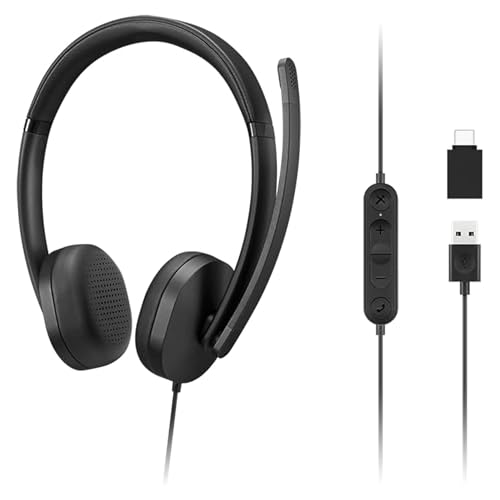
Lenovo 115 offers a compact, lightweight design with an in-line control box for quick volume and mute adjustments. It supports both USB-A and USB-C connections through an included adapter, making it suitable for laptops and desktops alike. The unified design and over-ear fit provide comfort for long listening sessions and daily communications.
Who it’s best for: Users who desire a simple, plug-and-play USB headset that adapts to multiple devices. Caution: For environments with extreme noise, consider models with more robust noise-canceling mics.
Buying Guide: Key Considerations for Choosing a USB-C Headset With Mic
- Connection options: Look for USB-C only, USB-C with USB-A adapter, or dual USB-C/USB-A compatibility to maximize device flexibility.
- Microphone quality: A noise-canceling or directional mic helps reduce ambient sounds. Check if the mic is rotatable for comfortable wearing on either ear.
- Comfort for long use: Lightweight headbands, soft earpads, and adjustable clamping force improve all-day wearability.
- Sound performance: Clear voice reproduction is essential for calls; consider headsets with tuned drivers and dynamic EQ for balanced audio during calls and multimedia.
- Inline controls: Accessible mute and volume controls on the cable help minimize interruptions during conversations.
- Device compatibility: Ensure the headset works with your primary devices—laptops, desktops, tablets, and smartphones—without requiring extra software.
- Durability: A sturdy frame and reinforced cables reduce wear from daily use, especially for those who travel with gear.
FAQ
- Are USB-C headsets compatible with older computers?
Many USB-C headsets also offer USB-A adapters or dual-connectivity; check the product specs for compatibility with your device’s ports.
- Is noise cancellation worth it for every headset?
For noisy environments, a noise-canceling microphone helps improve call clarity, but it varies by model quality.
- Should I choose a wired over wireless USB headset?
Wired headsets typically offer lower latency and no battery concerns, which is beneficial for professional calls and gaming.
- What is a good mic pickup pattern for headsets?
Unidirectional or cardioid mics focus on the user’s voice and reduce surrounding noise, improving clarity in calls.
- Can I use a USB-C headset with a smartphone?
Most USB-C headsets can connect to smartphones with USB-C ports, but some features might require adapter or compatibility checks.
- Do all USB headsets require drivers?
Many USB headsets are plug-and-play and do not require drivers, but some environments may benefit from updated firmware.