Best Desktops for Music Production and Studio Setups
Answering the needs of modern music producers, this guide highlights desks and desktops that optimize music software, plugins, and virtual instruments. The top picks include high‑performance workstations with ample RAM and fast storage, plus dedicated studio desks to keep your gear organized. Ideal buyers include professional producers needing reliable rendering and multitasking, home studios seeking budget‑friendly power, and creatives upgrading from older systems. Below, you’ll find five carefully chosen options with practical trade‑offs to help you decide what fits your workflow best.
Quick comparison snapshot (selected products):
- HP ProDesk 600G4 Tower Desktop: Best for content creators who want a powerful, upgradeable Windows 11 system.
- Dell Precision 3620: Great entry‑level music workstation with solid multitasking and storage options.
- Armocity Music Studio Desk (Workspace): Ideal when you need a ready‑made studio desk with power outlets and ambient RGB.
- Dell Optiplex 9020: Compact, reliable option for small studios needing basic music production capability.
- HP OMEN 16L: A gaming‑class desktop that doubles as a robust music production workstation with fast components.
HP ProDesk 600G4 Tower Desktop Computer

The HP ProDesk 600G4 is a solid all‑round desktop designed for content creation and multitasking. It features an 8th‑generation Intel i7 with 32GB of DDR4 RAM and a 1TB SSD, delivering fast boot times and ample headroom for large sample libraries and audio projects. The system is Windows 11 ready and includes Wi‑Fi 5G and Bluetooth for convenient connectivity. This model is best for professionals who need dependable rendering speed and room to grow their studio with additional drives or PCIe expansion. A potential limitation is the older generation CPU compared to newer architectures, which may impact future plugin optimization.
Best for: Professional producers who want high memory, fast storage, and future upgrade paths without breaking the bank.
Why selected: Combines ample RAM, fast SSD storage, and modern OS readiness in a compact form factor suitable for tight studio spaces.
Caution: Renewal status means warranties and long‑term support may differ from new units.
Dell Precision 3620 Music Production Workstation PC

The Dell Precision 3620 is positioned as an entry‑level music production workstation. It comes with an Intel i7‑6700 processor capable of handling multiple tracks and plugins, coupled with 32GB of DDR4 RAM and a combination of a 512GB SSD boot drive with additional HDD storage. It offers essential ports and Windows 11 Pro for robust multitasking and security features. This option is better for users who want a studio‑ready PC with reliable performance at a reasonable price, though it may be outpaced by newer CPUs in the long term.
Best for: Home studios and small projects needing dependable multitasking and solid storage without premium pricing.
Why selected: Balanced memory, storage, and upgrade potential make it a sturdy core for a beginner to intermediate music setup.
Caution: Older generation hardware may limit very demanding, modern plugin chains.
Armocity Music Studio Desk, Rustic Brown

Armocity’s Music Studio Desk blends a substantial working area with built‑in power outlets and USB ports. It features smart RGB lighting with 60,000 color variations and Bluetooth or remote control to synchronize ambience with your music sessions. The desk includes a raised monitor shelf, a 47‑inch surface to fit two monitors, and a pull‑out keyboard tray, helping maintain an ergonomic workflow. This desk is best for creators who want a ready‑to‑use, visually engaging studio workspace with clutter‑reducing cable management. A limitation is that it does not address the computer’s performance itself—only the workspace ergonomics.
Best for: Producers seeking an all‑in‑one studio desk with built‑in outlets and ambient lighting.
Why selected: Combines ample space, monitor ergonomics, and cable organization in a single setup for efficient sessions.
Caution: RGB features may be more about vibe than essential studio function.
Armocity Studio Desk Production Workstation

This Armocity model emphasizes practical layout for recording and editing. It mirrors the built‑in power outlet approach with USB ports, offering a large working area and a raised monitor stand to reduce neck strain. It includes a roomy shelf for multiple monitors and a pull‑out keyboard tray, making it easy to access audio interfaces, controllers, and external drives without desk clutter. It is best for dedicated home studios where space needs to accommodate several devices. The desk itself does not provide audio processing power; readers should pair it with a capable computer.
Best for: Studios needing a sturdy, spacious work surface with integrated cable management.
Why selected: Clear separation of space for monitors, keyboard, and outboard gear supports a productive workflow.
Caution: Heavy builds may require professional assembly to ensure frame stability over time.
Dell Optiplex 9020 Desktop PC Bundle

The Dell Optiplex 9020 bundle presents a compact, reliable platform for basic music production tasks. It features an Intel Quad‑Core i5 processor, 500GB HDD, 8GB RAM, and Windows 11 Pro, with wireless connectivity and integrated video. This option is best for entry‑level studios or secondary machines used for basic sequencing, audio playback, and light mixing. A key limitation is the slower mechanical storage and weaker RAM compared with higher‑end models, which can slow larger projects or dense sample libraries.
Best for: Budget‑minded beginners or secondary workstations for light production and schooling contexts.
Why selected: Small footprint and straightforward setup make it easy to add to a starter studio kit.
Caution: May require upgrades for larger projects or dense plugin chains.
HP OMEN 16L Gaming Desktop For Music Production
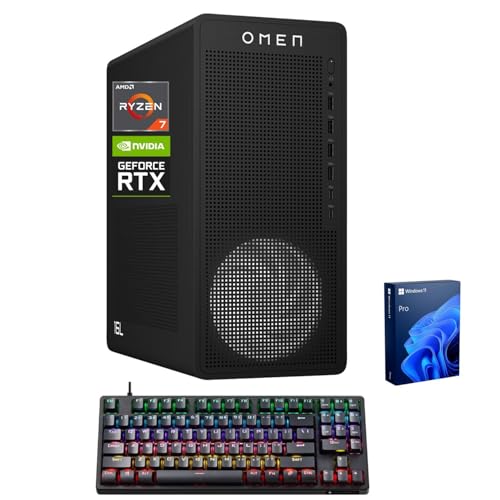
The HP OMEN 16L stands out for music production when you need a high‑performance engine. It combines an AMD Ryzen 7 8700F processor with NVIDIA RTX 5060 graphics, 16GB DDR5 RAM, and a 1TB SSD. This configuration supports demanding virtual instruments, large sample libraries, and multi‑track projects with smoother rendering and faster loading. It also includes robust connectivity options, including USB and display outputs. Choose this if you want a future‑proof, gaming‑class PC that can handle intensive music projects and visual workloads. A caution is that gaming features may exceed strictly audio needs and cost has a premium linked to performance.
Best for: Producers running resource‑heavy plugins, large templates, or dual‑purpose setups involving video editing or gaming.
Why selected: Top‑tier performance with ample fast storage supports complex projects and quick iteration cycles.
Caution: Higher price point and power consumption compared to non‑gaming desktops.
Buying Guide: Key Considerations For Desktop Music Production Setups
- What CPU power do you need? For multi‑track projects with many virtual instruments, prioritize multi‑core performance and higher clocks. Modern CPUs with more cores typically offer smoother real‑time playback and faster rendering.
- RAM and storage implications: 16GB is a baseline for basic productions; 32GB or more helps with large sample libraries and plugins. An SSD (1TB or larger) speeds up boot, load times, and project saves; consider adding HDD storage for large archives.
- Upgrade paths: Look for motherboards and cases that allow future memory and storage upgrades. This protects your investment as your workflow expands.
- Graphics and monitoring: If you also edit video or render visuals, a capable GPU helps. For pure audio work, focus mainly on CPU, RAM, and fast I/O.
- Workspace ergonomics: A dedicated studio desk with cable management reduces clutter. Monitor height, chair comfort, and desk depth influence long‑session ergonomics.
- Connectivity: Ensure USB, HDMI/DisplayPort, and PCIe slots match your audio interface, MIDI controllers, and external drives. Wireless options can reduce desk clutter but verify reliability for critical workflows.
- Operating system: Windows 11 Pro offers advanced security and management features for professional environments; Windows 11 Home can suffice for hobbyists.
- Noise and cooling: Quieter builds minimize distraction during recording sessions. Consider cases with good airflow or liquid cooling if running CPU‑heavy tasks for long hours.
- Peripherals pairing: If you’re adding a studio desk, assess its weight capacity, monitor spacing, and accessibility to audio interfaces and power outlets.
Frequently Asked Questions
- Is a desktop better than a laptop for music production? Desktops generally offer more power for a lower price, easier upgrades, and better cooling—beneficial for long sessions and large projects.
- How much RAM do I need for professional music production? 16GB is a starting point; 32GB or more is advisable for large sample libraries and dense projects.
- Should I prioritize CPU or GPU for music production? CPU power and fast storage typically yield the most impactful improvements for audio work; GPU benefits are mainly for video tasks or certain plugin visuals.
- What storage setup is best for music studios? A fast SSD (1TB or larger) for system and active projects, plus additional HDDs or SSDs for sample libraries and archives, provides balance between speed and capacity.
- Are gaming desktops suitable for music production? Yes, when paired with appropriate audio interfaces and drivers. They offer strong CPU/RAM and fast storage, but consider acoustics, power usage, and driver compatibility for audio work.
- What factors matter most in a studio desk? Ergonomics, cable management, monitor positioning, and sufficient space for interfaces, controllers, and speakers are key for efficient sessions.