Best Recording Studio Patch Bay Solutions for Seamless I/O Routing
For project studios and professional setups, a reliable recording studio patch bay streamlines I/O routing, reduces wear on gear, and keeps cables organized. This guide highlights top patch bays and related patch gear that suit different needs—from compact 1U racks to large, front-and-back patch bays for complex studios. Ideal buyers include: solo engineers needing quick reconfiguration, small studios upgrading from loose cables, studios with live-to-record workflows, and broadcast-ready environments seeking durable, modular I/O. The table below summarizes five strong picks and what they’re best for.
| Product | Brand | Best For | Notes |
|---|---|---|---|
| DIYTECH 16 Port XLR Patchbay | DIYTECH | Medium to large studios with balanced I/O | Reversible XLR connectors; rugged metal chassis |
| dbx PB-48 Point Patch Bay | dbx | Front/back 48-point I/O, classic reliability | Lots of I/O; easy mixer access |
| AMIMA 8-Channel XLR Patch Bay | AMIMA | Color-coded simple I/O | Color-coded ports for quick tracing |
| CHALITECK DB25 to XLR Snake Cable | CHALITECK | Snakes for DB25 to XLR connections | Balanced 8-channel; sturdy build |
| Temple Audio | Patch module for Templeboards and modular rigs | 2-channel accessory for patching |
DIYTECH 16 Port XLR Patchbay

The DIYTECH 16-Port XLR Patchbay is a premium front/back balanced patch bay designed for professional studios, live sound rigs, and broadcast carts. It consolidates I/O with a sturdy metal chassis and black powder coat, minimizing wear in touring environments.
- Best for studios requiring a robust, reversible I/O surface with flexible configurations.
- Reversible male/female XLR ports support versatile layouts without rewiring.
- Rugged steel chassis resists drops and scratches in busy environments.
Best for: mid-to-large studios that value durability and configurable routing. Limitation: as a 16-port unit, it may be overkill for very small setups with limited rack space.
dbx PB-48 Point Patch Bay

The dbx PB-48 is a classic 48-point patch bay with front and back panel access. It provides clear, easy, noise-free access to a mixer or other audio gear and reduces wear on jacks by centralizing connections.
- Best for studios needing frequent rerouting with ample jacks.
- Front and back panel access aids quick session changes.
- Potential limitation: front/back symmetry requires enough rack depth to fully utilize both sides.
Best for: traditional studios and broadcast carts seeking reliable, large I/O with straightforward organization. Choose this if you want a time-tested, widely compatible patch system and don’t need color-coding features.
AMIMA 8-Channel XLR Patch Bay

The AMIMA 8-Channel XLR Patch Bay offers a color-coded feed-through design with gold-plated contacts for reliable, low-noise signal routing. It’s a straightforward option for studios needing simple, quick identification of I/O paths.
- Best for smaller studios or setups prioritizing quick visual tracing.
- Color-coded ports reduce misrouting during live sessions or complex takes.
- Limitation: fewer channels than larger patch bays; may require expansion for bigger rigs.
Best for: compact studios, home/project spaces, and live rigs where speed and clarity trump sheer I/O count. Choose this if you value quick setup and clean visuals over high-channel density.
CHALITECK 3.28ft DB25 to XLR Cable

The CHALITECK DB25 to XLR snake offers a balanced, 8-channel path between DB25 devices and XLR gear. It’s ideal for connecting patch bays to interfaces or mixers while maintaining signal integrity.
- Best for clean, organized multi-channel connection between DB25 equipment and XLR gear.
- Includes a tangle-free snake design with color-coded channels for quick identification.
- Limitation: length is fixed at 1 meter—consider longer runs if needed.
Best for: studios needing reliable DB25-to-XLR linking within rack spaces. Choose this if you operate with DB25-based gear and want clear channel identification.
AxcessAbles 3ft TRS to TRS Patch Cables
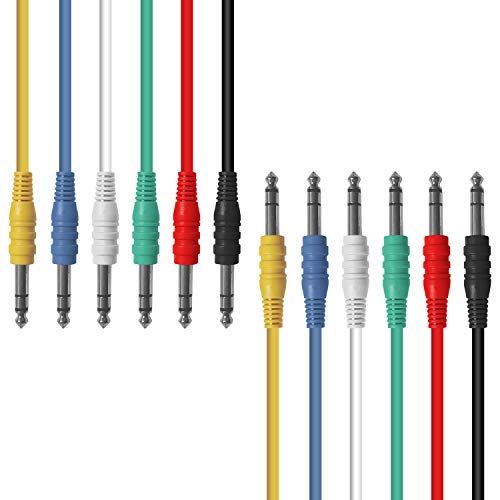
These multi-color TRS patch cables offer durable construction with nickel-plated plugs and OFC conductors for clean signal transfer. They’re designed to color-code and simplify patching across outboard gear and patch bays.
- Best for color-coded, quick-routing in busy setups.
- Multiple colors help prevent mispatches during sessions.
- Limitation: individual 3-foot length may not suit all rack layouts; consider longer or shorter runs as needed.
Best for: studios needing reliable, visually organized cables to support patch bays and outboard gear. Choose these if color-coding and durable construction matter most to you.
AxcessAbles 6-Pack TRS to TRS Cables (1.5ft)
Another AxcessAbles option, this 6-pack provides color-coded TRS cables in a compact length for patching small-to-mid-size setups. These cables emphasize signal clarity with OFC conductors and reliable connectors.
- Best for quick, short-distance patching in small studios or modular desks.
- Color-coding aids rapid identification during complex sessions.
- Limitation: short length may require extensions for some layouts.
Best for: patch-friendly environments where short, reliable connections are frequently used. Choose these if you need dense color-coding and compact cables for tight racks.
Temple Audio 2X MOD Patch Module

The Temple Audio 2X MOD Patch Module provides a compact 2-channel access point for Templeboard setups. It’s designed to extend modular rigs with a dedicated patching surface, supporting quick routing at the pedalboard or studio desk.
- Best for Templeboard users needing a compact, two-channel patch point.
- Ideal for modular studios or live rigs where quick I/O changes are frequent.
- Limitation: limited to two channels; not a full patch bay for larger setups.
Best for: Temple Audio users seeking an integrated patching option for small to mid-sized workflows. Choose this if you’re building a modular patching pathway around Temple gear.
Buying Guide: Patch Bay And Related I/O Decisions
Key questions to guide your purchase:
- What is my current rack space and channel count? Choose a patch bay with enough ports to avoid future bottlenecks.
- Do I need front-and-back access or a simpler front-only design? Front/back bays reduce wear and provide flexible routing in busy studios.
- Should I prioritize color-coding for quick identification? Color-coded ports and cables help prevent mispatches during sessions.
- Is DB25, XLR, or 1/4″ TRS the primary format in my studio? Ensure compatibility with your existing interfaces, consoles, and stage gear.
- Do I want modular or fixed layouts? Patch modules and breakout cables suit modular, expanding systems; fixed bays suit straightforward setups.
- What about durability for live or traveling setups? A rugged chassis and metal construction can reduce damage in transit.
Frequently Asked Questions
- What is a patch bay used for in studios? It centralizes I/O routing, reduces wear, and simplifies signal path management.
- Which patch bay format is most common? XLR-balanced and DB25-based systems are widely used in professional studios, with 1/4″ TRS cables common for patching.
- Should I buy a front-only or front-and-back patch bay? Front-and-back bays provide more routing options and longevity, especially in busy environments.
- Are color-coded cables necessary? They help prevent mispatches, particularly in complex sessions with multiple devices.
- Can I mix different formats in one setup? Yes, but plan careful layout to maintain clear signal paths and avoid accidental crossovers.
- Is a larger patch bay always better? Not always; choose based on current needs and future expansion potential to balance space and cost.