Best Noise-Cancelling Call Center Headsets for Clear Calls
Answering the demand for crisp, distraction-free conversations, these headsets are optimized for busy offices, home workers, and call-center environments. This guide highlights five top options that balance noise reduction, comfort, and practical features. Suitable buyers include: IT staff seeking reliable USB headsets for daily Teams or Zoom calls; remote workers needing all-day wear comfort; and agents requiring a dependable mic to minimize ambient noise during customer interactions.
| Product | Best For | Key Benefit |
|---|---|---|
| Logitech H390 | All-day office calls | Rotating noise-canceling mic and inline controls |
| AOC USB Headset (Black) | Professional meetings | 40mm drivers, 270° mic for clear voice |
| Mopchnic Wireless Headset | Remote work & travel | ENC noise cancelling with long battery |
| awatrue EH05-U | Budget-friendly reliability | Stable wired connection, mic mute, lightweight |
| Acer USB Headset | Multi-device use | ENC mic, dual USB-C/USB-A compatibility |
Logitech H390 Wired Headset for PC

The Logitech H390 is a wired USB headset designed for PC and laptop users who need reliable voice quality. It features digital stereo sound and a rotating noise-canceling microphone, which helps minimize background noise during calls and meetings. In-line controls on the cable allow quick adjustments to volume or muting without disrupting the conversation. Best for: budget-conscious office workers and student professionals who want straightforward, dependable performance for daily calls.
Why selected: It provides a balanced combination of clear voice capture and user-friendly controls in a compact design. The boom mic can be tucked away when not in use, reducing desk clutter. Caution: Some users may prefer more expansive sound for music, as this focus centers on clear speech during calls.
AOC USB Headset With Microphone (Black)

This AOC headset uses a 90° adjustable noise-canceling boom mic coupled with 40mm drivers for clear voice calls and balanced audio. It’s compatible across USB-A and USB-C devices, making it fit for office PCs, call centers, and home offices. Best for: teams using Zoom or Teams who need dependable call quality with versatile device compatibility.
Why selected: The 270°-style mic reach helps tailor noise suppression to fluctuating environments. The lightweight frame supports all-day wear. Caution: As a wired headset, there’s no wireless flexibility for mobile use without a dongle or adapter.
Mopchnic Wireless Headset with Noise Cancelling

The Mopchnic wireless headset delivers ENC noise-canceling performance with a long-lasting 500mAh battery, offering up to 80 hours of music playback and 50 hours of talk time at moderate volume. It supports dual-device connections via Bluetooth 5.3 and a USB dongle, with a plug-and-play charging base. Best for: remote workers who value long battery life and flexibility across devices.
Why selected: The long battery life and dual-connectivity options reduce range anxiety for busy workdays. A caution: The audio profile emphasizes clarity for calls; bass depth may be lighter than high-end wired models.
awatrue EH05-U Wired USB Headset
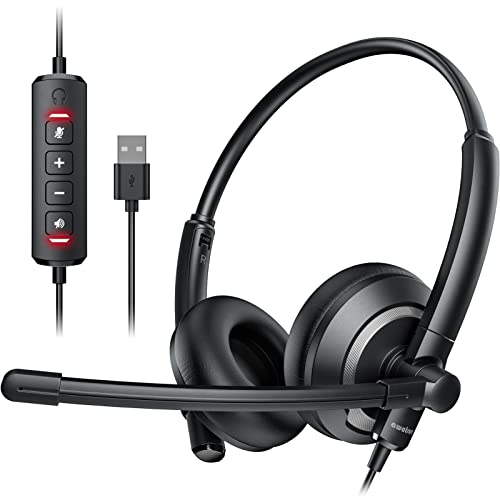
The awatrue EH05-U emphasizes a stable wired USB connection with a noise-cancelling microphone and inline controls. It’s lightweight and designed for long-wear comfort, suitable for conference calls, online classes, and webinars. Best for: cost-conscious buyers who need reliable mic performance without wireless variability.
Why selected: The model focuses on stable wired performance and mute controls. Caution: It may lack some advanced features found in premium headsets, such as multi-device pairing or Bluetooth compatibility.
Acer Headset With Microphone for PC

The Acer headset offers ENC noise cancellation and dual USB-C/USB-A compatibility, making it a flexible pick for multi-device environments. It’s designed for call center use, online meetings, and office work, with 40mm drivers to deliver clear voice and balanced audio. Best for: users who switch between devices or need a single headset that works across laptops, desktops, and tablets.
Why selected: The universal plug-and-play connectivity reduces setup friction. Caution: Some users may prefer more compact models for travel or lighter headsets for daily commuting.
Buying Guide
What should you prioritize for a call-center headset?
- Microphone quality and noise cancellation: Look for ENC or active noise cancellation to minimize background noise during calls.
- Connection type: USB wired headsets are reliable and simple; wireless options offer mobility but may require charging.
- Comfort and weight: Consider headband and ear cushion design for long shifts; weight matters for all-day wear.
- Compatibility: Ensure USB-A or USB-C compatibility with your devices, and verify software support for Teams, Zoom, or your CRM system.
- Durability and controls: Inline or on-ear controls for mute and volume help keep conversations uninterrupted.
Wired vs. Wireless: which is better for a call center?
Wired headsets deliver consistent sound with no Bluetooth interference, making them reliable for call-heavy workflows. Wireless models offer flexibility and mobility but require battery management and potential pairing troubleshooting. If you work in a shared environment, a wired option with a noise-canceling mic is often the simplest, most dependable choice.
Comfort considerations for long shifts
Prioritize soft protein-leather cushions, an adjustable headband, and a lightweight build. Over-ear designs typically reduce ear fatigue, and memory foam cushions help prevent discomfort after hours of wear.
Device compatibility considerations
Versatility matters. A headset with USB-A and USB-C or dual USB options can simplify use across PCs, laptops, tablets, and some smartphones. If you frequently switch devices, check for plug-and-play compatibility and effective driver support.
Usage scenarios to guide your pick
- Open-plan offices: Noise-canceling mics and closed-back designs help minimize ambient noise.
- Remote work: Long battery life and comfortable fit are essential for all-day calls.
- Call centers: Durable mics, consistent audio, and quick-access mute controls are critical.
FAQ
- What is the difference between ENC and ANC in headsets?
ENC (Environmental Noise Cancellation) reduces background noise during calls, while ANC (Active Noise Cancellation) reduces ambient sound across the environment, often used in wireless headphones. - Are USB headsets easier to set up than Bluetooth?
Yes. USB headsets usually require plug-and-play or straightforward driver installation, with fewer pairing steps than Bluetooth devices. - Can I use a wired headset with a mobile device?
Some wired headsets support USB-C or 3.5mm jacks; check compatibility with your mobile device’s ports and adapters. - What should I look for in a call center headset for Teams or Zoom?
Clear microphone pickup, reliable USB connection, comfortable fit, and good noise suppression are key. - Is dual-device connection important for daily use?
Dual-device support helps users stay connected to work and personal devices simultaneously, reducing switching friction. - Do wireless headsets need frequent charging?
Most wireless headsets offer days of use per charge, but real-world battery life depends on volume, mic usage, and Bluetooth activity.