Best Car Dashboard Tablets for Safer, Smarter Rides in 2026
Looking for a reliable tablet-style car dashboard display? This guide targets buyers seeking a portable, touchscreen infotainment upgrade that supports wireless CarPlay, Android Auto, GPS navigation, and dash cameras. It highlights five top options designed for different vehicles and driver needs. Whether you want a slim, ultra-responsive screen for daily commutes or a robust dash cam combo for family trips, these picks help you compare features and choose the right fit for your car. The table below summarizes the key options at a glance.
| Product | Best For | Key Benefit |
|---|---|---|
| 9.26″ Carplay Screen – Krunia | Tech-savvy daily drivers | Wireless CarPlay + Android Auto with fast response |
| Lehwey 10.26” Car Play Tablet | Families and safety-minded users | 4K front dash cam + 1080P rear |
| Lynadri 10.26″ Carplay Screen | Vehicle owners needing clarity | 4K front, 1080P rear with wide camera views |
| Topexplore 9″ CarPlay Screen | Older car models upgrading | OTA firmware fixes and wireless CarPlay |
| Yongeid Portable 7″ Screen | Budget-friendly upgrades | Backup cam, GPS, Bluetooth, mirror link |
Best Wireless CarPlay & Android Auto Screen

The Krunia 9.26″ CarPlay Screen is designed for drivers who want seamless wireless CarPlay and Android Auto. It supports live navigation via Apple Maps, Google Maps, or Waze with traffic updates. The device emphasizes fast touch response and smooth voice control, essential for hands-free operation during commutes. Best for tech-forward commuters who want quick, reliable wireless connectivity without cables. A potential limitation is its reliance on a stable wireless connection, which can vary by vehicle and environment.
Dashcam-Integrated Car Play Tablet
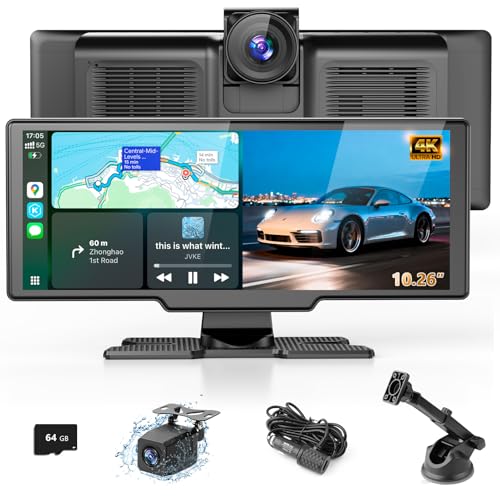
The Lehwey 10.26 Inch Car Play Tablet complements wireless CarPlay and Android Auto with a dual-camera setup. The 4K front dash camera and 1080P rearview capture high-definition footage, while the IPS display provides good visibility in daylight and night. Best for families or drivers who want built-in evidence in case of incidents. Choose this if you value comprehensive recording alongside navigation and media features. Note that larger hardware may demand more power and mounting space.
Clear 10.26″ CarPlay Screen For Any Car

The Lynadri 10.26″ CarPlay Screen emphasizes 4K front and 1080P rear dash cams with a wide field of view. It supports wireless CarPlay and Android Auto with automatic reconnect after initial setup, simplifying daily use. This option is ideal for drivers who want clear camera views in addition to navigation and media playback. Limitation to note: the rear camera may require additional wiring for optimal parking guidance in complex parking scenarios.
Upgrade-Ready 9-Inch CarPlay Screen

The Topexplore 9″ CarPlay Screen focuses on upgrading older vehicles with wireless CarPlay and Android Auto. It highlights OTA firmware updates that resolve Android Auto connection drops, making it a safer choice for drivers without built-in infotainment. Best for owners of older cars seeking modern connectivity without major car modifications. A caution: firmware updates may require following specific steps and apps to complete the upgrade process.
Versatile 7″ Car Play Screen On The Go

The Yongeid 7″ Portable Car Stereo provides a compact, budget-friendly upgrade with wireless CarPlay, Android Auto, and a built-in backup camera. It’s best for drivers who want a temporary or easy-to-move solution or limited dashboard space. Best for small cars or rental vehicles where a permanent install isn’t feasible. Limitation: smaller screen may reduce ease of use for maps and streaming while driving.
Buying Guide: How To Choose The Best Car Dashboard Tablet
Power needs and mounting options vary by vehicle type and driver habits. Choose a model with adequate processing speed, responsive touch, and reliable wireless connectivity for uninterrupted CarPlay/Android Auto use. Consider camera capabilities if you prioritize dash cam features or parking guidance. Screen size should align with dashboard space and readability—larger screens improve navigation ease but require more mounting depth.
- Connectivity: Prefer devices with Bluetooth 5.0 and strong Wi-Fi for quick pairing and stable streaming.
- Navigation: Look for devices that support Apple Maps, Google Maps, and Waze with live traffic.
- Camera System: Decide between front 4K and rear 1080P cameras, and whether parking guidance is included or customizable.
- OTA Updates: Firmware updates help fix compatibility issues and improve performance over time.
- Compatibility: Ensure the unit supports your car’s power system (DC voltage range) and dash mounting options.
Choosing The Right Size And Installation
Smaller screens (7–9 inches) fit compact dashboards and rental cars, while 10–11 inch displays offer better visibility for maps and menus. Installation can be temporary or semi-permanent. If you prefer not to modify the dashboard, look for dash-mount options and plug-and-play setups. For frequent travelers, consider a model with a robust storage card option and passive heat management to prevent screen glare and thermal issues in sunny climates.
Common Pitfalls To Avoid
Avoid models with limited app support or poor automatic reconnection. Wireless CarPlay and Android Auto are most valuable when they reconnect reliably after car ignition cycles. Beware devices that require constant recalibration of the rear camera, or have inconsistent GPS lock in urban canyons. Always verify the mounting solution works with your vehicle’s interior design and sun exposure.
FAQ: Quick Answers For Car Dashboard Tablet Buyers
- Do these screens require professional installation? Most are plug-and-play with dashboard mounts; complex dash rewiring may need professional help.
- Is wireless CarPlay universally available on all models? Wireless CarPlay is supported by most newer models, but check compatibility with your phone and vehicle.
- Can these devices function without a car’s built-in infotainment? Yes, they can provide navigation, media, and hands-free calls independently.
- Do dashcams degrade performance? Some models include dashcams; ensure your power supply can handle the extra draw without draining the battery.
- Are OTA updates mandatory? OTA updates improve stability and fix issues; you may choose to install or defer updates based on your preference.
- What if I have an older car model? Look for devices marketed as “upgrade for older cars” with OTA fixes and straightforward installation.