Best Analog to Digital Audio Converter for Clear, Bidirectional Sound
Looking to capture or digitize old analog audio with modern devices? This guide spotlights top picks that convert analog signals from RCA or 3.5mm jacks into digital coaxial or Toslink formats. Ideal for gamers, home theater enthusiasts, and anyone upgrading legacy equipment. The top picks shown here are best for converting stereo analog sources to digital formats for TVs, sound bars, or digital recorders.
Summary table of selected products
| Product | Best For | Key Benefit | Notes |
|---|---|---|---|
| Hdiwousp Analog To Digital Converter | General use with RCA or 3.5mm input | Simultaneous digital coaxial and Toslink outputs | Aluminum body, easy setup |
| senhilear Analog To Digital Converter | Soundbars and HDTVs | Volume adjust, automatic encoding | No software needed |
| ZZHypGr Analog To Digital Converter | Home cinema and TVs | Volume control, automatic encoding | RCA and 3.5mm inputs |
| Musou RCA Analog To Digital Optical Toslink Coaxial | Older stereo to digital sound | Two digital outputs at once | Analog source limitations noted |
| PROZOR 192K DAC (Digital To Analog) | Beyond strict ADC needs | High-resolution digital-to-analog conversion | Note: Direction is DAC, not ADC |
Best Overall: Hdiwousp Analog To Digital Converter
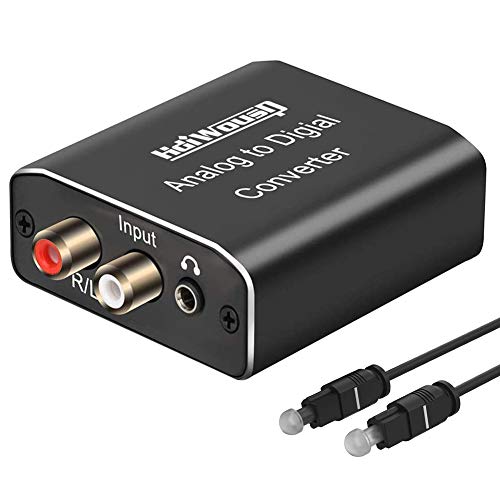
What it is: An analog-to-digital converter that transforms RCA L/R or 3.5mm stereo input into digital coaxial and Toslink SPDIF outputs simultaneously. It is best for users who need to feed a TV, soundbar, DAC, or digital recorder from an older analog source. The aluminum shell improves durability and heat dissipation, making it suitable for extended use in home setups.
Who it’s for: Gamers or home theater enthusiasts with legacy equipment who want to route analog audio into digital-only devices. It’s also suitable for users who need both coaxial and optical outputs at once for flexible connections.
Why selected: It clearly supports 8–96 kHz sampling and uncompressed 2-channel PCM output, giving compatibility with most TVs and receivers that accept SPDIF in PCM format. It’s straightforward to install with plug-and-play operation. A limitation: you must set the TV to PCM/LPCM and disable Dolby/DTS on the source to avoid compatibility issues.
Best DAC-Forward Alternative: PROZOR 192KHz DAC Digital To Analog Converter

This model sits in the DAC space (digital-to-analog) rather than an ADC, meaning it converts digital PCM signals into analog L/R and 3.5mm outputs. It’s best when you’re upgrading a digital source to analog output, such as sending sound from a digital streamer to analog speakers or a non-digital system. It supports up to 192 kHz/24-bit and PCM/LPCM formats, with a note to ensure TV output is set to PCM. Caution: it does not convert analog input to digital; choose this if your goal is to feed analog gear from a digital source.
Best Value ADC With Adjustable Volume: senhilear Analog To Digital Converter

What it does: Converts RCA or 3.5mm analog stereo to digital coaxial and Toslink outputs, with a built-in volume adjustment function. It also emphasizes automatic encoding, meaning no software is required. This is a practical option for home theaters or soundbars where you want quick, adjustable-level audio fed into a digital input.
Best for: Users needing direct volume control on the converter itself and straightforward plug-and-play setup. A potential limitation: ensure the TV or receiver accepts PCM/LPCM and that any Dolby/DTS settings are managed on the source device to avoid misalignment.
Best For Optical And Coaxial Integration: ZZHypGr Analog To Digital Converter

This converter takes analog RCA or 3.5mm input and outputs digital coaxial and Toslink. It includes a volume adjustment feature and emphasizes automatic encoding. It’s well-suited for TVs and home theater setups where you want to preserve stereo sound while moving from an older source to a digital destination.
Best for: Users who want a simple, reliable signal path from analog to two digital outputs with adjustable level. Limitation: as with most, you must ensure PCM/LPCM is used on the source and that the converter’s volume control is set appropriately to avoid distortion.
Best All‑In‑One Utility: Musou RCA Analog To Digital Optical Toslink Coaxial

What it offers: Converts RCA analog stereo to digital coaxial and Toslink, providing simultaneous output to multiple digital formats. It also notes support for 2-channel LPCM, which helps ensure compatibility with many devices. A key caveat: some users report that Dolby formats on the source may need to be disabled for clean PCM output.
Best for: People who need a flexible adapter that can feed multiple digital devices from a single analog source. Caution: verify that your playback chain uses PCM/LPCM to avoid format conflicts.
Buying Guide
What to consider when buying an analog-to-digital converter
- Inputs and outputs: Look for models that accept RCA L/R or 3.5mm inputs and offer both digital coaxial and Toslink outputs for broad compatibility.
- Direction clarity: Ensure the device supports analog-to-digital conversion (ADC). Some products on the market are digital-to-analog (DAC) devices, which can be confusing if you specifically need ADC.
- Sampling rate and bit depth: A higher sampling rate (e.g., 48 kHz, 96 kHz, up to 192 kHz) and 24-bit support generally provide better fidelity and future-proofing for modern gear.
- Volume control: Built-in volume adjustment helps when you need to regulate output without changing settings on your TV or amplifier.
- Setup simplicity: Plug-and-play designs with clear PCM/LPCM guidance reduce setup headaches. Avoid devices that require software or complex configuration unless you’re comfortable with them.
- Compatibility notes: Some devices require you to turn off Dolby/DTS formats on the source. Check your TV or soundbar settings to ensure PCM output is selected.
- Build and heat management: Aluminum or solid housings improve durability and heat dissipation, especially for long listening sessions or heavy use.
FAQ
- What is the difference between an ADC and a DAC?
– An ADC converts analog signals to digital data (what you need for digitizing analog sources). A DAC does the reverse, turning digital data into analog sound. - Will these adapters work with all TVs?
– Most will work with TVs that have PCM/LPCM digital input options. Dolby/DTS should be disabled on the source if necessary. - Can I connect a game console to these adapters?
– Yes, game consoles with analog outputs (RCA or 3.5mm) can be digitized and routed to digital inputs on a receiver or soundbar. - Do these converters affect sound quality?
– They are designed to preserve stereo PCM signals. Quality depends on the source, the adapter’s design, and proper format settings on connected devices. - Is volume control necessary?
– Built-in volume control provides convenient adjustment, but ensure you’re using PCM output and not introducing unnecessary processing in the chain. - Should I buy multiple outputs?
– If you need to feed both a coaxial and an optical input, choose a converter that outputs to both simultaneously for flexibility.