Best Acoustic Guitar Simulator Pedals for Natural Electric-Guitar Players
Whether you’re an electric guitarist seeking a convincing acoustic texture or a guitarist exploring new tonal landscapes, an acoustic guitar simulator pedal can quickly transform your tone. This guide highlights five top options that balance realism, versatility, and tonal control. Each pick is best for certain players: beginners may prefer straightforward sounds, while pros might want flexible modes and good stage reliability. Below, you’ll find clear, comparison-friendly details to help you choose the right pedal for your rig.
| Product | Best For |
|---|---|
| BOSS AC-3 Advanced Acoustic Simulator Guitar Pedal | Best for Studio/Stage with premium acoustic modeling |
| MOOER Acoustikar Acoustic Guitar Pedal | Best value with multiple modes for varied textures |
| IOppWin Acoustic Guitar Simulator Pedal | Best for versatile pedalboard setups |
| Rowin Acoustic AC Stage Pedal | Best for compact, realistic acoustic flavor |
| SONICAKE Acoustic Guitar Effects Pedal | Best for integrated preamp and XLR output |
BOSS AC-3 Advanced Acoustic Simulator Guitar Pedal

The BOSS AC-3 delivers advanced acoustic-guitar modeling in a compact pedal. It includes built-in reverb and is optimized for authentic acoustic simulations from an electric-guitar input. This pedal is best for players who want a premium, studio-quality acoustic texture with minimal setup. It’s well-suited for live stages and recording sessions where reliable, nuanced tone matters. Potential limitation: the depth of control may feel less accessible for beginners compared with simpler models.
MOOER Acoustikar Acoustic Guitar Pedal

The MOOER Acoustikar offers three modes (Piezo, Standard, Jumbo) to reproduce acoustic textures, aiming for warmth and natural sounds from an electric guitar. This is a strong choice for players who want a compact, affordable option with flexible textures. Caution: some users may find the midrange too forward in certain rigs, so it pays to test it with your amp and in your room acoustics before gigging.
IOppWin Acoustic Guitar Simulator Pedal
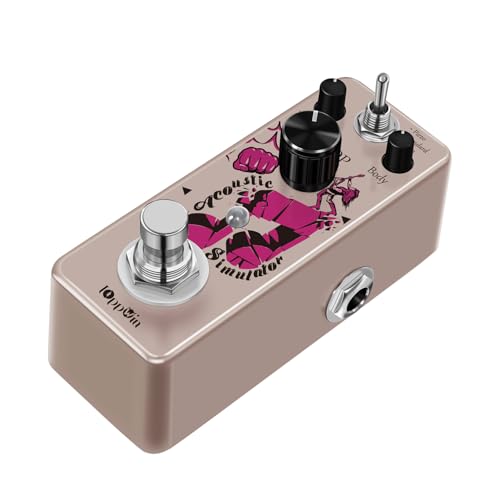
The IOppWin pedal focuses on Electric-to-Acoustic conversion with three cabinet modes (Piezo, Standard, Jumbo). It emphasizes advanced analog textures that avoid digital artifacts, delivering organic acoustic-like responses from electric guitars. Best for players who want a broad palette with a straightforward three-mode layout. Limitation: natural-sounding results may vary with guitar pickups and amp settings, so some tweaking is necessary.
Rowin Acoustic AC Stage Pedal

The Rowin AC Stage aims for very realistic acoustic tones with three modes: Piezo, Standard, and Jumbo. Piezo offers a brighter touch, Standard provides a balanced acoustic, and Jumbo yields a deep, full-bodied sound. It’s an excellent compact option for players who want a natural acoustic vibe on smaller pedalboards. Caution: being an analog-voiced pedal, it may respond differently with diverse amps, so consider a quick test run before a performance.
ISET Finger Print Acoustic Guitar Simulator

The ISET model provides three work settings—Piezo, Standard, and Jumbo—along with durable aluminium-zinc alloy construction in a compact form. It is designed to save space on crowded pedalboards while offering a convincing acoustic response. Best for players seeking a robust, minimalist option. Limitation: may have limited features for players demanding extensive tone-shaping controls.
Buying Guide: Key Considerations For Acoustic Guitar Simulator Pedals
- Mode Variety: Look for pedals with multiple modes (Piezo, Standard, Jumbo) to cover bright, balanced, and deep acoustic textures. This enables better matching to your guitar and amp.
- Analog vs Digital: Analog-sounding pedals often feel more natural to players, with fewer artifacts. Digital models can offer more precision and presets but may introduce latency or harshness in certain rigs.
- Output Options: Consider whether the pedal provides XLR or instrument-level output, as this impacts compatibility with mixers and audio interfaces.
- Bypass Type: True bypass helps preserve your original signal when the pedal is off, which is important for preserving tone in live settings.
- Build and Size: If you have a compact pedalboard, prioritize smaller, sturdy housings with reliable knobs and switches.
- Ease of Use: Beginners may favor pedals with intuitive controls and clear labeling; advanced players might want deeper EQ and gain controls to sculpt tones.
- Stage and Studio Application: For live uses, consider reliability, power requirements, and ruggedness; for studio work, prioritize sound fidelity and low noise.
FAQ
- What is an acoustic guitar simulator pedal?
It replicates acoustic guitar tones from an electric guitar input, using modeling or sampling to create textures reminiscent of acoustic guitars. - Do these pedals work with any electric guitar?
Most models work with a standard electric guitar passive pickup, but results may vary by pickup type and amp configuration. - Should I choose analog or digital for realism?
Analog pedals often feel more natural; digital pedals can offer broader tonal options and presets. - Can I use these pedals on stage?
Yes, many are designed for live use, but verify bypass reliability and output compatibility with your rig. - Do I need extra accessories?
Most pedals require a 9V DC power supply; some may offer negative polarity; check the product specs for compatibility. - How should I test a pedal before buying?
Test with your guitar, amp, and typical effects chain to hear how it integrates with your sound.