Best Cassette to MP3 Converters for Digitizing Your Tapes
Looking to convert tape to digital files or to a USB/SD card archive? This guide showcases five reliable cassette-to-digital converters that help you preserve memories and create modern formats. Each pick suits different needs—from portable on-the-go use to desktop-style digitizing with built-in microphones. Ideal buyers include memory archivers, students digitizing lectures, and casual listeners wanting easy playback and transfer options.
Summary of selected products
| Product | Best For | Key Benefit |
|---|---|---|
| SEMIER Small Cassette Tape Player | All-around digitizing on-the-go | Two-way conversion to MP3 via SD card or USB with Audacity support |
| KLIM K7 Cassette Tape Player (Silver) | Portable SD card storage | Built-in mic/speaker; 16GB/32GB options; no cassette recording to tape |
| Gracoso Cassette Player Recorder | Multi-function and portability | USB/SD/TF playback; retractable handle; flexible power options |
| DIGITNOW USB Cassette Player | PC-free conversion | USB drive capture; auto reverse; FAT32 support up to 128GB |
| Reshow Cassette Tape Player (White) | Direct digital conversion | USB-C; built-in speaker; compact travel-friendly design |
SEMIER Small Cassette Tape Player

Best for: Individuals who want a compact, two-way converter that stores MP3s on SD or via USB with Audacity support. The built-in mic enables quick recording directly from tapes, perfect for preserving memories with minimal setup.
Why selected: Combines portable design with two straightforward digital paths—SD card storage and USB-based MP3 creation. LCD navigation aids ease of use for on-the-go digitization.
Caution: Not compatible with Type IV or metal tapes, which limits certain archival tasks.
KLIM K7 Cassette Tape Player (Silver)

Best for: People who want a portable, standalone MP3 converter with built-in mic/speaker and multiple SD card sizes. Great for commuters or travelers who want to digitize tapes without a computer.
Why selected: Includes a 16GB SD card and a simple workflow for converting tapes to MP3 on SD. Built-in speaker enables immediate playback of digitized content.
Caution: Recording directly onto cassette tapes isn’t supported; use SD card storage for digitized files.
Gracoso Cassette Player Recorder

Best for: Users who want multi-function playback and recording with flexible power options and 3.5mm headphones. Ideal for field interviews or classroom note-taking where quick USB/SD capture is useful.
Why selected: Supports cassette, USB drive, and TF card playback with built-in mic for recording and transcription. Retractable handle adds portability for travel.
Caution: Recording quality can depend on tape condition; external mic can enhance clarity for speech.
DIGITNOW USB Cassette Player
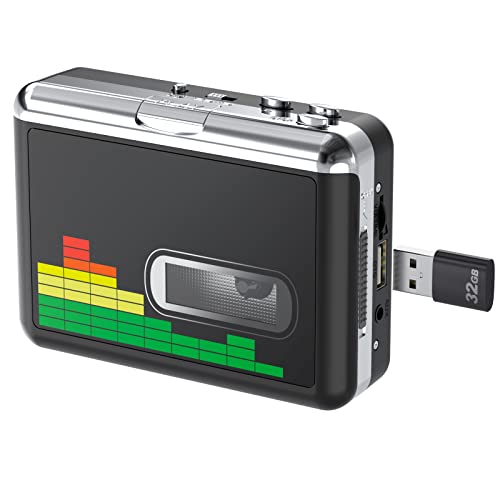
Best for: Quick, PC-free digitization to USB drives. Suitable for anyone who needs simple, reliable conversion without software installation.
Why selected: Plug-and-play operation with USB drive capture; supports FAT32 and up to 128GB, reducing the risk of skipped files during transfer.
Caution: Audio quality can vary with tape condition and hardware limits; external speakers or headphones recommended for assessment.
Reshow Cassette Tape Player (White)

Best for: Audiences seeking USB-C connected digitization with built-in speaker for immediate playback and a clean, portable design.
Why selected: Emphasizes digital conversion via USB-C while keeping a compact, travel-friendly form. Built-in speaker supports direct listening without extra gear.
Caution: May rely on USB-C power for best results; ensure compatible devices for desktop transfers.
Buying Guide: How to Choose a Tape-To-Digital Converter
What to consider when selecting a unit:
- Conversion method: Do you want SD card, USB, or direct PC transfer? Some devices offer multiple paths for flexibility.
- Power and portability: For travel, choose a compact model with battery or USB power and a built-in speaker for on-the-go listening.
- Recording support: If you plan to record new content, look for built-in mics and easy-to-use controls. Some models don’t support recording to cassette, only to digital media.
- Compatibility: Check SD card size support (e.g., 16GB vs 32GB) and file formats (MP3 typically). FAT32 formatting is common for USB drives.
- Tape compatibility: Some units exclude Type IV or metal tapes. Consider your tape library to avoid disappointment.
- Ease of use: LCD navigation, simple menus, and clear indicators help reduce setup friction for non-tech users.
Frequently Asked Questions
- Do these devices require a computer to digitize tapes? Some do not; models like DIGITNOW support PC-free USB transfer, while others offer USB with PC software compatibility.
- Can I convert to MP3 directly on SD cards? Yes, several units save MP3s to SD cards or USB drives for easy playback on modern players.
- Are there limitations with tape types? Some converters do not support Type IV or metal tapes; verify tape compatibility before use.
- Is external recording possible? Many units include built-in microphones, and some support external mics for higher-quality captures.
- Will these work with standard headphones? Most models include a 3.5mm headphone jack for private listening and monitoring during capture.
- Which model is best for long-term archiving? A device with reliable USB/SD storage options, stable power, and straightforward transfer workflow is ideal for archiving.