Best 7.1 Surround Sound Speakers for PC and PC-Ready Setups
Answering the demand for immersive, multi-speaker audio on a PC, this guide highlights top 7.1-channel-ready options and clear alternatives that deliver virtual or true surround sound. The selections are aimed at gamers, home-theater enthusiasts, and productive users who want precise positioning, strong dialogue clarity, and space-conscious layouts. Below, you’ll find product-by-product insights, plus a buying guide and quick FAQs to help you pick the right system for your desk or entertainment setup.
Summary of recommended picks
- Best for immersive virtual surround on a compact desk: ULTIMEA Aura A40 (7.1ch with wired and wireless routing).
- Best overall cinema-like output: Logitech Z906 (5.1 with THX, strong bass, wide compatibility).
- Best for pristine voice clarity in a larger room: ULTIMEA Aura A60 Pro (Dolby Atmos-ready 7.1 with advanced VoiceMX).
- Best for gaming with dynamic lighting and synchronized effects: Logitech G560 (7.1 DTS:X Ultra, RGB lighting).
- Best compact desktop 7.1-like system with sub: Razer Leviathan V2 (multi-driver bar with THX Spatial Audio).
ULTIMEA Aura A40 7.1ch Sound Bar With Subwoofer

7.1ch virtual surround with 4 wired surround speakers and a 330W peak. Aura A40 uses SurroundX technology for detailed, lifelike audio and AI tuning to coordinate all speakers. Best for users seeking an immersive TV-like experience in a living-room layout that also serves as a PC setup when connected to a computer via the opt/aux/Bluetooth options.
Best for: compact rooms or true virtual surround on a TV-leaning PC desk.
Why chosen: It combines a dedicated sub, multiple wired surrounds, and AI-optimized tuning for coherent mobile sound movement.
Caution: Wireless rear pairing can require a manual pairing sequence if connection drops.
Logitech Z906 5.1 Surround Sound Speaker System
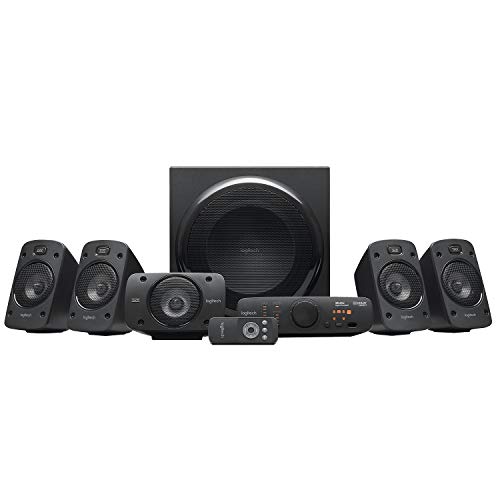
5.1 digital surround with 165W subwoofer and a combined 500W continuous power. THX certified for cinema-quality sound, with four satellite speakers and a center channel that helps preserve dialogue clarity. Best for desktop setups that prioritize strong, room-filling sound with straightforward setup.
Best for: users wanting a proven, cinema-grade 5.1 system for PC and media use.
Why chosen: THX certification and high peak output deliver reliable, immersive sound across games and movies.
Caution: It is a 5.1 system, not true 7.1; some users may prefer a 7.1 or virtual alternative for larger rooms.
ULTIMEA Aura A60 Pro 7.1ch Surround System for TV

7.1 Dolby Atmos-ready layout with 3 main channels and 4 surround speakers, plus a VoiceMX system to stabilize voices. Features a 5.25″ subwoofer, 18 mm high-excursion driver, and BassMX for deeper, more impactful bass. Ideal for premium PC gaming and home theater experiences that require precise dialogue and dynamic bass response.
Best for: larger desks or living spaces where cinematic audio adds value to both movies and games.
Why chosen: Advanced voice enhancements and deep bass extend the listening range beyond standard PC speakers.
Caution: Not compatible with Dolby Audio/Atmos in some configurations, which could affect certain content formats.
Logitech G560 PC Gaming Speaker System

7.1-enabled DTS:X Ultra surround sound with game-based LIGHTSYNC RGB lighting that responds to in-game actions. Two speakers and a subwoofer with Bluetooth and USB inputs, designed for a desktop setup. Best for gamers who want synchronized lighting effects with immersive positional audio.
Best for: gamers who want dynamic lighting and accurate surround for competitive play.
Why chosen: DTS:X Ultra offers a spatial audio experience that aligns with many modern games and media formats.
Caution: May require software to unlock full 7.1-like features; ensure your PC supports the intended inputs.
Razer Leviathan V2: Multi-Driver PC Soundbar

Two full-range drivers plus a down-firing subwoofer deliver full-range sound with THX Spatial Audio for precise 7.1-like positioning. Compact desktop design with a focus on space efficiency and easy placement. Best for users needing a desk-friendly, all-in-one sound solution with strong bass and immersive audio.
Best for: compact PC setups that still want immersive surround without a full speaker array.
Why chosen: THX Spatial Audio provides virtual surround in a single-bar form factor, balancing convenience and soundstage.
Caution: Not a true multi-driver 7.1 system; results may vary based on room acoustics and source material.
Buying Guide: Key Considerations for 7.1 PC Surround Systems
- True 7.1 vs virtual surround: True 7.1 uses multiple physical drivers around the listening area; virtual 7.1 relies on signal processing to simulate surround. Choose based on room size, desk setup, and preferred sound footprint.
- Speaker configuration: Optional wired surround speakers require space for front, rear, and center channels. Some systems use a bar plus wireless rear satellites, which reduces cables but can affect placement flexibility.
- Subwoofer impact: A larger sub adds depth, but placement matters. Look for a system with a subwoofer that can be placed away from your monitor to avoid bass localization issues.
- Connectivity: Ensure the system supports your PC connection method (USB, optical, HDMI eARC, AUX, Bluetooth). Some systems excel with PC software for tuning, others rely on a simple plug-and-play approach.
- Voice clarity: For movies and games with lots of dialogue, consider models with dedicated voice enhancement or DSP like VoiceMX or similar features.
- Room and desk compatibility: Consider the size of your desk or media cabinet. Larger, 7.1-ready bars may be overkill for small desks and can block monitor visibility.
- Brand ecosystem and support: Choose brands with clear firmware update paths and reliable after-sales support, especially for wired/wireless pairing of satellites.
Frequently Asked Questions
- What is the difference between 7.1 and 7.1 virtual surround for PCs?
7.1 real surrounds have separate drivers for each channel; virtual 7.1 uses DSP to simulate surround from fewer drivers, which is common in soundbars. - Do I need a home theater receiver to use these systems with a PC?
Most PC-ready systems are designed to work directly with PCs via USB, optical, or Bluetooth, but some may benefit from a separate receiver for advanced configurations. - Can these systems improve headphones or built-in laptop speakers?
Yes, they provide a broader soundstage and more dynamic bass than most built-in laptop speakers, offering a better baseline for games and movies. - Which system is best for small desk spaces?
Razer Leviathan V2 and ULTIMEA Aura A40 are compact options that offer strong audio in tight spaces without multiple rear satellites. - Are RGB lighting features important for audio quality?
RGB lighting is primarily a cosmetic feature; it does not affect audio. Choose lighting that enhances your setup without causing distraction.