Best Karaoke Mixer for Soundbar: Top 5 Sound Town Picks for Your Home Theater
If you want to pair a karaoke mixer with a soundbar for clear vocals and powerful audio, these five Sound Town models are designed to blend music and voice through HD ARC, optical, and AUX connections. They’re ideal for small gatherings, home theaters, and family karaoke nights. Each option targets different user needs—from wireless mic stability to multi-device compatibility and easy setup with smart TVs.
Buyer tips at a glance: for smart TVs with ARC, look for HDMI ARC/PCM guidance; for simple plug-and-play with soundbars, check AUX/Optical compatibility; for venues or larger rooms, consider models with more inputs, more mic channels, and wider frequency options. The table below compares the top five picks to help you choose quickly.
| Product | Best For | Key Connectivity | Notable Strength |
|---|---|---|---|
| Sound Town SWM15-MAX | Smart TVs and soundbars | HD ARC, Optical, AUX, 3.5mm, USB | Vocal and instrument effects, versatile inputs |
| Sound Town SWM15-PROS | Flexibility with many devices | HD ARC, Optical, AUX, USB-C power | Wide device compatibility and clear ARC return |
| Sound Town SWM16-MAX | Two-mic setups with TV integration | HDMI IN/OUT, Optical, AUX, 3.5mm | Two handheld mics included, strong FX |
| Sound Town SWM16-PRO | Soundbars and home theaters | 3.5mm, Optical, HDMI-like outputs, AUX | Two mic inputs and robust IF noise control |
| Sound Town SWM16-2MEGA | Weddings, meetings, small venues | 3.5mm TRS, Optical, 1/8”, 1/4” | Two mic channels plus two wired mics, easy mixer controls |
Sound Town SWM15-MAX Karaoke Mixer System

Best for smart TVs and soundbars with robust ARC support. The SWM15-MAX offers HD (TV ARC), Bluetooth, Optical (Toslink), and 3.5mm AUX inputs and outputs. It supports 1/4″ mono jacks for dynamic mics and instruments. The HD Audio Return Channel lets your TV feed audio directly into the mixer, blending music and vocals for output to a soundbar or amplifier (HDMI cable required). Effects include vocal reverb and echo, plus a dedicated vocal cut mode for karaoke.
Who it’s best for: households with smart TVs or media boxes that want a single solution for music and karaoke through a soundbar. Limitation: requires proper CEC/PCM TV settings to activate ARC and avoid lip-sync issues.
Sound Town SWM15-PROS Karaoke Mixer System
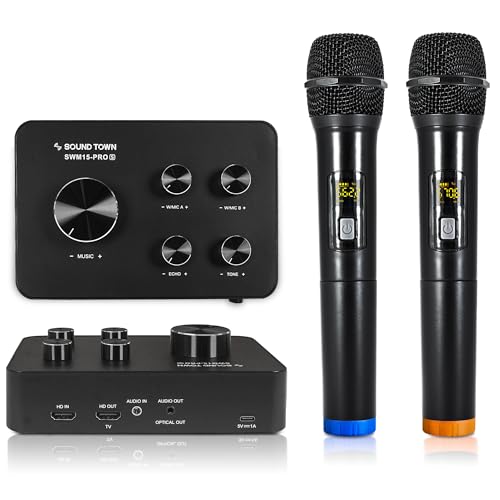
Better for users needing a broad range of inputs and straightforward ARC integration. The SWM15-PROS features an HD input, HD ARC output, 3.5mm AUX, and an optical/HDMI-style output that works with various devices, including Bose, Samsung, and Vizio soundbars. The Bluetooth control adds quick source switching. It’s suitable for households with multiple media devices and laptops or tablets.
Who it’s for: consumers seeking a versatile, device-friendly mixer that can act as a central hub for a home theater setup. Caution: ensure the TV’s PCM mode is enabled for proper ARC audio extraction.
Sound Town SWM16-MAX Karaoke System
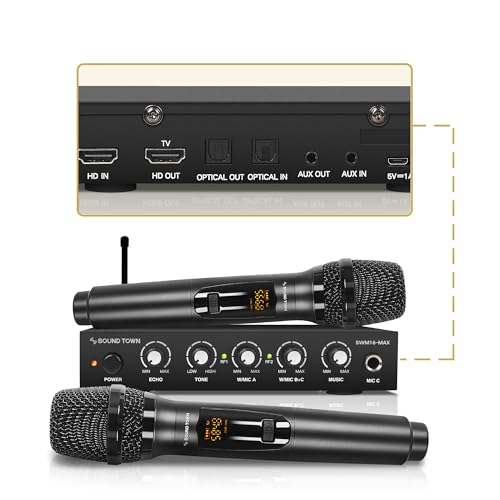
Best for two-mic karaoke with flexible connections. The SWM16-MAX includes two handheld wireless microphones and a broad set of inputs: HDMI IN, HDMI OUT (TV ARC), Optical IN/OUT, and 3.5mm AUX IN/OUT. It blends TV audio with vocals for a seamless output to a soundbar or amplifier. The system uses UHF for reduced interference and offers 16 selectable frequencies.
Who it’s for: families or small gatherings that want two wireless mics and reliable TV integration. Limitation: HDMI cable not included, so some setup steps may require purchasing accessories separately.
Sound Town SWM16-PRO Karaoke System
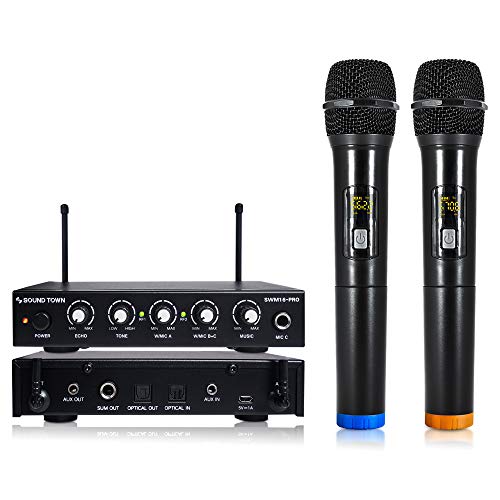
Choose this for a compact setup with strong optical support. The SWM16-PRO uses an optical Toslink input/output along with a 3.5mm connection to couple with modern soundbars and receivers. It emphasizes clear audio transfer and notes instructions to optimize sound: maximize external soundbar volume, raise mic volume, and set the monitor mixer below mid-level for best results.
Who it’s for: users prioritizing linking with modern soundbars via optical connections and seeking straightforward EQ adjustments. Caution: ensure optical links are properly detected and configured on your devices.
Sound Town SWM16-2MEGA Karaoke System

Best for larger rooms or events with two mics and dual wired options. The SWM16-2MEGA provides flexible connectivity: two 3.5mm TRS and optical I/O, plus 1/4″ mic connections. It handles both wireless and wired mics with separate volume controls and includes rotatory knobs to adjust echo, tone, and microphone levels. It’s ideal for gatherings where multiple audio sources must blend seamlessly.
Who it’s for: DJs, small venues, or weddings needing a versatile mixer plus strong mic control. Caution: more options mean more setup steps; ensure all devices recognize the ARC/PCM settings.
Buying Guide
What to consider when choosing a karaoke mixer for a soundbar
- Device compatibility: Confirm ARC, HDMI, Optical, and AUX support for your TV, soundbar, and media players. If you rely on a smart TV, HD ARC with PCM mode is essential for clean audio return.
- Microphone setup: Decide between bundled wireless mics or the option to add wired mics. If you host larger gatherings, look for models with multiple mic channels and UHF frequencies to reduce interference.
- Input/output options: A mixer with HDMI IN/OUT, Optical IN/OUT, and AUX/3.5mm ports offers the broadest compatibility with modern home theaters and older sound systems.
- Ease of use: Some units provide built-in vocal effects (reverb, echo) and simple tone controls. If you want a quick setup, choose a model with clear, labeled controls and minimal required steps for ARC activation.
- Sound quality and interference: UHF frequencies reduce crowd interference, which is especially important in busy rooms. Review how many selectable frequencies the model offers and whether it supports both wireless and wired mics.
- Room size and venue type: For small rooms, a two-mic setup with a compact mixer may be sufficient. For larger spaces or events, a 16-channel system with robust outputs ensures better coverage.
FAQ
- Can I use these mixers with any soundbar? Most models support common soundbars via Optical, HDMI ARC, and AUX. Check your soundbar’s inputs and PCM/CEC settings.
- Do these mixers require special TV settings? Yes. Enable CEC and set the TV’s audio format to PCM to allow HDMI ARC to pass audio to the mixer.
- Is wireless microphone interference an issue? UHF models reduce interference compared to VHF. Look for 16 selectable frequencies or more for stability in busy environments.
- Should I buy extra mics with a kit? If you host gatherings, extra wired or wireless mics are helpful. Ensure your mixer has enough mic inputs or expansion options.
- Is optical better than HDMI for audio? Optical provides a reliable digital link for many setups, but HDMI ARC can carry both video and audio and may simplify wiring if your devices support it.
- Are there any price limits? Prices vary by features and channel count. Focus on connectivity, mic options, and ease of use rather than only price.