Best Audio Cables for Monitor Setups: Top Picks and Quick Guide
Answering buyers’ needs: choose the right audio cable to connect monitors, speakers, soundbars, or AV receivers with clarity and minimal signal loss. This guide highlights five reliable options, suitable for different monitor setups—from basic speaker connections to professional audio chains. Whether you need 3.5mm AUX, optical, or balanced TRS connectivity, the selections below help you pick the best match for your gear and space.
| Product | Best For | Key Benefit |
|---|---|---|
| QianLink 2 Pack AUX Cable | General home/auto audio | Durable nylon braided, hi-fi sound |
| Amazon Basics 3.5mm Cable | Budget, quick connect | Gold-plated plugs, simple to pair |
| KabelDirekt TOSLINK Optical Cable | TVs, soundbars, game consoles | Immune to electrical interference |
| Birvemce 2 Pack 1/4″ TRS Cable | Studio/monitor setups | Balanced stereo, low-noise |
| SYNCWIRE 3.5mm Nylon Braided Cable | Portable devices, car audio | Durable, long bend life |
QianLink 2 Pack AUX Cable

The QianLink AUX Cable pair is designed for general audio connections with 3.5mm jacks. It uses 24K gold-plated connectors and an enameled wire core to deliver clean stereo sound. The copper connector shell helps reduce signal loss, and the double-braided nylon exterior adds durability and tangling resistance.
Best for: casual home setups, car stereos, and portable devices where a reliable 3.5mm link is needed. Choose this if you want extra-long cords (6.6 feet / 2 meters) and a durable build for daily use. Caution: avoid excessive bending near the plug to extend life.
Amazon Basics 3.5mm Male-to-Male Cable
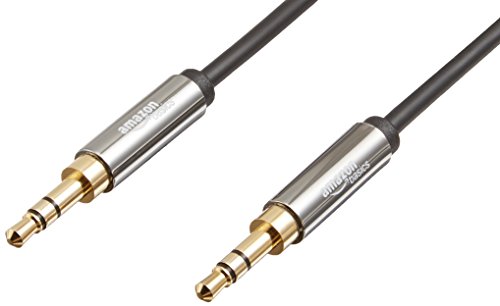
This compact 4-foot 3.5mm cable is a straightforward solution for connecting devices with standard AUX jacks. It is compatible with most smartphones, tablets, and portable players, and can link to car stereos or portable speakers for quick, reliable audio transfer.
Best for: users seeking a budget-friendly, plug-and-play option for everyday audio tasks. Better for: short-distance connections where minimal clutter matters. Caution: limited length may require more routing in larger setups.
KabelDirekt TOSLINK Optical Cable

The KabelDirekt TOSLINK cable provides optical digital audio connectivity. It is designed for devices with a TOSLINK/optical interface, making it ideal for delivering high-quality digital audio from TVs, soundbars, gaming consoles, or Blu-ray players to an AV receiver or DAC.
Best for: users needing crystal-clear digital audio with minimal interference in home theater or gaming setups. Better for: environments where electrical interference could affect sound. Caution: requires compatible optical ports; not suitable for analog 3.5mm connections.
Birvemce 2 Pack 1/4″ TRS Cable

The Birvemce 2-pack uses a 1/4 inch TRS plug designed for balanced stereo signals. It is well-suited for professional audio gear like studio monitors, mixers, and keyboards. The cable features 128 OFC cores and multi-layer shielding plus gold-plated connectors to reduce hum and noise.
Best for: studio or live sound setups requiring low-noise, two-channel transmission. Choose this if you need longer reach (10 feet) and robust shielding. Caution: 1/4″ connectors may require adapters for some consumer devices.
SYNCWIRE 3.5mm Nylon Braided Aux Cable

The SYNCWIRE cable emphasizes universal compatibility with devices featuring a 3.5mm AUX port. It uses polished 24K gold-plated connectors to minimize signal loss and noise, and a nylon braided jacket to resist tangling. It offers a bend lifespan well above standard cables.
Best for: users needing a reliable general-purpose 3.5mm cable for portable devices, cars, or home stereo links. Better for: quick swaps between multiple devices. Caution: incompatible with certain protective cases that tightly enclose phones or tablets.
AkoaDa 1/4 Inch TRS Instrument Cable

The AkoaDa 1/4 TRS instrument cable uses gold-plated 6.35mm jacks for stereo signals. It is compatible with electric guitars, mixers, amplifiers, keyboards, and other pro audio devices. The braided nylon sheath provides durability and resistance to wear.
Best for: musicians and studio engineers needing a sturdy, long-lasting 1/4″ TRS connection. Better for: balanced stereo links in professional environments. Caution: not ideal for consumer 3.5mm ports without adapters.
Eanetf 3RCA Cable

The Eanetf 3RCA cable provides three-connector audio/video versatility. It is suitable for home theater setups that require AV transmission with RCA connections. The 24K gold-plated joints and copper shielding reduce interference and improve durability.
Best for: users connecting legacy AV equipment, DVD players, or older TVs to stereo systems. Caution: requires compatible RCA ports and color-coded cables to ensure correct connections.
Buying Guide
- Connection type: Pick 3.5mm for general audio, optical (TOSLINK) for digital audio cleanly separated from electrical noise, or RCA for older AV gear.
- Durability: Look for braided jackets, gold-plated connectors, and shielding to minimize interference and wear.
- Length vs. convenience: Longer cables provide flexibility but can introduce signal loss in modest-quality analog cables; choose length appropriate to your space.
- Device compatibility: Ensure the cable matches your monitor, speakers, or receiver inputs (3.5mm, TRS, RCA, or optical).
- Use-case clarity: For computer monitor setups with built-in speakers, a simple 3.5mm AUX may suffice; for home theater, optical or high-quality RCA interconnects might be better.
FAQ
- What cable should I use to connect a monitor’s audio to a separate speaker system?
– A 3.5mm AUX (if both devices have a 3.5mm jack) or RCA interconnects if your monitor and speaker system use RCA inputs. - Do optical cables improve sound quality for TV and soundbar setups?
– Yes, optical cables avoid electrical interference and can deliver clear digital audio to compatible devices. - Is a longer AUX cable always better?
– Not always; excessive length can introduce slight signal loss in low-cost cables. Choose the shortest length that fits your setup. - When should I choose a TRS 1/4″ cable?
– For professional audio gear like mixers, studio monitors, or keyboards that use 1/4″ balanced connections. - Can I use any 3.5mm cable with my phone and car stereo?
– Most phones and car stereos support standard 3.5mm AUX, but some cases or adapters may block access. - Are optical cables compatible with all TVs?
– Most modern TVs have TOSLINK outputs; verify your device supports optical audio and has the necessary ports.