Best Headphone Splitter for PC: Top 5 3.5mm Y Adapters for Clear VOIP
The best headphone splitter for PC lets you connect a single 3.5mm headset to separate audio and microphone jacks on a computer. This guide highlights five reliable options suitable for VOIP, gaming, and everyday calls. Each pick targets different needs: compact portability, robust build, or best compatibility with TRRS headsets. Use this overview to choose a splitter that preserves sound quality while keeping mic input dependable for online chats and meetings.
| Product | Best For | Why It Stands Out |
|---|---|---|
| D & K Exclusives Headphone Splitter For Computer | General VOIP and laptop use | Gold-plated, compact, easy plug-and-play; good all-around value |
| UGREEN Headphone Splitter for Computer | Users needing durable build and mic compatibility | 24K gold-plated connectors, aluminum alloy shell, braided cord |
| SYNCWIRE Nylon-Braided 3.5mm Extension Cable | Travelers and multi-device setups | Hi-Fi sound, nylon-braided, slim connector fits most cases |
| ienza PC Headset/Microphone Splitter | Gaming headsets with separate mic/audio jacks | CTIA TRRS compatibility, supports major gaming headsets |
| Bordsek Headphone Splitter | Budget options with wide compatibility | 24K gold-plated contacts, broad device compatibility |
D & K Exclusives Headphone Splitter For Computer

This 3.5mm audio Y-splitter connects newer headsets with separate audio and microphone jacks to a PC or laptop. It is best for users who need quick VOIP setup with programs like Skype, MSN Messenger, and Google Voice. The gold-plated copper design aims to maximize conductivity and durability in a compact form.
Best for: those who want a simple, portable adapter for frequent travel or quick desk setups. Limitation: may not resolve mic issues with non-CTIA headsets.
UGREEN Headphone Splitter for Computer

UGREEN offers a 2-to-1 mic and headphone splitter that supports separate audio and mic jacks for PC or laptop use. It emphasizes high-fidelity transmission with 24K gold-plated connectors and an aluminum alloy shell, plus a nylon braided cable for durability. They note the importance of using a CTIA-compliant TRRS cable for microphone functionality.
Best for: users who want a durable option with strong build quality and clear stereo output. Limitation: microphone performance may depend on headset compatibility with TRRS standards.
SYNCWIRE Nylon-Braided 3.5mm Extension Cable
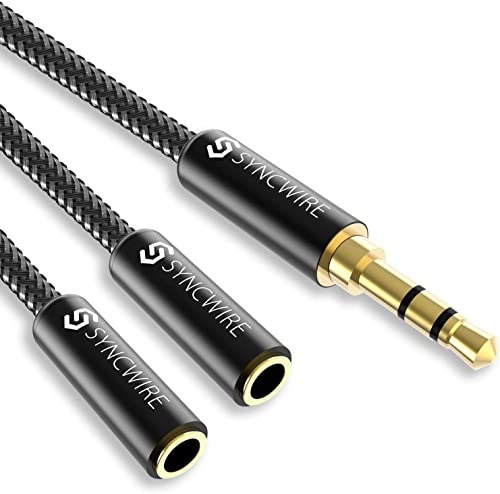
SYNCWIRE’s splitter is a 2-to-1 audio cable designed for Apple, Samsung, tablets, and laptops to feed two outputs from one 3.5mm jack. It features 24K gold-plated connectors and a double shielding design to minimize interference and noise. The slim connector fits most cases but may not work with LifeProof cases.
Best for: travelers and users who need a lightweight, compact splitter without mic functionality. Limitation: no separate mic channel when using with a single TRRS port.
ienza PC Headset/Microphone Splitter

ienza’s PC Y-splitter adapts four-pin (CTIA TRRS) gaming headsets to PC systems with separate audio and mic jacks. It is compatible with Astro A10/A40, Turtle Beach, HyperX Cloud, Razer, Sennheiser, and other major brands. The adapter is marketed as a practical option for gaming headsets needing dual connections.
Best for: gamers who need reliable CTIA-compatible splitters. Limitation: performance depends on headset model and mic compatibility with TRRS standards.
Bordsek Headphone Splitter

Bordsek offers a budget-friendly 3.5mm splitter with a 3.5mm female port and two male outputs. The gold-plated contacts are designed to deliver clearer sound and minimize signal loss. It fits a wide range of headsets, including some popular gaming models and office headsets.
Best for: users seeking a low-cost option with broad compatibility. Limitation: may be less durable over long-term use compared to premium builds.
Buying Guide
Key considerations when choosing a PC headphone splitter:
- Headset type: Ensure the splitter supports CTIA TRRS jacks if your headset uses separate audio and mic plugs.
- Connectivity quality: Look for gold-plated contacts and oxygen-free copper for better signal integrity.
- Durability: Braided cables and rugged housings improve longevity, especially for travel or daily commuting.
- Compatibility: Check device compatibility with PCs, laptops, consoles, or VOIP software you use most.
- Mic compatibility: Some adapters require a CTIA standard; others may struggle with non-standard mics. Verify mic functionality with your specific headset.
- Case fit: If you use a protective case, consider slim connectors that fit without removing the case.
FAQ
- What is a 3.5mm TRRS splitter used for?
It splits one combined audio/mic jack into separate audio and microphone connections for PC or laptop use.
- Do all headsets work with these splitters?
Most CTIA TRRS headsets do; some Apple/Beats or non-CTIA devices may require a different adapter for mic support.
- Is a gold-plated connector necessary?
Gold plating can improve conductivity and reduce corrosion, which helps longevity and signal quality.
- Can I use a splitter with gaming headsets on consoles?
Yes, many splitters support PC and some gaming consoles, but check compatibility with console voice chat features.
- Will a longer splitter cable affect sound quality?
Longer runs can introduce slight signal loss; choose a high-quality cable if a long reach is needed.
- What should I do if my mic doesn’t work after buying a splitter?
Verify the headset uses CTIA, confirm the splitter is plugged into the correct ports, and ensure the software VOIP settings recognize a microphone.