Best Ways to Convert CD to Digital: Top External Drives for Easy Ripping
Convert CD collection to digital files with reliable external CD/DVD drives. This guide highlights five top options, explains who they’re best for, and shows why each is suitable for ripping CDs and burning disks. The picks favor people who want simple, driver-free setup, fast transfers, and broad compatibility. Whether you’re archiving music, photos, or software, these drives help you digitize efficiently. The top picks are ideal for home users, students, and professionals needing portable, plug-and-play solutions.
Summary of chosen products
- Amicool External DVD Drive — Best for USB-C and USB 3.0, easy setup, wide OS support
- Rioddas External CD/DVD Drive — Best for direct back-of-PC power and reliable data transfer
- Alronly External CD/DVD Drive — Best for high-speed read/write and broad device compatibility
- ORIGBELIE External CD/DVD Drive (4-port) — Best for multi-connectivity and card slots
- Laurensory External DVD Drive — Best for versatile use as burner, reader, or ripper
Amicool External DVD Drive: Dual Interfaces

Best for users who need both USB 3.0 and Type-C connectivity. It supports DVD+R/RW and CD-R/RW with read/write up to 8x/24x. The dual-interface design enables fast transfers up to 5Gbps when connected directly to a computer, which helps fast ripping sessions. This drive is plug-and-play and works with Windows, Linux, and macOS on Intel or Apple Silicon systems. Note that it does not support Blu-ray, DVD-RAM, or certain proprietary formats. For best results, connect directly to a computer port rather than a hub.
Who it’s best for: Casual and power users who need straightforward ripping and burning with broad OS support, especially on newer laptops with USB-C.
Limitations: Some newer media suites may require VLC or similar players for media access; not compatible with iPads, TVs, or gaming consoles.
Rioddas External CD/DVD Drive: Simple and Stable

Best for users who value plug-and-play reliability with simple port placement. It is powered through USB, with no extra power adapter required, and is designed to work well when plugged into a high-power back-of-the-PC USB port. It supports USB 3.0 (backward compatible with USB 2.0) and delivers up to 5Gbps data transfer. A dedicated eject button helps safely release discs even if the computer hasn’t recognized the drive. Copper mesh and thoughtful engineering aim to reduce errors during reading and writing.
Who it’s best for: Students or professionals who need a dependable, straightforward drive that works well with desktops and laptops without fuss.
Limitations: Some users may encounter initial recognition delays; a different USB port often resolves the issue.
Alronly External CD/DVD Drive: High-Speed Dual Ports

Best for users who want high-speed performance and broad device compatibility. This drive supports up to 8x DVD rewrite/read and 24x CD write/read, with up to 5Gbps transfer rates via USB-C and USB 3.0. It is plug-and-play, with USB-A and USB-C connectors, and works with Windows, macOS, and Linux. It includes robust cross-compatibility across devices, making it suitable for mixed ecosystems. A caution: macOS users may need to insert a disc first to see the drive icon on some systems.
Who it’s best for: Multi-OS households or small offices that use both Windows and Mac machines and want a fast, flexible drive.
Limitations: Some Macs may require media players to access content; not all features may be available on Chromebook or tablets.
ORIGBELIE External CD/DVD Drive: 4 USB Ports

Best for users who want extra USB hubs and memory card slots in one device. This drive provides USB 3.0 high-speed data transfer and supports multiple disc formats, including CD±R/RW and DVD±R/RW, plus DVD-RAM. It also includes SD/TF card slots, making it a good option for photographers or students who transfer files directly from memory cards. It’s compatible with Windows, macOS, and Linux. Car, TV, tablet, and projector use are not supported.
Who it’s best for: Creatives or students who need a compact all-in-one device for disc burning and memory card transfers.
Limitations: The SD/TF card slots cannot be used simultaneously; choose one card type at a time.
Laurensory External DVD Drive: Portable Burner & Ripper
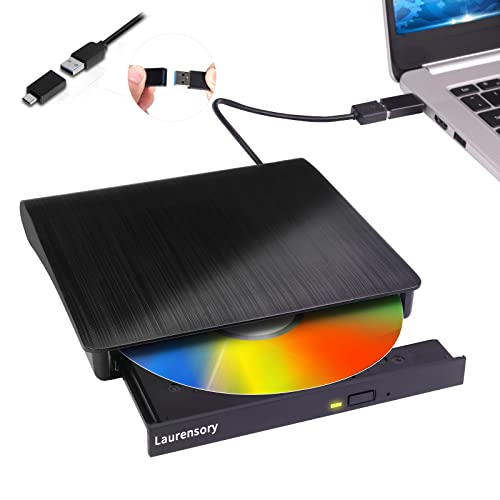
Best for users who want versatile ripping and burning with broad compatibility. This drive functions as a burner, writer, reader, and ripper, enabling music, movie, and data backups. It supports USB 3.0 and 2.0 and yields up to 8x DVDR and 24x CD speeds, with a maximum 5Gbps transfer rate. It is plug-and-play and designed for easy setup on laptops and desktops. It’s compatible with Windows and Mac OS, though some advanced playback features may require appropriate software.
Who it’s best for: People who need a flexible device for multiple tasks, including ripping CDs, burning DVDs, and handling backups on the go.
Limitations: Not all features are guaranteed across all OS environments; ensure you have compatible ripping/burning software installed.
Buying Guide: How To Choose The Right External CD/DVD Drive For Digitizing CDs
What speeds matter for ripping?
Look for drives with up to 8x DVD read and 24x CD write/read speeds to minimize ripping time. USB 3.0 or USB-C interfaces deliver higher data transfer rates, aiding quicker extraction of audio and data from discs.
Do I need USB-C or USB-A?
USB-C offers modern compatibility, but USB-A remains common on older laptops. A dual-port or combo drive reduces compatibility concerns, especially in mixed-device environments.
Is plug-and-play enough, or do I need drivers?
Most drives are plug-and-play and do not require extra drivers. Some Mac users may need to insert a disc first to see the drive icon, or use compatible media players. If in doubt, choose a model marketed as “Plug & Play.”
What about card slots and extra ports?
Some models include SD/TF card slots or USB hubs. These features are valuable for photographers and students who frequently transfer media from cameras, phones, or flash drives.
What formats should the drive support?
Ensure the drive supports CD-R/RW and DVD±R/RW, plus potentially DVD-RAM. If you plan to back up or archive large collections, confirm compatibility with your preferred software and file formats.
FAQ
Can I use these drives to rip and store music files? Yes. They support ripping CDs to digital formats via compatible software on Windows, macOS, or Linux.
Will these drives work with Macs with Apple Silicon? Many do, especially those marketed as compatible with Intel and Apple Silicon Macs. Some models may require appropriate ripping software.
Do I need an external power supply? Most models are powered via USB. If a drive arrives with a recommended extra power cable for power-hungry tasks, follow the manufacturer guidance.
Are these drives compatible with Chromebooks? Some models are not supported on ChromeOS. Check the product specifications for ChromeOS compatibility before purchasing.