Best Wireless Inner Ear Monitors for Stage and Studio
When choosing wireless inner ear monitors (IEMs), prioritize stable wireless transmission, clear audio, and easy setup for your environment. This guide highlights five top options across 2.4 GHz and UHF bands, suitable for bands, studios, churches, and solo performers. Each pick targets different needs—from low-latency practice to multi-user setups—so you can match the right system to your gigs and practice sessions.
| Product | Band / Channel Style | Best For |
|---|---|---|
| Xvive U45 Wireless IEM System | 5.8 GHz true diversity | Live performances with clear channels |
| JOYO JW-07 | 2.4 GHz with auto pairing | Practice and small gigs with simple setup |
| Phenyx Pro PTM-11 | UHF mono with separate outputs | Professional mono monitoring for church, studio, stage |
| LEKATO MS-02 | 2.4 GHz, one-to-many | Small to mid-size setups with multiple performers |
| LEKATO MS-1 | 2.4 GHz, auto-pairing | Solo or small bands needing easy auto-pairing |
Xvive U45 Wireless In-Ear Monitor System

The U45 system uses 5.8 GHz true diversity for robust RF connection up to about 100 ft (30.5 m). It supports a broad 20 Hz–20 kHz frequency range and a 24-bit/48 kHz audio path with 110 dB SNR for clear, detailed sound at any volume. Best for performers who need reliable on-stage wireless monitors without interference from other devices. Channel Scan Mode helps quickly identify the best channel; then manual transmitter matching completes setup. Limitation: 5.8 GHz can be sensitive to dense RF environments; consider frequency planning for large venues.
JOYO JW-07 Wireless In-Ear Monitor System

The JW-07 operates on 2.4 GHz and emphasizes low latency with real-time control and auto pairing. It supports 48 kHz/16-bit audio clarity and uses frequency-hopping to mitigate interference, making it suitable for practice rooms, small gigs, and DJ setups. Best for beginners or solo performers who want straightforward pairing and dependable performance without complex setup. Caution: 2.4 GHz can encounter congestion in crowded venues with many wireless devices.
Phenyx Pro PTM-11 UHF Mono Wireless IEM System

PTM-11 uses a UHF band with 50 adjustable frequencies and a mono monitoring path with separate outputs. It supports up to five simultaneous IEMs and offers a long 164 ft operating range with a built-in PAD to prevent input overload. Best for professional stage or studio work where mono monitoring improves focus and reduces phasing. Limitation: Mono output may not satisfy teams needing true stereo monitoring for complex mixes.
LEKATO MS-02 Wireless In-Ear Monitor System

MS-02 provides upgraded latency (<4.5 ms) and 24-bit/48 kHz audio with auto-pairing and one-to-many operation (up to four receivers). It supports up to six hours of battery life and features a simple pairing process, making it good for small to mid-sized performances or rehearsal settings. Best for groups who need quick setup and reliable multi-receiver monitoring. Limitation: 2.4 GHz can face interference in RF-dense environments; plan channel usage accordingly.
LEKATO MS-1 Wireless In-Ear Monitor System
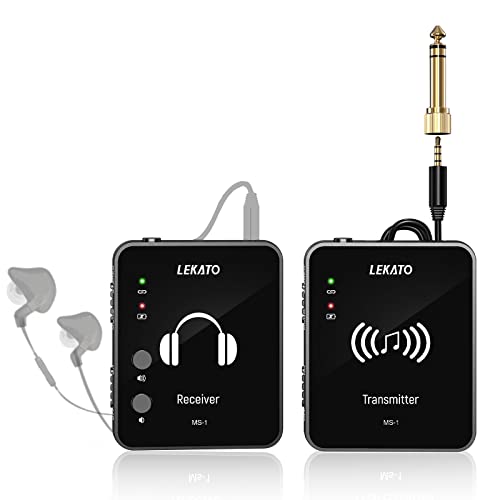
MS-1 offers auto-pairing and true stereo transmission with a single transmitter and multiple receivers (up to six). It’s designed for easy setup in small to medium gigs and practice settings. Best for performers who want a simple, reliable mono-to-stereo option with quick pairing. Caution: Auto-pairing can occasionally require manual confirmation in noisy RF environments.
Buying Guide
What to consider when choosing wireless IEMs:
- Frequency band: 2.4 GHz systems offer broad compatibility and low cost but may suffer from congestion; UHF systems typically provide better interference resistance and longer ranges.
- Latency: Look for sub-5 ms latency for real-time monitoring, especially during live performance and practice sessions.
- Channel management: Systems with multiple channels or auto-pairing simplify setup for bands and multi-performer scenarios.
- Output options: Mono vs. stereo outputs affect how you mix stage audio; ensure compatibility with your mixer or personal mix preferences.
- Battery life and charging: Longer operation times reduce interruptions; check battery indicators and charging requirements.
- Range and obstacles: Consider venue size and wall materials; thicker walls and metal can reduce effective range.
Frequently Asked Questions
- Q: Do I need a mono or stereo IEM system? A: Mono can simplify monitoring for spoken-word or single-instrument setups; stereo is preferred for full musical mixes with detailed imaging.
- Q: What is the typical latency to expect? A: Most systems advertise under 5 ms; actual latency may vary with environment and firmware.
- Q: How many receivers can work with one transmitter? A: Many 2.4 GHz and UHF systems support multiple receivers, ranging from 2 to 6 or more depending on the model.
- Q: Is auto-pairing reliable for live gigs? A: Auto-pairing is convenient for quick setups, but confirm the connection on-site to avoid last-minute drops.
- Q: What should I avoid for best performance? A: Keep line-of-sight where possible, minimize thick walls or metal barriers, and select frequencies with the least interference in your venue.
- Q: How do I choose the right system for a band of multiple performers? A: Consider one-to-many capabilities, battery life, and the number of compatible receivers to cover all players in the group.