Best Video Conferencing Equipment for Large Rooms
Answering your search for scalable, reliable large-room video conferencing gear, this guide highlights five top options that deliver clear video, solid audio, and easy setup in big spaces. These picks are best for mid-to-large conference rooms, boardrooms, and hybrid meeting spaces where multiple participants are present. You’ll find AI tracking, wide fields of view, and strong microphone arrays to help everyone stay seen and heard. The buyer-friendly sections explain who each product is best for and why it was chosen, with practical cautions when relevant.
Summary table of chosen products:
| Product | Best For | Key Benefit | Note |
|---|---|---|---|
| TONGVEO All-in-One Conference Room System | Mid‑sized to large rooms | AI auto-tracking PTZ with built-in speakerphone | All-in-one solution |
| Logitech MeetUp | Small to mid-sized rooms | Ultra-wide 120° FOV with clear audio capture | Compact and simple |
| Logitech Group | Mid to large rooms | Plug‑and‑play with robust audio | Solid, scalable option |
| TONGVEO 4K Conference with Gesture Control | Medium to large rooms | 4K output with AI auto-tracking and gesture controls | Advanced control features |
| TONGVEO Conference Room System 4K UHD | Large rooms | Integrated 4K camera with wireless speakerphone | Smart meeting features |
Best All-in-One Tracking Conference System

The TONGVEO All-in-One Conference Room System combines a full HD 1080p camera with AI auto-tracking and a Bluetooth conference speakerphone. It outputs via HDMI and USB 3.0 for flexible conferencing on most platforms. Best for mid-sized rooms where a single device should manage video and audio in sync. The system supports 350° horizontal and 180° vertical tracking to keep speakers in frame as they move. Limitations include potential integration considerations with some non-USB/HDMI-based displays.
Logitech MeetUp: Wide-Angle Curb All-in-One

Logitech MeetUp emphasizes ease of use for small to mid-sized rooms. It features Ultra HD 4K imagery with a wide 120° field of view and up to 5x zoom, enabling clear visibility of participants around the room. Built-in beamforming microphones provide clearer voice pickup within several meters. This is a favorable pick for rooms where a simple, reliable setup is valued over advanced tracking. It may be less ideal for very large rooms or highly dynamic meeting environments.
Logitech Group: Big-Room Ready Audio & Video

Logitech Group is designed for mid-to-large conference rooms with a plug-and-play USB connection. It offers a 90-degree camera view with a 20 ft audio range, and supports up to about 14 participants with optional expansion mics to accommodate bigger groups. It is selected for environments needing straightforward setup and reliable, scalable audio/video performance, though it lacks some AI tracking features found in newer models.
TONGVEO 4K Conference Room With Gesture Control

This 4K system combines a high-resolution PTZ camera with AI auto-tracking, gesture control, and 5x digital zoom. It supports 4K at 30fps via HDMI and 1080p 30fps via USB 3.0, making it versatile for modern display setups and PC-based conferencing software. Gesture controls provide quick, hands-free management in dynamic meetings. Consider this when room shape or presenter movement benefits from intuitive tracking and gesture interaction, but verify compatibility with your preferred collaboration tools.
TONGVEO 4K UHD Conference System With Wireless Speakerphone
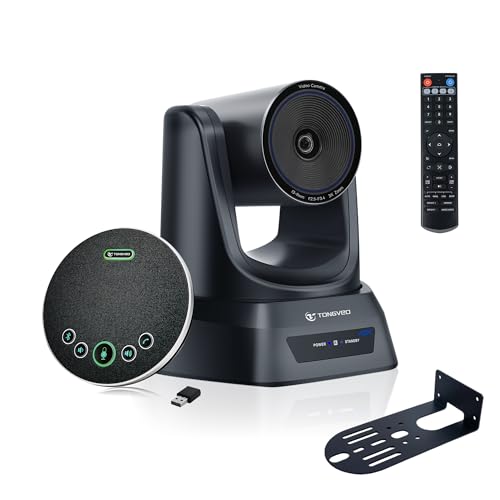
All-in-One 4K UHD conference solution with a wireless speakerphone, designed for seamless synergy between video and audio. The 3x optical zoom and 120° FOV support broad room coverage, while AI modes offer either presenter tracking or auto framing. It is a smart fit for rooms that require a cohesive system with smart features, but ensure your meeting software supports the camera’s AI modes for optimum results.
Buying Guide
- Room size and shape: For large rooms, prioritize wide FOV, strong mic arrays, and AI tracking. A system with 4K output can also help on big displays.
- Tracking and controls: AI auto-tracking and gesture controls improve presenter visibility in dynamic spaces. If you prefer simple use, a model with solid fixed framing and plug‑and‑play may suffice.
- Compatibility: Check HDMI/USB outputs and compatibility with your meeting software (Zoom, Teams, Meet, etc.). Ensure USB3.0 or higher for smooth data transfer.
- Audio quality: Look for beamforming mics, noise reduction, and echo cancellation. In larger rooms, consider additional mics or expansion mics.
- Installation and setup: All-in-one systems reduce cable clutter but verify power and display placement. Some units include wireless speakerphones for easier setups in big rooms.
- Future-proofing: 4K capable devices provide better image quality on large displays and when sharing high-resolution content.
FAQ
- What features matter most in large-room video conferencing? For large rooms, prioritize a wide field of view, high-quality audio pickup, AI tracking, and reliable USB/HDMI outputs for compatibility with existing displays and software.
- Is AI auto-tracking essential for big spaces? It helps maintain the speaker in frame as people move, reducing manual panning. However, a strong fixed frame can be enough in rooms with stationary layouts.
- Can I mix and match camera and mic systems? Yes, but ensure they connect to the same conferencing software and deliver synchronized audio/video streams.
- Do these systems require professional installation? Most are plug-and-play, though larger rooms may benefit from mounting, cable management, and room acoustics optimization.
- What is 4K output useful for? It improves image clarity on large displays and enables better detail sharing during presentations.
- Are expansion mics necessary? In very large rooms, expansion mics extend coverage and reduce dropouts in audio pickup.