
The Logitech Z906 is the closest match for shoppers specifically seeking 500-watt computer speakers: its listing states 500 watts of continuous power and 1,000 watts peak. For a simpler 2.1 setup, consider the Logitech Z623; for a smaller desktop system, compare the Cyber Acoustics CA-3908 or Edifier G2000. The Klipsch ProMedia 2.1 is a THX-certified option with a dedicated subwoofer, though the supplied product details do not state its wattage.
| Product | Best For | Power Information Provided |
|---|---|---|
| Logitech Z906 | Surround sound and a 500-watt specification | 500 watts continuous; 1,000 watts peak under certain circumstances |
| Logitech Z623 | 2.1 sound for a computer or entertainment room | 400 watts maximum output |
| Klipsch ProMedia 2.1 | THX-certified desktop audio | Not stated in the supplied product details |
| Cyber Acoustics CA-3908 | Desktop controls and a lower-power 2.1 system | 92 watts peak; 46 watts RMS |
| Edifier G2000 | Compact gaming audio and multiple inputs | 32 watts peak; 16 watts RMS |
Logitech Z906 5.1 Surround Sound

Best for: Buyers who want a multichannel speaker setup and a product listing that explicitly states 500 watts of continuous power. The Z906 is a 5.1 system, not a basic pair of desktop speakers, so it is intended for a more involved audio arrangement.
Its listed features include THX certification, Dolby Digital and DTS surround sound, four wall-mountable satellite speakers, and a subwoofer. Logitech states that the system delivers 500 watts continuous power and can reach 1,000 watts peak under certain circumstances. These power figures make it the most direct fit for a search for “500 watt computer speakers.”
Why it was selected: It matches the requested wattage in the supplied product information and adds surround formats for compatible content. Limitation: A 5.1 system requires more space and speaker placement than a two-speaker or 2.1 desktop setup. Check the computer’s available audio connections and the room layout before choosing it.
Logitech Z623 2.1 Speaker System

Best for: Buyers who prefer a two-satellite-and-subwoofer arrangement for music, movies, or games. Logitech lists a maximum output power of 400 watts, making this a strong alternative for shoppers who want a powerful system but do not require an exact 500-watt specification.
The Z623 is THX-certified and includes two satellite speakers, each listed at 35 watts, plus a subwoofer. RCA and 3.5 mm inputs allow connection of up to three audio devices, such as a computer, game console, or compatible portable player. Logitech describes the system as suitable for filling larger entertainment rooms.
Why it was selected: It combines a subwoofer, multiple input options, and a high stated maximum output in a simple 2.1 configuration. Limitation: The listed maximum of 400 watts is not the same as a 500-watt continuous rating. The product information also says the system is not waterproof, so keep it away from moisture.
Klipsch ProMedia 2.1 THX System

Best for: Desktop users who want a THX-certified 2.1 system for games, movies, and music. The listed configuration pairs two satellite speakers with a 6.5-inch side-firing, ported subwoofer.
Klipsch highlights MicroTractrix horn technology and says its design directs sound toward the listener. The two-way satellites use 3-inch midrange drivers, while the subwoofer is designed to provide bass response. This system is worth comparing with the Z623 if a two-speaker layout with a separate subwoofer suits the available desk or room space.
Why it was selected: It offers a clearly described 2.1 configuration and named acoustic features, plus THX certification. Limitation: The supplied product details do not state a wattage, so buyers focused on a verified 500-watt figure should not assume it meets that target. Confirm the required connections for the intended computer or audio source.
Cyber Acoustics CA-3908 2.1 Speakers

Best for: Buyers seeking a desktop-focused system with a control pod and clearly differentiated power figures. Cyber Acoustics lists 92 watts peak power and 46 watts RMS, which helps shoppers compare its stated output with products that provide only a maximum figure.
The CA-3908 includes a ported 6.5-inch side-firing subwoofer, two satellite speakers with 2-inch drivers, and a passive radiator satellite system. Its control pod adjusts volume and bass, provides a 3.5 mm auxiliary input, and includes a headphone jack. The listed connection uses include PCs, Macs, laptops, gaming systems, tablets, and smartphones with a 3.5 mm audio connection or headphone jack.
Why it was selected: It offers practical desktop controls, a subwoofer, and explicit RMS and peak numbers. Limitation: Its 46-watt RMS rating is far below 500 watts, so it is not a match for buyers who require that output level. The manufacturer recommends setting source volume between 65% and 80% before adjusting speaker volume.
Edifier G2000 Gaming Speakers
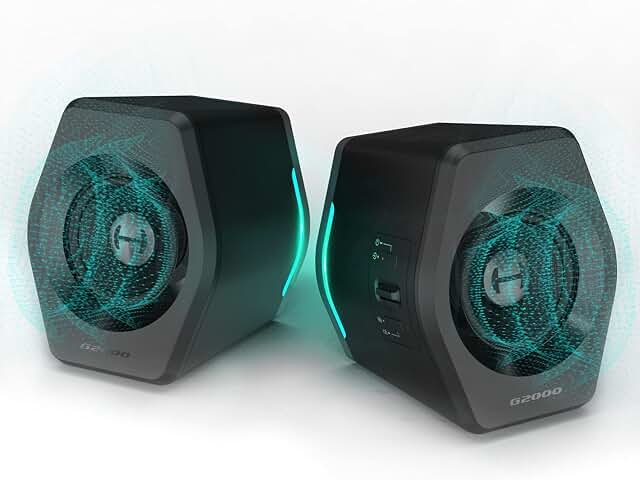
Best for: Buyers who value several connection choices and selectable sound modes in a compact PC speaker system. The G2000 provides USB, Bluetooth, and 3.5 mm AUX inputs, as well as Game, Music, and Movie modes.
Edifier lists a 2.75-inch full-range speaker unit, a rear bass port, 16 watts RMS, and 32 watts peak power. The product information also identifies a subwoofer output interface. Its stated device compatibility includes PCs, Macs, laptops, consoles, TVs, CD players, and mobile phones, though the appropriate connection depends on the source device.
Why it was selected: It is a flexible choice for a compact desktop or gaming setup, especially when USB or Bluetooth input is useful. Limitation: Its stated 32-watt peak output makes it a lower-power option, not a substitute for a 500-watt system. Choose it for connection flexibility and modes rather than high total output.
Buying Guide: How To Choose Computer Speakers
Does “500 watts” mean continuous or peak power?
Check whether a listing identifies its figure as RMS, continuous, or peak power. These terms describe different power measurements and should not be treated as interchangeable. In this selection, the Z906 is listed at 500 watts continuous and 1,000 watts peak under certain circumstances. The CA-3908 distinguishes 46 watts RMS from 92 watts peak, while the G2000 lists 16 watts RMS and 32 watts peak.
A product described with a high maximum or peak number may not deliver that figure continuously. If matching a specific output is essential, look for the exact measurement type in the product specifications. Do not infer a speaker’s RMS rating from its peak rating or compare a system’s peak number directly with another system’s continuous number.
Should you choose 2.1 or 5.1 speakers?
A 2.1 system has two satellite speakers and a subwoofer. It is generally the simpler configuration to position around a desk, and it can provide separate bass support without placing multiple surround speakers around the room. The Z623, ProMedia 2.1, and CA-3908 are examples in this list.
A 5.1 system adds more speaker channels for surround sound. The Z906 is the only 5.1 option here and supports Dolby Digital and DTS soundtracks. It may suit a room-based entertainment setup better than a small desk, but it requires planning for the satellites and the source audio. Consider the room and intended content before deciding that more channels are necessary.
Which inputs should you check before buying?
Match the speaker inputs to the devices you intend to connect. The Z623 lists RCA and 3.5 mm inputs and can connect to up to three audio devices. The CA-3908 has a 3.5 mm auxiliary input and a headphone jack on its control pod. The Edifier G2000 lists USB, Bluetooth, and 3.5 mm AUX options.
Do not assume that every listed input supports every device in every configuration. Check the ports available on your computer, console, phone, or other source. If you plan to use several devices, prioritize the listed connection types and consider how often you will switch between them.
How much desk and room space do you have?
Separate satellites and a subwoofer take more room than a compact pair of speakers. Measure the desk area and consider where a subwoofer could sit before choosing a 2.1 system. A 5.1 arrangement also requires positions for additional satellite speakers. The Z906 satellites are listed as wall-mountable, which may help with placement options, but the room still needs to accommodate the full system.
For near-field computer listening, speaker placement matters: leave space for the satellites and keep controls reachable. For a larger entertainment room, compare the systems’ configuration, connection options, and power descriptions rather than relying on wattage alone.
Are certifications and sound modes important?
THX certification is listed for the Logitech Z623, Klipsch ProMedia 2.1, and Logitech Z906. It can be a useful specification to compare, but it does not replace checking the system type, power measurement, or connections. The Edifier G2000 lists Game, Music, and Movie modes, which let users select among its stated EQ options.
Choose features that fit your actual use. A buyer who primarily watches compatible surround content may value the Z906’s listed formats. Someone who changes between games, music, and movies may prefer the G2000’s modes. A person who needs simple desktop controls may find the CA-3908 control pod more relevant than a higher peak-power number.
Frequently Asked Questions
Which speaker system in this list is rated at 500 watts?
The Logitech Z906 is listed as delivering 500 watts of continuous power, with peak power up to 1,000 watts under certain circumstances. It is a 5.1 surround sound system.
Is a 500-watt speaker system always louder?
Not necessarily. Wattage describes electrical power, but it is not the only factor that determines perceived loudness. Speaker design, room placement, source audio, and whether the listed figure is peak or continuous also matter.
Are the Logitech Z623 speakers rated at 500 watts?
No. The supplied Z623 product details state a maximum output power of 400 watts. They also list two 35-watt satellite speakers and a subwoofer.
What is the difference between RMS and peak watts?
RMS and continuous ratings describe sustained power differently from peak ratings, which refer to higher short-term output. Compare like with like: a peak figure should not be treated as equivalent to an RMS or continuous figure.
Which option has Bluetooth and USB inputs?
The Edifier G2000 lists Bluetooth, USB sound card, and 3.5 mm AUX inputs. Check that the chosen input works with the specific device and setup you plan to use.
Which system is designed for surround sound?
The Logitech Z906 is the 5.1 system in this selection and lists Dolby Digital and DTS support. The other systems described here use a 2.1 or compact stereo-style configuration.