
The best noise-cancelling microphone for video conferencing depends on whether you need a personal desk mic or a speakerphone for several people. The TONOR G11 Pro is best for group calls needing AI noise reduction and 360-degree pickup; the CMTECK G009 is a compact option with active noise cancelling and a mute indicator. For a small meeting space, consider the Yealink SP92 or EMEET M0 Plus, while the FIFINE AM8T suits buyers who want a USB/XLR desktop microphone.
| Product | Best For | Standout Feature |
|---|---|---|
| TONOR G11 Pro | Group calls with background noise | AI noise reduction and 11.5-foot omnidirectional pickup |
| CMTECK G009 | Individual desk calls | Active noise cancelling and visible mute status |
| Yealink SP92 | Small meeting rooms | Speakerphone design with AI noise cancelling |
| EMEET M0 Plus | Shared conference calls | Four microphones and 360-degree voice pickup |
| FIFINE AM8T | Flexible desktop setups | Dynamic microphone with USB and XLR connections |
TONOR G11 Pro Conference Microphone

The TONOR G11 Pro is best for conference calls, online learning, and conversations where people sit around a shared table. Its built-in AI noise reduction is described as reducing distractions such as fan noise and keyboard clicks. The omnidirectional microphone picks up sound from 360 degrees, with a stated pickup distance of 11.5 feet.
Physical controls let users adjust microphone and monitoring volume, with four volume levels. This makes it a practical choice for people who want on-device adjustments rather than relying only on computer settings. It is a microphone, not a speaker, so callers need a separate way to hear the meeting, such as computer speakers or headphones.
- Best for: A small group sharing one microphone.
- Why it stands out: Combines wide-area pickup with stated AI noise reduction.
- Limitation: It does not provide playback as a speakerphone.
CMTECK G009 USB Desktop Microphone

The CMTECK G009 is best for an individual who wants a straightforward computer microphone for video meetings, online classes, or chat. Its listed features include an omnidirectional condenser pickup pattern and active noise cancelling supported by a CMTECK CCS2.0 smart chip. A pop filter is included to help prevent plosive sounds from overloading the microphone.
A physical mute button provides quick control during calls. The built-in LED indicates operating status: green means connected, while red means mute mode. These visual cues can help prevent accidental transmission when switching between speaking and listening.
- Best for: Desktop users who value a dedicated mute button and status light.
- Why it stands out: It lists active noise cancelling and a pop filter in a USB computer mic.
- Limitation: The omnidirectional pattern is designed to capture sound from multiple directions, so it may not isolate one speaker as tightly as a close-positioned directional mic.
Yealink SP92 Conference Speakerphone

The Yealink SP92 is best for users who want a combined conference speaker and microphone for a small meeting room. The listed product details identify it as a speakerphone with AI noise cancelling, Bluetooth, USB connectivity, and up to 20 hours of call time. This all-in-one format can reduce the need to pair a separate desktop microphone with another audio device.
The product listing describes it as Teams certified and intended for use with a computer or laptop. Its speakerphone design is useful when meeting participants need to hear remote callers without wearing headsets. As with any shared room microphone, placement and room acoustics can affect how clearly participants are captured.
- Best for: Small-room calls where both microphone and speaker functions are needed.
- Why it stands out: Combines AI noise cancelling, Bluetooth, and USB speakerphone features.
- Limitation: Buyers seeking only a personal microphone may not need its speakerphone format.
EMEET M0 Plus Conference Speakerphone

The EMEET M0 Plus is best for shared calls where participants sit around a central device. Its listed name specifies four microphones and 360-degree voice pickup, making it a conference speakerphone rather than a close-talk personal mic. The multiple-microphone layout is intended to capture voices from different positions around the unit.
Choose this model if your main need is a single conference device for room participants. It is a better fit for group conversations than a mic designed to sit directly in front of one person. The supplied product details do not specify noise-cancellation performance, so buyers prioritizing a stated noise-reduction feature should compare it with the TONOR, CMTECK, or Yealink options.
- Best for: Shared meetings requiring 360-degree voice pickup.
- Why it stands out: The four-microphone configuration is designed for voices around the device.
- Limitation: Noise-cancelling capability is not specified in the provided product details.
FIFINE AM8T USB/XLR Dynamic Microphone
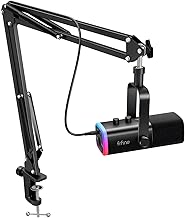
The FIFINE AM8T is best for a single speaker who wants a desktop microphone with both USB and XLR connection options. The listed product name identifies it as a dynamic PC microphone and gaming microphone set, with the AM8T supporting USB/XLR. That flexibility can suit buyers who want a direct computer connection now and an XLR-based setup option later.
Unlike the other products here, the provided details do not specify active or AI noise cancellation, a pickup distance, or a mute indicator. Choose it for its dynamic-mic format and connection choices rather than assuming it will suppress room noise automatically. For noisy rooms, microphone placement and the meeting app’s own noise controls remain important.
- Best for: Individual users who want USB/XLR flexibility.
- Why it stands out: Offers a dynamic desktop microphone format and two connection types.
- Limitation: Noise-cancellation features are not stated in the supplied product information.
Buying Guide: How To Choose A Conference Microphone
Do you need a personal microphone or a speakerphone?
A personal desktop microphone is usually the more direct choice for one person speaking from a desk. It can be positioned near the speaker, which helps keep the voice prominent. A conference speakerphone is designed for calls with multiple people around a shared device and combines a microphone with a speaker. The EMEET M0 Plus and Yealink SP92 are speakerphone-style options; the CMTECK G009 and FIFINE AM8T are desktop microphones.
For a group, check whether the pickup pattern and stated range suit the room. Omnidirectional microphones can capture sound from several directions, but they may also pick up more of the surrounding environment. A stated 360-degree pickup or a multi-microphone array helps describe coverage; it does not guarantee that every participant will sound equally clear in every room.
Which noise-reduction feature matters?
Noise cancelling, noise reduction, and directional pickup are not interchangeable. The TONOR listing specifies AI noise reduction for distractions such as fan noise and keyboard clicks. The CMTECK listing specifies active noise cancelling and a pop filter. The Yealink listing identifies AI noise cancelling. The provided EMEET and FIFINE details do not state a noise-cancellation feature, so do not assume those products include one.
Noise processing can help with steady background sounds, but it cannot replace a quiet room or good microphone placement. Keep the mic close enough to capture speech clearly, limit nearby noise where practical, and test the sound in the conferencing app before an important call. App-level noise suppression may also affect results.
How many people need to be heard?
For one speaker, a desktop mic positioned near the user is typically more appropriate than a room speakerphone. For several participants, look for omnidirectional pickup and a stated coverage distance. TONOR lists an 11.5-foot pickup distance; EMEET’s listed name highlights four microphones and 360-degree pickup. These details are useful starting points, not a substitute for matching the device to the room size and seating layout.
For hybrid meetings, also consider how remote participants will be heard in the room. A microphone-only model needs a separate playback device. A speakerphone provides both functions, which can simplify a shared setup, but users should verify that its connection method and meeting platform fit their needs.
What controls and connections should you check?
A hardware mute button is useful when you need to stop sending audio quickly. The CMTECK G009 includes a mute button and an LED that shows whether it is connected or muted. The TONOR G11 Pro lists physical controls for microphone and monitoring volume. On-device controls can be easier to locate during a call than software settings, although the best control layout depends on your workflow.
Check whether the device connects by USB, Bluetooth, or XLR, and confirm that the intended computer or meeting setup supports that connection. The FIFINE AM8T lists USB and XLR. The Yealink SP92 lists USB and Bluetooth. Product names and listing descriptions are not a substitute for checking current device requirements and included accessories.
How should you compare these five options?
- For AI noise reduction and group pickup: Consider TONOR G11 Pro, which lists 360-degree pickup and an 11.5-foot range.
- For a personal mic with a mute indicator: Consider CMTECK G009, which includes active noise cancelling and an LED status light.
- For a combined microphone and speaker: Compare Yealink SP92 and EMEET M0 Plus; Yealink lists AI noise cancelling, while EMEET highlights four microphones and 360-degree pickup.
- For USB/XLR desktop flexibility: Consider FIFINE AM8T, while noting that noise cancellation is not specified in the provided details.
Before choosing, decide whether you prioritize one-person voice capture, shared-room coverage, playback, physical controls, or connection flexibility. Then confirm the latest product listing for compatibility and setup details. The product features above describe the supplied information and do not establish that any microphone will remove every background sound.
Frequently Asked Questions
What is the best type of microphone for video conferencing?
For one person, a desktop microphone placed near the speaker is a practical choice. For a group around a table, a conference speakerphone or omnidirectional microphone is usually more suitable. Choose based on the number of speakers and whether you also need audio playback.
Does a noise-cancelling microphone remove all background noise?
No. Noise-reduction features may help reduce certain distractions, but results depend on the sound, room, microphone placement, and software settings. A quieter space and close, clear speech remain important.
Is an omnidirectional microphone good for a meeting room?
It can be useful when participants sit around the microphone because it captures sound from multiple directions. It may also capture more room noise than a microphone positioned close to one speaker, so consider the space and seating arrangement.
Should I choose a USB microphone or a Bluetooth speakerphone?
USB is a direct wired connection and can suit a desk setup. Bluetooth can provide a wireless connection when supported by the computer or other device. Check the product’s connection details and your equipment before choosing.
Do I need a separate speaker with a conference microphone?
It depends on the product. A microphone-only model needs separate headphones or speakers for listening. A speakerphone, such as the Yealink SP92 or EMEET M0 Plus, combines microphone and speaker functions.
What does a mute indicator add?
A visible indicator helps show whether the microphone is muted or active. The CMTECK G009 listing identifies green as connected and red as mute mode, alongside its physical mute button.