
The best USB to 3.5mm adapter depends on what you need to connect: UGREEN is best for higher-resolution headphone audio, MOSWAG is a straightforward headset pick, and STSAUX provides a two-pack for compatible computers. Fidioto is another microphone-capable option, while ANDTOBO is designed for a specific USB flash-drive-to-AUX car setup—not for connecting headphones to a computer. Check the connector type and signal direction before choosing.
| Product | Best for | Key consideration |
|---|---|---|
| UGREEN USB to 3.5mm Adapter | Higher-resolution headphone output | 24-bit/96kHz applies to headphone audio, not microphone audio |
| MOSWAG USB to 3.5mm Adapter | Everyday headset listening and speaking | Microphone connection requires a TRRS headset |
| STSAUX USB-A to 3.5mm Adapter | Getting two adapters for compatible computers | Not for TVs or car systems; listed iOS microphone limitation |
| Fidioto USB to 3.5mm Adapter | Headset use where interference shielding matters | Does not support TS or TRS connectors |
| ANDTOBO USB to AUX Adapter | Playing a USB flash drive through a compatible AUX system | Not a general-purpose headphone adapter |
UGREEN USB to 3.5mm Adapter

Best for: People who want a USB-A audio connection with a stated 24-bit/96kHz headphone output and microphone support. This adapter connects 3.5mm headphones, headsets, or speakers to a PC’s USB-A port, and its in-line control and microphone function are intended for activities such as gaming and chat.
UGREEN lists support for CTIA and OMTP headsets and a built-in smart chip for audio conversion and noise reduction. The product description distinguishes headphone output from microphone input: 24-bit/96kHz is specified for headphones, while the microphone does not support that resolution. It also specifies a TRRS requirement for the microphone connection.
Why it stands out: Among these choices, it has the clearest stated high-resolution headphone-output specification and describes both listening and talking. Its aluminum-alloy shell and nylon-braided cable are also listed construction features.
Limitation: Choose another option if your microphone uses a TS or TRS connector rather than the required TRRS connection.
MOSWAG USB Audio Adapter

Best for: Buyers who need a compact USB sound card for both headphone audio and headset microphone use. MOSWAG describes its adapter as adding a 3.5mm TRRS port with audio output and microphone input, making it a practical choice for compatible headsets used for calls, voice chat, and listening.
The listed features include a built-in DAC, 16-bit/48kHz audio output, noise reduction, and support for CTIA and OMTP headset standards. The manufacturer lists compatibility with Windows versions, Linux, Mac OS X, Google Chromebook, Raspberry Pi, PS4, PS5, and Windows Surface 3. Check the device’s available USB connection and headset requirements before buying.
Why it stands out: It combines listening and speaking in one adapter and provides a specific 16-bit/48kHz output specification. It is a better fit for routine headset use than for shoppers prioritizing the highest stated output resolution.
Limitation: The product information says its microphone connection does not support TS or TRS connectors. Confirm that your headset uses a compatible TRRS plug.
STSAUX USB-A Adapter Two-Pack
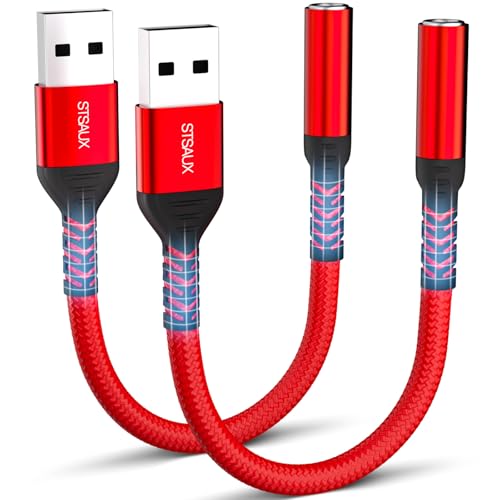
Best for: Buyers who want two USB-A-to-3.5mm adapters for compatible computers or a spare. STSAUX describes this as an external sound card with a 3.5mm TRRS connection, listening and microphone functions, plug-and-play setup, and no driver or software requirement.
The listed output specification is 24-bit/96kHz, and the product description names support for Windows 10/11, Mac OS, Linux, Chrome OS, and Surface Pro. It also states compatibility with CTIA/OMTP standards and mentions Android headsets, gaming headphones, and PC speakers. The two-pack format can suit households or work setups that need more than one adapter.
Why it stands out: It combines a two-adapter package with a stated high-resolution output specification and microphone functionality. It is a better match for USB-enabled computers than for entertainment systems or vehicle audio.
Limitation: The listing says it is not compatible with TVs or cars and notes that iOS microphone functionality is unavailable. Its USB-A connector also means it is not a direct fit for devices without a suitable USB-A port.
Fidioto USB Headphone Adapter

Best for: Users who want a USB-to-headset adapter with a stated focus on shielding against electromagnetic interference. Fidioto describes the adapter as providing audio output and microphone input through a 3.5mm TRRS port, with a smart sound chip for audio decoding.
The listed features include an enameled copper core, interference shielding, and noise suppression. These claims may be relevant to buyers looking for a simple external sound card for a headset, but the product information does not provide a numerical audio-resolution specification. The product title lists Mac, PS4, PC, laptops, and desktops among its intended devices.
Why it stands out: It is a reasonable comparison choice when microphone support and interference shielding are priorities. Its dual-function design is more appropriate for a compatible headset than a one-way headphone-only connection.
Limitation: The listing says it does not support TS or TRS connectors. Buyers should verify that the headset plug is TRRS and that the device has a compatible USB port.
ANDTOBO USB Flash Drive To AUX
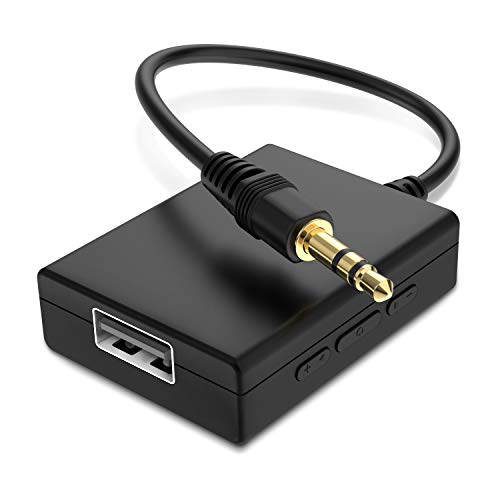
Best for: A specific setup in which a USB flash drive containing MP3 music files is played through a compatible car audio system’s AUX input or an older speaker system with a 3.5mm connector. This is not the same use case as connecting USB headphones or a computer to a 3.5mm headset.
ANDTOBO says the adapter is unidirectional and requires a USB power source during use. Its instructions call for inserting a flash drive with MP3 files, powering the adapter with the supplied USB-C cable, and connecting its AUX plug to the audio system. The listing cautions that the device is not a signal converter and does not support reverse operation.
Why it stands out: It covers a specialized car-audio need that the computer-focused DAC adapters do not. Choose it only when the audio system and USB media setup match the listed requirements.
Limitation: It is not compatible with USB headphones, phones, laptops, PCs, Bluetooth speakers, or devices requiring decoding, according to the product information. The listing also says it does not charge external devices.
Buying Guide: How To Choose A USB To 3.5mm Adapter
USB-to-3.5mm adapters do not all perform the same job. Most products in this comparison act as an external sound card: they take digital audio from a USB port and provide an analog 3.5mm connection for headphones, headsets, or speakers. A specialized product such as ANDTOBO instead describes playing files from a USB flash drive through an AUX audio input. Identify the direction of the audio connection before choosing a model.
Do You Need Headphone Audio, A Microphone, Or Both?
If you only need to listen, check that the adapter supports audio output for your headphones or speakers. For calls, gaming chat, or recording, confirm that the adapter also supports microphone input. Product descriptions may call this a two-in-one adapter or an external sound card with microphone functionality.
Do not assume every 3.5mm plug supports both functions. The listed MOSWAG, UGREEN, and Fidioto products specify TRRS requirements for microphone use, and the STSAUX listing describes a TRRS connection. If your headset has separate headphone and microphone plugs, check the adapter’s port arrangement before buying; the supplied product details do not establish support for every split-plug configuration.
Which 3.5mm Connector Standard Does Your Headset Use?
TRRS plugs have four conductors and are commonly used for combined headphone and microphone connections. TS and TRS plugs have fewer conductors and may be intended for different audio tasks. The exact limitations depend on the adapter: MOSWAG and Fidioto state that their microphone connections do not support TS or TRS, while UGREEN specifies TRRS for microphone use.
UGREEN, MOSWAG, and STSAUX list support for CTIA and OMTP headset standards. These terms describe different wiring arrangements for some headset plugs. Check the adapter’s stated standards and your headset documentation rather than assuming every combination will work.
Does The Audio Resolution Matter?
Among the selected products, UGREEN and STSAUX specify headphone output up to 24-bit/96kHz. MOSWAG specifies 16-bit/48kHz output. Fidioto describes a smart sound chip but does not list a numerical resolution in the supplied features. These specifications can help compare stated capabilities, but they do not guarantee that every source, app, or connected device will use the maximum resolution.
Also distinguish headphone output from microphone input. UGREEN explicitly says its 24-bit/96kHz specification applies to headphone audio, not microphone audio. If microphone recording quality is the main priority, look for specific microphone specifications rather than relying on the headphone-output figure.
What USB Port Does Your Device Have?
The computer-focused options listed here use USB-A. Check the physical port on your computer, console, or other device before ordering. If the device does not have a matching port, these product details do not establish that a separate converter or hub will work with it.
Compatibility claims vary by model. MOSWAG lists several operating systems and devices, including Windows, Linux, Mac OS X, Chromebook, Raspberry Pi, PS4, and PS5. STSAUX lists Windows 10/11, Mac OS, Linux, Chrome OS, and Surface Pro, while also stating limitations for TVs, cars, and iOS microphone functionality. Use the individual product’s compatibility notes as the deciding reference.
Are You Connecting A Flash Drive To A Car AUX Port?
A standard USB sound adapter is not automatically a way to play music from a flash drive through a car’s AUX jack. The Eanetf product description, for example, says that its USB flash drive use depends on the car’s 3.5mm AUX port having an MP3 decoding function. ANDTOBO also describes a specialized, unidirectional flash-drive-to-AUX setup and lists several exclusions.
Before choosing this type, confirm that the audio system can read and decode the files from the USB drive. If the car’s AUX input only accepts analog audio, a flash drive may not work through an adapter designed for that decoding-dependent use.
What Other Practical Details Should You Compare?
- Package quantity: STSAUX is listed as a two-pack, which may suit a buyer who needs a spare or a second adapter.
- Construction: UGREEN lists an aluminum-alloy shell and nylon-braided cable. Consider these stated materials if durability and portability matter to your setup.
- Setup: STSAUX describes plug-and-play operation without drivers or software. Do not assume that every other model has identical setup behavior unless its product information says so.
- Usage limits: Read exclusions carefully. For example, a computer headset adapter and a flash-drive-to-car-AUX adapter are built for different connection directions.
- Microphone connector: Verify TRRS, CTIA, or OMTP requirements where relevant, especially if voice input is essential.
Frequently Asked Questions
What Does A USB To 3.5mm Adapter Do?
A typical USB-to-3.5mm audio adapter acts as an external sound card, converting audio from a USB connection for headphones, headsets, or speakers with a 3.5mm plug. Some models also provide microphone input. Check the product’s features to confirm which functions it supports.
Can I Use A USB To 3.5mm Adapter For A Headset Microphone?
Some adapters support both headphone output and microphone input, but the headset plug must meet the adapter’s connector requirements. Several products here specify TRRS microphone connections. Check the listing and headset documentation before purchase.
Will Any USB To AUX Adapter Play A Flash Drive In My Car?
No. Flash-drive playback requires a product and car audio system that support the needed file decoding. The Eanetf listing specifically says the car’s AUX port must have an MP3 decoding function. Confirm that requirement before buying.
What Is The Difference Between TRS And TRRS?
TRS and TRRS refer to the number of conductive sections on a 3.5mm plug. TRRS has an additional conductor commonly used for a combined headset microphone connection. Adapter support varies, so compare the plug type with the product’s stated requirements.
Does 24-Bit/96kHz Apply To The Microphone?
Not necessarily. UGREEN states that its 24-bit/96kHz specification applies to headphone output and that its microphone does not support that resolution. Check each adapter’s microphone specifications separately.
Can I Connect These Adapters To A TV Or Car Stereo?
Do not assume so. The selected computer-oriented adapters list particular USB devices and, in some cases, explicitly exclude TVs or cars. The ANDTOBO model targets a specialized flash-drive-to-AUX setup. Match the product’s connection direction and compatibility notes to your equipment.