
For a headset with one combined 3.5 mm plug and a computer with separate headphone and microphone ports, the D & K Exclusives Y splitter is the most directly relevant option here. It divides the headset connection into two plugs for a PC’s separate jacks. The other picks are wired headsets with different connection details: the Cyber Acoustics AC-204 is a stereo headset with a boom mic, the Logitech H151 has one 3.5 mm audio jack, the HyperX Cloud III offers 3.5 mm and USB connections, and the Yealink UH34 Lite uses USB-A.
| Product | Best suited for | Connection detail provided |
|---|---|---|
| D & K Headset Y Splitter | Using a one-plug headset with separate PC ports | One female socket to two 3.5 mm male plugs |
| Cyber Acoustics AC-204 | A basic stereo headset with a boom mic | Connection details not provided |
| Logitech H151 | Calls and general listening | One 3.5 mm audio jack |
| HyperX Cloud III | Gaming and multi-connection flexibility | USB-C, USB-A, and 3.5 mm |
| Yealink UH34 Lite | USB-A headset use | USB-A |
D & K Headset Y Splitter

Best for: Connecting a headset with a single combined audio-and-microphone plug to a computer that has separate headphone and microphone sockets. The splitter has one 3.5 mm female connection and two 3.5 mm male plugs, one for each PC port.
The listed features describe it as an adapter for newer headsets and PC or laptop voice-chat applications. The cable has gold-plated connectors and oxygen-free copper, and its compact design is intended for portability. For buyers searching specifically for “headphones with mic two jacks,” this is the most direct match in the selection because it creates the two-plug connection from a compatible one-plug headset.
Choose this if you already own a headset with a combined 3.5 mm plug and need separate speaker and microphone plugs. Limitation: It is an adapter, not a headset; it does not provide headphones or a microphone by itself. Confirm that your headset’s plug and computer’s ports match the splitter’s intended arrangement.
Cyber Acoustics AC-204 Stereo Headset
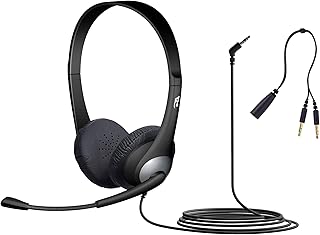
Best for: Buyers who want a wired stereo headset with a boom microphone rather than an adapter for an existing headset. The product name identifies it as a stereo headset with an ambidextrous boom mic, making it a relevant headset option for communication and everyday computer use.
It is included as a complete headset alternative to the standalone Y splitter. However, the available product information does not specify the AC-204’s connector type or whether its microphone and audio terminate in one plug or two. That distinction is essential for someone whose computer has separate headphone and microphone jacks.
Choose this if the boom-mic headset format suits your needs and you can verify the connector details before purchase. Limitation: Do not assume it has two separate 3.5 mm plugs based only on the product name. Check the listing and your computer’s port requirements to determine whether an adapter is needed.
Logitech H151 Wired Stereo Headphones

Best for: Calls and video conversations where an adjustable headset microphone and a 3.5 mm connection are useful. Logitech lists full stereo sound, a noise-cancelling boom microphone that rotates out of the way, and the option to wear the mic on either side. Its adjustable headband and foam ear cups support a personalized fit.
The H151 is a headset rather than a two-plug splitter. Its listed connection is one 3.5 mm audio jack, so it may not connect directly to a computer with separate headphone and mic sockets. The D & K splitter is a possible type of adapter to consider only if the headset’s plug configuration is compatible with that adapter; check the physical plug and device requirements first.
Choose this if you want a wired headset with a movable microphone for calls. Limitation: The product information describes one 3.5 mm jack, not two independent male plugs. It is therefore not a direct match for buyers who specifically need a headset supplied with two separate plugs.
HyperX Cloud III Wired Gaming Headset
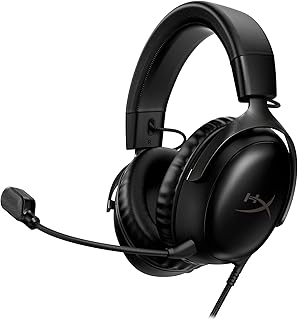
Best for: Gaming buyers who want a wired headset with several connection options. The listed features include 3.5 mm, USB-C, and USB-A connections, angled 53 mm drivers, spatial audio, memory foam, a durable frame, and a detachable-style 10 mm microphone described as ultra-clear in the product name.
Compared with a basic analog headset, this model offers USB connection options as well as 3.5 mm, which may suit buyers whose computer setup supports those ports. The included details do not identify the 3.5 mm connector as two separate plugs, so buyers should not treat it as a confirmed two-jack headset. A splitter is relevant only if the actual headset connection and device ports match.
Choose this if gaming features and USB/3.5 mm connection choices matter more than having confirmed dual plugs. Limitation: The listed connection information does not establish that it ships with two separate audio and microphone plugs.
Yealink UH34 Lite USB-A Headset

Best for: Buyers specifically seeking a wired USB-A headset with an in-line control and a noise-canceling microphone. The listed product name identifies those features, making it a useful comparison for people who do not need the traditional two-plug analog arrangement.
USB-A is a different connection approach from two separate 3.5 mm plugs. The headset connects through the USB-A port described in the product information, so a two-jack splitter is not the matching accessory for this connection. This can simplify the port choice if the intended computer has USB-A available, but the provided details do not specify further controls or headset fit features.
Choose this if you prefer a USB-A headset and want the listed noise-canceling mic and in-line controls. Limitation: It is not listed as a dual-3.5 mm headset and will not fill two separate analog audio ports using the connection information provided.
Buying Guide: How To Choose A Headset For Two Jacks
What does “headphones with mic two jacks” mean?
The phrase usually refers to a headset that separates headphone audio and microphone audio into two plugs. A desktop computer may have one port for headphone output and another for microphone input. A headset with two plugs can connect one plug to each port, provided the plug sizes and port functions match.
Some newer headsets instead use one 3.5 mm plug that carries both audio and microphone signals. A splitter adapter can separate that combined connection into two plugs for a computer with separate ports. The D & K adapter in this list is made for that type of conversion: one female headset socket and two male plugs.
Should you buy a headset or a splitter?
Buy a headset if you need both headphones and a microphone. Choose a splitter if you already own a compatible headset and only need to adapt its connection. The splitter does not improve sound or add a microphone; it only changes how a compatible headset connects to separate PC ports.
How can you check whether your computer needs two plugs?
Look at the computer’s available ports and the symbols beside them. Separate headphone and microphone ports typically require separate audio and mic connections. A single headset port may accept a combined plug instead. Consult the computer’s documentation if the port markings are unclear, and compare those requirements with the headset’s connector before buying an adapter.
What should you check before choosing an adapter?
- Headset plug: Determine whether your headset has one combined 3.5 mm plug or separate headphone and microphone plugs.
- Computer ports: Confirm whether the computer has separate audio and microphone jacks or a single combined headset port.
- Adapter direction: A headset-to-PC splitter should have a female socket for the headset and two male plugs for the computer ports.
- USB alternatives: USB-A and USB-C headsets use digital USB connections, not two analog 3.5 mm plugs.
- Product details: When a listing does not specify plug configuration, verify it rather than assuming the headset has two jacks.
Are USB headsets interchangeable with two-jack headsets?
They serve a similar purpose—providing headphone audio and a microphone—but connect differently. A USB headset plugs into a USB port, while a two-jack headset uses separate analog audio and microphone ports. A 3.5 mm Y splitter does not convert a USB headset to analog or turn a USB port into two audio jacks.
Frequently Asked Questions
Can I use a one-plug headset with a computer that has two jacks?
Often, a compatible headset-to-PC splitter can separate the combined 3.5 mm connection into headphone and microphone plugs. Check the headset plug and the computer ports to confirm that the adapter matches both.
Does a two-jack splitter include headphones or a microphone?
No. A splitter is an adapter. It connects a compatible headset to separate computer ports, but it does not provide the headset, headphones, or microphone.
Are two separate plugs better than one combined plug?
Neither arrangement is universally better. Two plugs connect directly to separate computer ports, while a combined plug can suit a single headset socket. The right format depends on the headset and the device’s available ports.
Can I connect a USB headset with a 3.5 mm splitter?
No. A 3.5 mm splitter is for compatible analog audio connections. It does not adapt USB-A or USB-C into separate headphone and microphone plugs.
Does the Logitech H151 come with two separate plugs?
The provided product details specify one 3.5 mm audio jack, not two separate plugs. Check the current product listing if a dual-plug connection is essential.