
The best choice depends on whether you need true multichannel 5.1 audio or a headset that creates a virtual surround effect. The Turtle Beach Z6A is the clearest match for multi-speaker 5.1 sound. The Corsair HS35 Surround v2 and HS55 Surround v2 suit gamers seeking software-based spatial audio, while the ATTACK SHARK L60 offers several connection modes. The Dytole is a TV-listening alternative, not a documented 5.1 gaming headset.
| Product | Best For | Audio And Connection Notes |
|---|---|---|
| Turtle Beach Ear Force Z6A | Multi-speaker 5.1 audio | Eight amplified speakers and independent channel controls |
| Corsair HS35 Surround v2 | Wired multiplatform gaming | Dolby Audio 7.1 through included USB adapter on PC and Mac |
| Corsair HS55 Surround v2 | Lightweight gaming and spatial audio | Dolby Atmos on PC; Tempest 3D AudioTech support on PS5 |
| ATTACK SHARK L60 | Wireless flexibility | 2.4G, Bluetooth, and wired modes; listing describes 5.1 and 3D audio |
| Dytole Wireless TV Headphones | TV dialogue and private listening | TV-focused wireless audio; 5.1 support is not specified |
Turtle Beach Ear Force Z6A

Best for: Buyers who specifically want a headset described with multi-speaker 5.1 hardware rather than relying only on a virtual surround mode. The listed features include eight amplified speakers, dual subwoofers, acoustically angled speakers, and a 5.1-channel amplifier.
Independent controls for all five audio channels give this model a distinctive advantage for listeners who want channel-level adjustment. Angled speakers are intended to support directional audio perception, which can help make positional cues easier to distinguish in compatible content.
Why it was selected: Among these options, the Z6A has the most explicit hardware description of 5.1-channel playback. It is the most direct match for a search focused on a 5.1 surround sound headset.
Limitation: The supplied product details do not state current platform compatibility or connection requirements. Check those before choosing it for a specific console or computer.
Corsair HS35 Surround v2
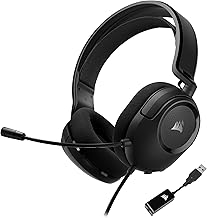
Best for: Gamers who want one wired headset for several devices and are comfortable using virtual surround audio. Corsair lists Dolby Audio 7.1 through the included USB adapter on PC and Mac, while a universal 3.5mm connection is listed for PC, Mac, consoles, mobile devices, and more.
Custom-tuned 50mm drivers are designed to reproduce a broad range of in-game sound, including footsteps and other cues. The flexible omnidirectional microphone supports in-game communication. The mix of USB-based surround and 3.5mm connectivity makes this a practical option for buyers who move between a computer and other devices.
Why it was selected: It combines a clearly identified virtual surround mode with broad wired connectivity. It is a better fit than a single-platform headset for buyers who want to use one model across several listed device types.
Limitation: Dolby Audio 7.1 is specified for PC and Mac with the USB adapter. The supplied details do not say that the same surround processing is available through the 3.5mm connection on every platform.
Corsair HS55 Surround v2

Best for: PC gamers who want Dolby Atmos spatial audio and a lightweight fit. The listing says the included USB adapter unlocks Dolby Atmos on PC. For PS5 players, it also specifies support for Tempest 3D AudioTech.
The HS55 weighs 246 grams, or just over half a pound, according to the product details. Adjustable leatherette memory foam ear cups and an adjustable headband are designed for extended listening. Its custom-tuned 50mm neodymium drivers are intended to cover a wide range of game audio.
Why it was selected: This is a useful alternative for buyers prioritizing a named spatial-audio format, low listed weight, and adjustable padding. It is better suited to someone comparing immersive audio modes than someone insisting on physical 5.1 speaker channels.
Limitation: The provided details identify Dolby Atmos on PC and Tempest 3D support on PS5, but do not establish that the headset provides true hardware-based 5.1 audio.
ATTACK SHARK L60 Wireless

Best for: Buyers who value wireless options and want a headset that can also connect by wire. The listed modes include 2.4G wireless, Bluetooth, and wired use. The product details state 20ms latency for 2.4G, along with a dual USB/Type-C receiver for a stable connection with compatible devices.
The L60 has 40mm drivers and a detachable noise-cancelling microphone. Its listed fit features include breathable fabric ear cushions, an adjustable headband, and a 230-gram weight. The listing describes 3D surround sound and includes 5.1 surround sound in the product name, but the supplied feature text also characterizes playback as high-fidelity stereo.
Why it was selected: It is a flexible choice for users switching among wireless, Bluetooth, and wired listening. The three connection modes distinguish it from the wired Corsair options.
Limitation: The provided details do not explain how 5.1 processing works or which connection modes support it. Choose this only after confirming the surround feature and device compatibility meet your needs.
Dytole Wireless TV Headphones

Best for: TV viewers who want private listening, adjustable volume, and clearer dialogue rather than a gaming headset with confirmed 5.1 surround. The listed features focus on vocal enhancement, individualized volume control, and a transmitting and charging dock.
Dytole advertises less than 40ms latency to reduce audio and picture sync issues, plus a wireless range of up to 100 feet. Its product details also list a 65-hour battery. These features may appeal to people who want to listen to TV without raising the room’s main volume or disturbing others.
Why it was selected: It covers a different buyer need within the broader headset search: watching TV comfortably and hearing dialogue at a personal volume. It is not a substitute for a headset whose specifications explicitly confirm 5.1-channel gaming audio.
Limitation: The supplied information does not specify 5.1 surround sound or gaming-platform support. Choose it for TV listening needs, not as a confirmed 5.1 gaming headset.
Buying Guide: How To Choose A 5.1 Surround Sound Headset
Do you need true 5.1 or virtual surround?
Start by distinguishing physical multichannel playback from software-based spatial audio. A headset advertised with 5.1, 7.1, Dolby Atmos, or 3D audio may use processing to create a sense of direction. Those labels do not automatically mean the headset contains five discrete speaker channels and a subwoofer. In this group, the Turtle Beach Z6A is described with eight amplified speakers and a 5.1-channel amplifier. The Corsair models list software or platform-based spatial audio instead.
Check the exact audio mode, supported device, and connection method in the product specifications. A surround feature may require a USB adapter or may be limited to a particular computer or console. If you need a specific format for a game, movie, or setup, confirm that the source device and headset both support it.
Which connection type fits your devices?
A 3.5mm plug is useful when you want a wired connection across devices that accept that connector. The HS35 lists universal 3.5mm connectivity and separately identifies USB-adapter surround for PC and Mac. Wireless headsets offer freedom from a cable, but the available modes can differ: the L60 lists 2.4G, Bluetooth, and wired connections. Confirm what each mode supports rather than assuming all features work in every mode.
For TV listening, check whether the headset includes a transmitter or dock and whether your television has a compatible audio output. The Dytole listing describes a transmitting and charging dock, but the supplied details do not list specific TV connections. Verify connection needs before purchase.
How important are weight and ear-cup materials?
Weight, padding, and adjustability matter when a headset will be worn for long sessions. The HS55 lists a 246-gram weight, memory foam ear cups, and an adjustable headband. The ATTACK SHARK L60 lists a 230-gram weight, breathable fabric earmuffs, and an adjustable headband. These specifications can help narrow choices, but comfort remains personal and depends on fit as well as materials.
For TV use, consider whether you need a personal volume setting or vocal enhancement. The Dytole feature list specifically emphasizes dialogue clarity and independent volume adjustment. Those priorities differ from gaming features such as a microphone, positional cues, and low-latency game audio.
What should you check before buying?
- Platform support: Match the product’s listed compatibility to your PC, Mac, console, phone, or TV.
- Surround format: Check whether the listing identifies physical 5.1 speakers, virtual surround processing, Dolby Atmos, or another mode.
- Connection requirements: Confirm whether surround audio requires a USB adapter, transmitter, or particular input.
- Microphone needs: For multiplayer gaming, compare whether a microphone is included and whether the listing describes it as flexible, detachable, or noise cancelling.
- Fit and listening duration: Compare the stated weight, ear-cup material, padding, and headband adjustment.
- Use case: Choose gaming-focused audio for communication and positional cues, or TV-focused headphones for dialogue and private listening.
Frequently Asked Questions
Is a 7.1 headset the same as a 5.1 headset?
No. The numbers refer to different channel formats, and a headset may simulate surround sound through software rather than use discrete physical channels. Check whether the listing describes virtual processing or multi-speaker hardware.
Which option here is described with physical 5.1 hardware?
The Turtle Beach Ear Force Z6A is listed with eight amplified speakers, dual subwoofers, and a 5.1-channel amplifier. Confirm its connection and compatibility requirements for your setup.
Does the Corsair HS35 provide surround sound on every connection?
The supplied details specify Dolby Audio 7.1 on PC and Mac with the included USB adapter. They do not confirm that this processing is available through its 3.5mm connection on every device.
Which headset is the lightest according to the provided specifications?
The ATTACK SHARK L60 is listed at 230 grams. The Corsair HS55 is listed at 246 grams. Weight alone does not determine comfort, so also compare ear-cup materials and adjustability.
Are the Dytole headphones a 5.1 gaming headset?
The supplied product details do not specify 5.1 surround or gaming-platform support. They focus on TV listening, dialogue clarity, personal volume control, and wireless range.
What should I verify for console surround sound?
Check the headset’s stated console compatibility, the console’s supported audio format, and whether any surround feature requires a USB adapter or other connection. Do not assume a PC surround mode also works on a console.