
The best conference speaker for a laptop depends on how many people need to be heard and whether you prefer USB, Bluetooth, or both. The EMEET M0 Plus is best suited to small groups that may need to expand; the Jabra Speak 510 is a portable USB and Bluetooth choice; and the AIRHUG offers USB-C plug-and-play connections. The Yealink SP92 highlights AI noise cancellation and listed call time, while the Anker PowerConf is designed for personal workspaces and has six microphones.
| Product | Best suited for | Key listed features |
|---|---|---|
| EMEET M0 Plus | Small groups with expansion needs | Four microphones, 360-degree pickup, daisy chain |
| Jabra Speak 510 | Portable laptop meetings | USB or Bluetooth, compatible with major meeting software |
| AIRHUG Conference Speaker | USB-C plug-and-play use | 360-degree pickup, noise reduction, echo cancellation |
| Yealink SP92 | Small rooms and longer calls | AI noise cancellation, up to 20-hour call time |
| Anker PowerConf | Personal workspaces | Six microphones, 360-degree pickup, up to 24-hour call time |
EMEET M0 Plus Conference Speaker

The EMEET M0 Plus is best for small laptop meetings where multiple people sit around one speakerphone. Its listed configuration includes four microphones with 360-degree voice pickup and noise reduction. The product description identifies use for groups of up to eight people and daisy chaining for up to 16, making expansion a key reason to consider it.
It supports USB-C and USB-A connections as well as Bluetooth. That combination is useful when a laptop connection or a wireless setup is preferred, though users should confirm that the available port and connection method suit their specific computer and meeting arrangement. The listing says it works with leading software but does not identify every application in the provided product details.
- Best for: Small teams that want broad voice pickup and the option to daisy chain.
- Why it stands out: It lists four microphones, 360-degree pickup, and multiple connection options.
- Limitation: Its listed group size is up to eight without the expanded daisy-chain setup; larger meetings may require additional equipment.
Jabra Speak 510 Portable Speakerphone

The Jabra Speak 510 is best for people who move between laptop locations and want a speakerphone that supports USB or Bluetooth. The product listing describes it as portable and identifies compatibility with Microsoft Teams, Google Meet, and Zoom. Those named platforms make it a straightforward option to compare if your regular calls use one of those services.
Its connection choice helps accommodate different meeting setups: USB can provide a direct wired route, while Bluetooth supports a wireless connection. The supplied information does not specify microphone count, battery call time, or voice-pickup range, so buyers who prioritize those measurements should compare the full product specifications before choosing.
- Best for: Laptop users who need a portable speakerphone for common video-meeting platforms.
- Why it stands out: It offers both USB and Bluetooth and names Teams, Meet, and Zoom compatibility.
- Limitation: The provided product details do not state battery duration or microphone configuration.
AIRHUG USB-C Conference Speaker

The AIRHUG Conference Speaker is best for laptop users seeking a USB-C speakerphone with a simple wired setup. Its listed features include USB-C plug-and-play connection, Bluetooth, 360-degree voice pickup, advanced noise reduction, and echo cancellation. It is identified as compatible with Zoom and Microsoft Teams.
Noise reduction and echo cancellation are relevant features for people joining calls from shared or acoustically challenging spaces, but the product details do not quantify their effect. The 360-degree pickup is intended to collect voices from around the unit, which can suit a small group rather than only one person speaking directly into a laptop microphone.
- Best for: Users who want USB-C and Bluetooth options with named Zoom and Teams compatibility.
- Why it stands out: It combines 360-degree pickup with listed noise-reduction and echo-cancellation features.
- Limitation: The supplied description does not provide a microphone count, group-size limit, or call-time figure.
Yealink SP92 Conference Speaker

The Yealink SP92 is best for laptop users who want a speakerphone described for small meeting rooms and longer calls. Its listing specifies AI noise cancellation, USB speakerphone functionality, Bluetooth, and up to 20 hours of call time. The product name also identifies it as Teams certified, which may matter to buyers whose meetings primarily use Microsoft Teams.
For a computer or laptop, the combination of USB and Bluetooth gives buyers two connection types to evaluate. The listed call-time figure can help people who expect extended meetings or prefer not to recharge between calls. It is a small-room-oriented choice, so buyers planning larger gatherings should check whether its pickup coverage fits their room and group.
- Best for: Small-room meetings and users who value the listed 20-hour call time.
- Why it stands out: It combines USB and Bluetooth with AI noise cancellation and a Teams-focused designation.
- Limitation: The product description targets small meeting rooms and does not provide a larger-room group-size specification.
Anker PowerConf Speakerphone
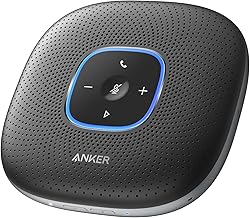
The Anker PowerConf is best for a personal workspace where a laptop user wants a speakerphone with multiple microphones and substantial listed call time. Its product details identify six microphones, 360-degree enhanced voice pickup, up to 24 hours of call time, Bluetooth 5.3, and USB-C. The description also calls it Zoom Certified and says it is compatible with leading platforms.
The six-microphone setup and 360-degree pickup are useful points of comparison for users who want more than a basic single-direction laptop microphone. USB-C and Bluetooth 5.3 provide wired and wireless connection choices. The listing positions this model for personal workspaces, so people buying for a larger conference room should verify that the intended coverage is sufficient.
- Best for: Individual remote workers who want multiple microphones and long listed call time.
- Why it stands out: It lists six microphones, 360-degree pickup, USB-C, and up to 24-hour call time.
- Limitation: Its stated positioning is for personal workspaces rather than a specified large-room group.
Buying Guide: How To Choose A Laptop Conference Speaker
A conference speakerphone combines a speaker and microphone so participants can hear meeting audio and speak through a shared device. The right choice depends on where the laptop is used, how many people need to participate, and how the device connects. Compare each model’s stated features against your meeting habits rather than assuming that a longer feature list guarantees better results in every room.
How many people will use the speakerphone?
For a one-person home office, a personal-workspace model such as the Anker PowerConf may be a better match than a device chosen for group expansion. For a small team around one table, compare the EMEET M0 Plus’s stated support for up to eight people and its daisy-chain option. The Yealink SP92 is described for small meeting rooms. Group-size descriptions are useful starting points, but room layout and seating distance also affect whether everyone can be heard.
Should you choose USB, Bluetooth, or both?
USB provides a direct connection to a laptop, while Bluetooth can reduce cable use when the computer supports the required wireless connection. Models in this list offer different combinations: the EMEET includes USB-C, USB-A, and Bluetooth; the Jabra offers USB or Bluetooth; and AIRHUG, Yealink, and Anker list USB-C and Bluetooth. Check your laptop’s ports and Bluetooth support before buying. If your computer lacks a matching port, confirm whether you have a suitable adapter rather than assuming one is included.
What does microphone count and 360-degree pickup tell you?
Microphone count is one specification to compare, not a standalone measure of call quality. The EMEET lists four microphones, and the Anker lists six. Several products describe 360-degree pickup, which indicates that their microphone design is intended to collect voices around the device. Consider where attendees sit and how far they are from the speakerphone. The provided product details do not give comparable pickup distances for these five models.
Do noise reduction and echo cancellation matter?
Noise reduction and echo cancellation are intended to address different distractions during calls. Noise reduction targets unwanted background sound, while echo cancellation is intended to reduce echo in the audio path. AIRHUG lists both features, and EMEET lists noise reduction; Yealink specifies AI noise cancellation. These labels do not establish how a device will perform in every room. If you work near other people or in a reflective space, compare the stated features and consider your room’s noise and acoustics.
How important is call time?
Call-time specifications matter most when you plan to use a speakerphone wirelessly for long meetings. Yealink lists up to 20 hours of call time, and Anker lists up to 24 hours. These figures are product claims, not a guarantee of identical runtime in every setup. The Jabra and AIRHUG details provided here do not state a call-time figure. If you expect to use Bluetooth for extended sessions, check the full product information for charging and battery details.
Which meeting software should you check?
Confirm that the speakerphone works with the service and computer setup you use. The Jabra listing names Microsoft Teams, Google Meet, and Zoom. AIRHUG names Zoom and Microsoft Teams, Yealink identifies Teams certification, and Anker describes Zoom certification and compatibility with leading platforms. EMEET says it works with leading software but does not name specific applications in the supplied details. Check the current product documentation for your operating system and preferred meeting app.
Frequently Asked Questions
Can I use a conference speaker with a laptop?
Yes. These products are described as speakerphones for computers or laptop meetings and offer USB, USB-C, USB-A, or Bluetooth connections, depending on the model. Check that your laptop supports the connection you plan to use.
Is a USB speakerphone better than a Bluetooth model?
Neither connection is best for every user. USB offers a direct wired connection, while Bluetooth provides a wireless option. Choose based on your laptop’s ports, your preference for cables, and the connection methods listed for the specific device.
Which option is designed for a small group?
The EMEET M0 Plus lists use for up to eight people and a daisy-chain option for up to 16. Yealink describes the SP92 for small meeting rooms. Check room layout and the complete product specifications before relying on a stated group size.
Which speakerphone lists the longest call time?
Among the products described here, Anker lists up to 24 hours of call time. Yealink lists up to 20 hours. The other supplied product details do not state a call-time figure.
Do all five products list noise control features?
No. EMEET lists noise reduction, AIRHUG lists advanced noise reduction and echo cancellation, and Yealink lists AI noise cancellation. The supplied descriptions for Jabra and Anker do not specify those features.