
The best USB microphone for video conferencing depends on your meeting setup: the TONOR G11 suits small or medium groups sharing a room, while the Logitech Blue Yeti is better for a single speaker who wants multiple pickup patterns. For a webcam with integrated audio, consider the EMEET C960 or NexiGo N60. The EMEET M0 Plus is the most complete choice here for room audio because it combines microphones with a speakerphone.
| Product | Best For | Key Feature |
|---|---|---|
| TONOR G11 | Small and medium in-person meetings | 360-degree pickup with an 11.5-foot pickup distance |
| NexiGo N60 | Video calls needing a webcam and mic | 1080p video and built-in noise-canceling microphone |
| EMEET C960 | Video calls with a privacy cover | 1080p webcam and two omnidirectional microphones |
| EMEET M0 Plus | Shared-room conference calls | Four microphones and an integrated speaker |
| Logitech Blue Yeti | Solo calls, streaming, and recording | Four selectable pickup patterns |
TONOR G11 Conference Microphone

The TONOR G11 is a USB condenser microphone designed for conference calls, rather than a speakerphone. Its omnidirectional pickup pattern captures voices from 360 degrees, and the listed pickup distance is 11.5 feet. This makes it a practical option when several people are seated around one table and need to speak toward a shared microphone.
Best for: Small or medium meetings in a shared room, including remote training, seminars, business negotiations, and video chats. It is selected for its conference-oriented design and broad pickup, which can reduce the need for each participant to lean toward an individual mic.
The microphone is listed as plug and play on Windows and macOS, with no driver installation required. If the computer does not recognize it automatically, the manufacturer’s instructions say to select it as the computer’s input device.
Limitation: The G11 is a microphone, not a speaker or speakerphone. It captures audio but does not play remote participants’ voices through a built-in speaker.
NexiGo N60 Webcam With Microphone

The NexiGo N60 combines a 1080p webcam with a built-in noise-canceling microphone. Its camera supports video up to 1920 by 1080 at 30 frames per second. The microphone is designed to reduce ambient noise, making this an all-in-one option for video meetings, calls, online school, and streaming.
Best for: People who need both a webcam and a microphone in one USB device. It is selected for combining video and audio functions, as well as broad stated operating-system compatibility that includes Windows, macOS, Android, Linux, and Chrome OS.
The N60 works with USB 2.0 or 3.0 and does not require additional drivers according to the product details. Its lens is optimized for fixed distances from 19.6 inches to 13 feet, which is useful to consider when positioning the camera.
Limitation: This is a webcam microphone, not a dedicated tabletop conference mic. The listing also says it is not compatible with Xbox, PS4, or PS5.
EMEET C960 1080p Webcam

The EMEET C960 is a 1080p webcam with two built-in omnidirectional microphones and a privacy cover. Its video uses a fixed-focus lens, and the listed focus range is 11.8 to 118.1 inches. Automatic exposure and color adjustment are intended to support stable image performance, while the five-layer anti-glare lens is designed to reduce glare.
Best for: A home-office user who wants a video camera, integrated microphone, and physical privacy cover in one device. It is selected for its dual-microphone setup and the option to cover the camera when it is not in use.
To use the C960’s microphone, select EMEET C960 as the input device in the computer and video-call application, and make sure microphone permissions are enabled. The product information notes that lighting affects image quality, so a well-lit room is preferable.
Limitation: The C960 does not include built-in speakers. It captures audio, but users need a separate way to hear other meeting participants.
EMEET M0 Plus Conference Speakerphone

The EMEET M0 Plus combines four microphones with a 3-watt speaker, so it can capture room voices and play remote participants’ audio. Its microphone array provides 360-degree voice pickup. The product details also describe background-noise filtering, echo reduction, and full-duplex audio, which allows participants to speak and hear one another more naturally during a call.
Best for: Shared-room meetings where people need both an input microphone and an output speaker. It is selected because the integrated speakerphone design addresses both sides of conferencing, unlike standalone microphones and webcam microphones.
For larger rooms, the product listing says two compatible EMEET speakerphones can be linked through daisy chaining to extend the conferencing space, supporting up to 16 attendees. Check device and setup requirements before relying on this arrangement.
Limitation: This is a speakerphone rather than a basic microphone-only device. Choose a standalone USB mic if you do not need an integrated speaker or room-call setup.
Logitech Blue Yeti USB Microphone
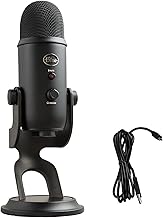
The Logitech Blue Yeti is a USB condenser microphone with a three-capsule array and four pickup patterns: cardioid, omnidirectional, bidirectional, and stereo. Its listed uses include video calls, podcasting, streaming, gaming, and recording. Blue VO!CE software offers vocal effects and audio samples for supported creative workflows.
Best for: A solo meeting participant who also wants a microphone for podcasts, streams, or recordings. It is selected for its adjustable pickup patterns, which make it more adaptable than a microphone with only one stated pattern.
For a typical one-person video call, a user can choose a pickup mode suited to the voice and room setup. The other listed modes provide flexibility for recording more than one direction or a wider stereo image.
Limitation: The listing describes a standalone microphone, not an integrated webcam or speakerphone. Its range of patterns may be unnecessary for someone who only wants a simple shared-room conference mic.
Buying Guide: How to Choose a USB Microphone for Video Conferencing
A suitable microphone depends on who needs to speak, how far they sit from the device, and whether the setup also needs a camera or speaker. Start by deciding whether the microphone will serve one person at a desk or several people around a meeting table. Then check connection and input-selection requirements for the computer and video-call software.
Is a standalone microphone or webcam microphone better?
A standalone microphone focuses on audio capture. The TONOR G11 is built for shared conference use, while the Blue Yeti offers four pickup patterns for more varied use. A webcam microphone combines audio capture with a camera, which can simplify a desk setup. The NexiGo N60 and EMEET C960 are options when video is also needed.
Integrated webcam microphones save space, but their placement is tied to the camera. A separate tabletop microphone can be positioned closer to meeting participants. Consider which arrangement fits the room, rather than assuming that one type is best for every call.
How many people need to be heard?
For a single speaker, a desktop microphone such as the Blue Yeti may be a practical fit. For several people in a small or medium room, an omnidirectional device is designed to pick up voices from different directions. The TONOR G11 lists 360-degree pickup and an 11.5-foot pickup distance; the EMEET M0 Plus has four microphones and 360-degree pickup.
Pickup specifications do not guarantee identical results in every room. Distance, room noise, speaker position, and application settings can all affect call audio. For larger meetings, check the product’s stated expansion options and evaluate whether the setup suits the room layout.
Do you need a speaker as well as a microphone?
A microphone sends your voice to the meeting. It does not necessarily play incoming audio. The TONOR G11 and EMEET C960 are not speakerphones, and the C960 listing specifically says it has no built-in speakers. The EMEET M0 Plus combines microphones with a speaker, making it the clearest choice in this group when a shared room needs both functions.
What does pickup pattern mean for meetings?
A pickup pattern describes the directions from which a microphone is designed to capture sound. Omnidirectional pickup is intended to receive voices from around the device, which can suit a group seated around a table. Cardioid pickup is one of the Blue Yeti’s available patterns; the product listing also includes bidirectional and stereo modes.
Choose a pattern based on the number and position of speakers. For one person at a desk, a directional mode may help focus on the speaker. For people seated around a shared device, omnidirectional pickup may be more suitable. The right choice still depends on microphone placement and room conditions.
Which connection and setup details should you check?
Confirm the computer has a suitable USB port and that the operating system is listed as compatible. The TONOR G11 is listed for Windows and macOS, while the NexiGo N60 lists compatibility with additional systems. Product details may distinguish between devices that need drivers and those described as plug and play.
After connecting a microphone, select it as the input device in both the computer’s sound settings and the meeting application. If a webcam has a built-in microphone, ensure the application is using the intended mic rather than another available input. Also check that microphone permissions are enabled.
What room conditions affect call quality?
Microphone choice is only one part of clear conferencing. Position the device where speakers can be heard, reduce nearby noise when possible, and avoid placing it too far from participants. Webcam image quality also depends on lighting: the EMEET C960 product details recommend normal or well-lit environments for optimal video.
For a shared room, consider whether participants can hear remote voices clearly. A standalone mic may need a separate speaker or headphones. A speakerphone combines these functions, but room size and seating still matter. A product feature is a guide to fit, not a guarantee of performance in every environment.
Frequently Asked Questions
What is the best USB microphone for a conference room?
The EMEET M0 Plus is the most complete room-conferencing option in this selection because it combines four microphones with a speaker. The TONOR G11 is a microphone-only alternative for small or medium meetings that already have a way to play incoming audio.
Can I use a webcam microphone for Zoom or Teams?
The NexiGo N60 and EMEET C960 are listed for video conferencing and include microphones. Select the webcam microphone as the input device in the computer and meeting application, and confirm that microphone permissions are enabled.
Does a USB microphone include a speaker?
Not necessarily. The TONOR G11 is a microphone, not a speakerphone, and the EMEET C960 does not include built-in speakers. The EMEET M0 Plus is a speakerphone with both microphones and a speaker.
Is an omnidirectional microphone suitable for a group call?
It can be suitable when several participants sit around one device because it is designed to capture sound from multiple directions. The TONOR G11 and EMEET M0 Plus list 360-degree pickup. Room noise and participant distance can still affect the result.
Why is my USB microphone not being used in a meeting?
Check the computer’s sound settings and the meeting application’s audio settings. Select the intended microphone as the input device and verify that the application has microphone permission. If a webcam and separate microphone are both connected, confirm that the correct one is selected.