
A powered subwoofer can add dedicated low bass to computer audio, while a 2.1 speaker system bundles a subwoofer with desktop speakers. The Edifier T5s is best for buyers who already have compatible speakers and want adjustable bass; Logitech Z313 and Cyber Acoustics CA-3090 are complete desktop systems. Mackie ThumpSub GO is a portable, battery-powered option, while OHAYO is a compact 2.0 speaker alternative rather than a subwoofer system.
| Product | Best For | Type |
|---|---|---|
| Edifier T5s | Adding adjustable bass to an existing audio setup | Powered subwoofer |
| Logitech Z313 | A simple desktop 2.1 system | Speakers with subwoofer |
| Cyber Acoustics CA-3090 | Basic 2.1 computer audio with bass control | Speakers with subwoofer |
| Mackie ThumpSub GO | Portable bass for compatible audio setups | Battery-powered subwoofer |
| OHAYO Computer Speakers | Compact stereo sound without a separate subwoofer | 2.0 speakers |
Edifier T5s Powered Subwoofer

The Edifier T5s is a standalone powered subwoofer for buyers who already have speakers and want to add a dedicated low-frequency component. Its listed specifications include an 8-inch long-throw woofer, 70 watts RMS, and bass response down to 35 Hz. That makes it the clearest match in this selection for someone searching specifically for a powered subwoofer rather than a complete speaker kit.
- Best for: Desktop or home audio users seeking adjustable bass alongside a separate speaker setup.
- Useful controls: A 30–160 Hz low-pass filter and a 0°/180° phase selector allow adjustment for the connected setup.
- Design: The compact cabinet has a front-firing driver, a right-firing acoustic port, and an 18 mm MDF enclosure.
Choose this model if control over crossover and phase is important. The product information describes it for home audio and home theater, so buyers should confirm that their existing speakers and audio source provide a suitable way to integrate a separate subwoofer. It is not a complete computer speaker system and does not include desktop satellites in the listed features.
Logitech Z313 2.1 Speaker System

The Logitech Z313 is a complete 2.1 multimedia system, combining stereo speakers with a compact subwoofer. Its listed output is 25 watts RMS, and a control pod provides a convenient way to operate the system. This format suits buyers who want speakers and a subwoofer together rather than a separate powered subwoofer to add to equipment they already own.
- Best for: Computer users who want a compact, all-in-one 2.1 speaker package.
- Convenience: The control pod is a dedicated feature for system control.
- Low-frequency component: The system includes a compact subwoofer.
Choose the Z313 over the Edifier T5s if you need a set of speakers as well as a subwoofer. The supplied product details do not specify the subwoofer’s driver size, frequency range, or connection types, so check the listing for the exact setup requirements before purchase. Its stated 25-watt RMS output is a system figure; the supplied information does not break it down by speaker.
Cyber Acoustics CA-3090 2.1 Speakers

The Cyber Acoustics CA-3090 is a desktop-oriented 2.1 package with two satellite speakers and a ported subwoofer. It is listed at 9 watts RMS and 18 watts peak. The subwoofer uses a four-inch, side-firing poly-carbon driver, and the satellites have two-inch drivers. Those details help buyers compare its compact components with systems that do not disclose driver sizes.
- Best for: Buyers looking for a basic computer speaker system with separate bass adjustment.
- Controls: The control pod adjusts overall volume and turns the speakers on or off; bass volume is adjusted on the subwoofer.
- Design: The product is described as having flat-panel stereo speakers and a subwoofer.
Choose the CA-3090 if separate bass control is a priority and a modestly specified 2.1 system meets your needs. Its stated output is lower than the Logitech system’s 25-watt RMS rating, although the two products’ listings do not provide enough detail for a complete performance comparison. The listed 18 watts is peak output, not RMS output.
Mackie ThumpSub GO Portable Subwoofer

The Mackie ThumpSub GO is a portable, battery-powered subwoofer intended for use away from a fixed power outlet. The product description highlights an 8-inch format, 400-watt rating, a carry handle, and the ability to place the cabinet horizontally or vertically. Its emphasis is portability and pairing with Thump GO for full-range sound off the grid, rather than a typical plug-in desktop setup.
- Best for: Users who need portable bass for a compatible audio setup beyond a desk.
- Battery feature: Two hot-swappable battery compartments support up to 12 hours of continuous operation when using two batteries. One GB-200 battery is included and is listed for up to six hours; the second battery is sold separately.
- Placement: The cabinet can be used horizontally or vertically and has an ergonomic handle.
Choose this model when mobility and battery operation matter more than a conventional computer-speaker format. Its description specifically refers to pairing with Thump GO; the supplied details do not establish computer connections or desktop compatibility. Avoid treating the listed 400-watt rating as a direct comparison with the RMS ratings given for the other systems.
OHAYO Compact Computer Speakers
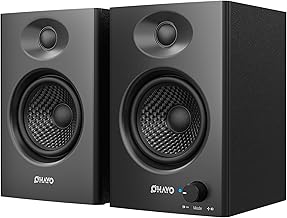
The OHAYO system is listed as a pair of 2.0 computer speakers, not as a powered subwoofer or 2.1 system. It is included as a relevant alternative for shoppers who want compact desktop audio but do not need a separate bass cabinet. The listed drivers are a 0.75-inch carbon-fiber silk-dome tweeter and a three-inch carbon-fiber full-range driver, with a rear bass port.
- Best for: Buyers who prioritize a compact stereo pair for a desktop, home office, or gaming station.
- Listed features: Bluetooth 5.3, a front-panel volume knob, an MDF enclosure, and an integrated independent sound card are stated in the product details.
- Output description: The listing describes 30 watts by two and also refers to 60 watts of computer-speaker output.
Choose the OHAYO if you want a compact 2.0 option with stereo speakers and do not require a dedicated subwoofer. The listing title and features do not describe a separate subwoofer, so buyers specifically seeking a powered subwoofer should select a different product. Its rear port is described as adding low-end depth, but that is not the same as including a subwoofer.
Buying Guide: How To Choose A Computer Subwoofer
Start by deciding whether you need only a subwoofer or an entire speaker system. A powered subwoofer such as the Edifier T5s is designed to add bass to an existing setup. A 2.1 system such as the Logitech Z313 or Cyber Acoustics CA-3090 includes both stereo speakers and a subwoofer, which can simplify a first desktop audio purchase.
Do You Need A Standalone Subwoofer Or A 2.1 System?
Choose a standalone powered subwoofer if you already own speakers and want to add low-frequency output. Before buying, verify how your speakers or audio source connect to a subwoofer. A subwoofer’s controls do not guarantee that it will connect directly to every computer or speaker system.
Choose a 2.1 system if you need a matched set of satellites and a subwoofer. These systems reduce the need to choose separate components, but their specifications may offer less detail about individual drivers and adjustment options. The Logitech and Cyber Acoustics models are complete 2.1 options in this selection.
Which Specifications Matter Most?
For a standalone subwoofer, look for driver size, RMS output, frequency response, and adjustment controls. The Edifier T5s lists an 8-inch woofer, 70 watts RMS, a 35 Hz low-frequency figure, and adjustable low-pass and phase controls. These are useful comparison points, but they do not by themselves determine how a subwoofer will sound in a specific room or with particular speakers.
For a complete system, distinguish RMS output from peak output. Cyber Acoustics lists 9 watts RMS and 18 watts peak, while Logitech lists 25 watts RMS. Those figures use different measures, so compare RMS with RMS rather than treating a peak rating as equivalent. Also consider whether the product lists separate bass controls, as the CA-3090 does.
How Much Space And Mobility Do You Need?
Measure the desk area and floor space before choosing a subwoofer. A separate cabinet takes up space apart from the satellites, while a compact system may be easier to place in a small work area. Cabinet orientation and port direction can affect placement choices; the T5s has a front-firing driver and right-firing port, while the Mackie can be positioned horizontally or vertically.
For a stationary computer, battery operation may not be necessary. The Mackie ThumpSub GO is better suited to portable use, and its listed battery life depends on the battery configuration. One battery is included for up to six hours; the stated up-to-12-hour figure requires a second, separately sold battery.
What Should You Check Before Connecting It?
Check the computer’s available audio outputs and the input or connection requirements for the speaker system. The supplied descriptions do not list connection details for every product, so confirm them in the product listing before ordering. For a standalone subwoofer, also check how its signal will reach the subwoofer and how the existing speakers will be connected.
Do not assume that a product labeled “computer speakers” includes a subwoofer. The OHAYO listing describes a 2.0 pair with a rear bass port, not a separate bass cabinet. A port can contribute to a speaker’s low-frequency output, but buyers seeking a dedicated subwoofer should look for an explicit 2.1 or powered-subwoofer description.
How Should You Compare The Options?
- For adjustable bass with existing speakers: Consider the Edifier T5s, and verify integration requirements.
- For an all-in-one desktop package: Compare the Logitech Z313 and Cyber Acoustics CA-3090 by controls, listed output, and disclosed driver details.
- For portable battery-powered bass: Consider the Mackie ThumpSub GO, keeping its stated pairing purpose and battery configuration in mind.
- For stereo speakers without a separate subwoofer: Consider the OHAYO 2.0 pair rather than expecting a 2.1 system.
Frequently Asked Questions
What Is A Powered Subwoofer?
A powered subwoofer is a subwoofer with its own amplification. It is generally purchased to add low-frequency sound to a separate speaker setup. Check the specific model’s connection requirements to confirm it can integrate with your computer audio equipment.
Is A 2.1 Computer Speaker System The Same As A Subwoofer?
No. A 2.1 system includes two stereo speakers and a subwoofer. A standalone powered subwoofer is a separate component and does not, by itself, provide the two main speakers.
Can I Use The Edifier T5s With Any Computer Speakers?
The listed features describe integration with home stereo or active speaker setups, but do not confirm compatibility with every computer speaker system. Check the connection options for both the subwoofer and your speakers before buying.
Does The OHAYO Speaker Pair Include A Subwoofer?
The OHAYO product is listed as a 2.0 stereo speaker pair. Its rear bass port is described as supporting low-end depth, but the supplied product details do not list a separate subwoofer.
What Does RMS Output Tell Me?
RMS output is a power specification used to describe sustained output, while peak output refers to a higher short-term figure. Compare RMS ratings with other RMS ratings and peak ratings with other peak ratings; the two measures are not interchangeable.
Is A Battery-Powered Subwoofer Suitable For A Desk?
It can be considered if the setup and connections suit your needs, but battery-powered models are particularly useful where portability or operation away from an outlet matters. The Mackie ThumpSub GO is described for portable use and pairing with Thump GO, so confirm its computer connection requirements before choosing it for a desk.