
The best HDMI-to-digital-optical converter depends on where the audio starts: use an HDMI audio extractor for a streaming device or game console, or an HDMI ARC/eARC converter when sending sound from a compatible TV to an optical audio system. The ATLAHET extractor is best for newer high-resolution HDMI sources, while the VPFET is a simpler option for basic 4K setups. For TVs without optical output, consider an ARC/eARC model—but check its setup and audio-format requirements first.
| Product | Best For | Key Distinction |
|---|---|---|
| ATLAHET 8K HDMI Audio Extractor | Newer HDMI sources | 8K/60Hz and multiple audio outputs |
| VPFET HDMI Audio Extractor | Basic source-to-audio conversion | 4K/30Hz, optical and 3.5mm |
| 192KHz eARC/ARC Converter | ARC/eARC-equipped TVs | Optical and coaxial output, CEC volume control |
| TUOLNK HDMI/Optical Adapter | Buyers considering an ARC/optical link | 192kHz support stated in the product name |
| HDMI eARC to Optical Converter | TV-to-soundbar connections | ARC/eARC conversion indicated by the product name |
ATLAHET 8K HDMI Audio Extractor

Best for: People who need to extract audio from a modern HDMI source while passing high-resolution video to a display. Its listed HDMI 2.1 specifications include support for 8K at 60Hz and 4K at 120Hz, plus backward compatibility with lower resolutions.
This model can send extracted audio to optical, coaxial, left/right analog, or 3.5mm outputs. Optical and coaxial support DTS 5.1, while the analog outputs support PCM 2.0. EDID controls offer eight modes, including automatic matching and fixed configurations, which can help when source and display audio settings do not agree.
Why it was selected: It offers the broadest listed range of video pass-through and audio-output choices among these products. It is a better fit for a home theater or gaming setup than an ARC-only converter when the audio source is a separate HDMI device.
- Check before buying: The listing says the source’s audio output should be set to PCM.
- Limitation: It does not support 7.1-channel audio. The listing also warns that HDMI cables over 2 meters can cause signal instability.
VPFET HDMI Audio Extractor
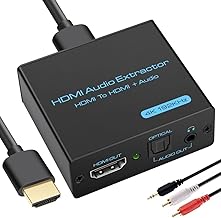
Best for: Buyers connecting a separate HDMI source to an optical receiver or a 3.5mm stereo device in a straightforward setup. The listed outputs and three audio modes make it possible to choose between stereo, 5.1-channel, and pass-through operation.
The VPFET extracts audio from an HDMI signal and sends it over optical or 3.5mm. Its HDMI 1.4 specification supports up to 4K at 30Hz and HDCP 1.4. The listing assigns 5.1-channel audio to optical and PCM 2.0 to 3.5mm. It also describes a pass mode for troubleshooting when the other modes do not produce an audio or video signal.
Why it was selected: Its stated connections and mode choices cover common basic conversion needs without requiring an ARC/eARC TV connection. Choose it if your source device connects to the converter by HDMI and your audio system accepts optical or analog stereo.
- Limitation: It does not support ARC or eARC, and the listing says a TV should not be used as the input source.
- Check before buying: The listing notes that some named streaming and game devices are limited to 1080p with this product, despite the stated 4K/30Hz capability.
192KHz eARC/ARC Optical Converter

Best for: A TV with an HDMI ARC or eARC port that needs to send sound to an optical- or coaxial-input soundbar, amplifier, or active speaker. The product is designed to convert the TV’s ARC/eARC audio channel rather than extract audio from an ordinary HDMI source input.
Listed features include 24-bit/192kHz sampling support, CEC volume control, and support for PCM 2.0, Dolby 5.1, and DTS 5.1. The included 5-foot cable is identified in the product name. Its setup instructions say to enable CEC, select the ARC device as the TV’s audio output, and choose a supported audio format.
Why it was selected: It is the clearest match for someone whose TV lacks a separate optical or coaxial output but has an ARC/eARC connection. The dual digital outputs provide a choice between optical and coaxial inputs on the receiving audio equipment.
- Limitation: It requires an ARC/eARC connection and TV settings configured for ARC. It is not the right type of converter for a game console connected directly as the HDMI source.
- Check before buying: Confirm the TV has an ARC/eARC-labeled HDMI port and that the sound system has a compatible digital input.
TUOLNK HDMI And Optical Adapter

Best for: Buyers looking for a 192kHz optical/HDMI ARC connection for a TV and soundbar, receiver, or speaker setup. The product name describes it as an optical-to-HDMI ARC converter and also identifies a 6.6-foot cable, so it may suit a connection where cable reach matters.
The listing’s name states 192kHz support and describes the device as a no-lag optical-to-HDMI ARC cable for audio equipment. However, the supplied product information does not provide detailed specifications for supported audio formats, exact port direction, or setup steps. Those details are important because ARC conversion and HDMI-source audio extraction are different functions.
Why it was selected: Its title directly targets optical and HDMI ARC audio connections, making it relevant to buyers comparing TV-to-sound-system options. It is a candidate to investigate when an ARC connection is part of the intended setup.
- Limitation: The available feature information is limited, so supported formats and connection direction cannot be confirmed from the supplied details alone.
- Check before buying: Verify the manufacturer’s port diagram and confirm whether the device sends audio from the TV’s ARC port to optical or performs the reverse conversion.
HDMI eARC To Optical Audio Converter

Best for: Buyers searching for a direct TV-to-soundbar or TV-to-amplifier ARC/eARC converter. The product name identifies HDMI eARC/ARC as the input connection and optical audio as the intended output connection.
Its stated product description names use with a TV, soundbar, amplifier, or speaker. The supplied information does not specify audio formats, sample rates, cable length, volume-control support, or detailed setup requirements. Compare those details with the connected TV and audio system before choosing it over a model with clearly listed format support.
Why it was selected: It is directly relevant to a TV that needs to route ARC/eARC audio to an optical-input audio device. This type of adapter can address a different problem from an HDMI extractor, which takes audio from a separate source such as a console or streaming device.
- Limitation: The available feature details are sparse, so compatibility with particular formats or control functions should not be assumed.
- Check before buying: Confirm the TV supports ARC/eARC on the port you plan to use and check the product’s instructions for supported audio formats.
Buying Guide: How To Choose An HDMI-To-Optical Converter
Does the audio come from a TV or a separate HDMI device?
This is the most important choice. An HDMI audio extractor receives an HDMI signal from a source device, separates the audio, and passes video onward to a display. This is typically the relevant category for a game console, disc player, or streaming device connected to a TV. An ARC/eARC converter instead uses the TV’s audio-return channel to send sound from the TV to another audio device.
Do not assume that a product labeled “HDMI to optical” supports both directions. Check the port labels and connection diagram. A standard HDMI input on an extractor is not the same as an ARC/eARC input, and an optical-to-HDMI converter may perform the reverse conversion from the one you need.
Which connections are available on the TV and sound system?
Check both devices before selecting a converter. A TV-to-soundbar ARC setup needs an HDMI port labeled ARC or eARC on the TV. The audio system needs the corresponding input supported by the converter, such as optical or coaxial. For a source-device extractor, confirm that the source can connect to the extractor over HDMI and that the receiver or soundbar accepts the chosen audio output.
Also consider the physical cable run. The listed models include different cable descriptions, and the ATLAHET listing specifically cautions against HDMI cables longer than 2 meters because of possible signal instability. Allow enough space for the converter and its connections without exceeding stated limits.
What audio format and channel count do you need?
Match the converter’s supported formats to the audio source and playback equipment. The ATLAHET listing specifies DTS 5.1 over optical and coaxial, but says it does not support 7.1-channel audio. The VPFET listing specifies optical DTS 5.1 and PCM 2.0 over 3.5mm. The 192kHz ARC model lists PCM 2.0, Dolby 5.1, and DTS 5.1.
When a product’s format information is missing, do not infer support from “digital,” “optical,” or a sample-rate figure alone. Check the product documentation and audio-device settings. In some setups, changing the source or TV output to PCM is necessary; other systems may need a compatible Dolby or DTS setting.
Do video resolution and refresh rate matter?
For a source-to-display extractor, check video pass-through specifications as well as audio outputs. The ATLAHET product lists HDMI 2.1, 8K at 60Hz, and 4K at 120Hz. The VPFET lists HDMI 1.4 and up to 4K at 30Hz, with additional limitations stated for some source devices. A converter that handles audio correctly may still restrict the video signal, so compare its specifications with the source and display.
ARC/eARC converters serve a different role: they route TV audio rather than necessarily passing a separate source’s video through the device. Prioritize the TV’s ARC/eARC support and audio-format compatibility for that use case.
When are EDID controls or setup modes useful?
EDID settings help a source, converter, and display agree on supported audio and video modes. The ATLAHET extractor lists automatic and fixed EDID options, which may help when a signal or audio mode is not negotiated as expected. The VPFET offers 2.0-channel, 5.1-channel, and pass modes, with instructions for choosing a mode based on output type.
For ARC/eARC products, follow the TV setup instructions. These can include enabling CEC, selecting the ARC device as the audio output, and choosing an audio format supported by both ends. A converter cannot resolve every mismatch if the TV or receiver is set to an incompatible mode.
Frequently Asked Questions
Can an HDMI-to-optical converter connect a TV to an optical soundbar?
Yes, if the converter is designed for TV ARC/eARC audio and the TV has a compatible ARC/eARC port. A standard HDMI audio extractor generally takes audio from an HDMI source device instead and may not accept the TV as its input.
Is HDMI ARC the same as a regular HDMI input?
No. ARC is an audio-return feature on a designated HDMI port. A regular HDMI input on an audio extractor receives audio and video from a source device; it does not automatically receive audio returned by a TV.
Does optical audio carry 7.1-channel sound?
Do not assume it does. Support depends on the converter, audio format, and connected equipment. The listed ATLAHET extractor explicitly does not support 7.1-channel audio, and the VPFET also states that it does not support 7.1 channels.
Why is there no sound after connecting the converter?
Check the input and output directions, select the correct TV or source output, and confirm that the audio format is supported. For ARC models, enable ARC and CEC if required by the instructions. For an extractor, select the appropriate channel mode and confirm that the HDMI source is connected to the converter’s input.
Should I choose an optical or coaxial output?
Choose the connection that matches the receiving soundbar, receiver, or amplifier. Optical and coaxial are both digital audio connections, but the equipment must have the corresponding input. If only one type is available on the audio system, that determines the practical choice.