
The best portable player for a car depends on what you want to play: choose a portable DVD player for movies, a CD player for music discs, or a portable CarPlay screen for smartphone navigation and audio. The DBPOWER and SUNPIN DVD players are suited to road-trip viewing, while the Coby is a compact choice for CD playback. PASLDA and FUNAURORE are better for drivers seeking a touchscreen interface with Apple CarPlay and Android Auto.
| Product | Best For | Primary Playback or Feature |
|---|---|---|
| DBPOWER 11.5-inch Portable DVD Player | Movies and multiple media formats | DVDs, CDs, USB, and SD cards |
| SUNPIN 11.5-inch Portable DVD Player | Flexible viewing for passengers | DVDs and private listening |
| Coby Portable CD Player | Music and audiobook discs | CD, CD-R, CD-RW, and MP3 discs |
| PASLDA 7-inch CarPlay Screen | Smartphone navigation and audio | Wireless or wired CarPlay and Android Auto |
| FUNAURORE 7-inch CarPlay Screen | Portable touchscreen upgrade | Wireless CarPlay and Android Auto |
DBPOWER 11.5-Inch Portable DVD Player
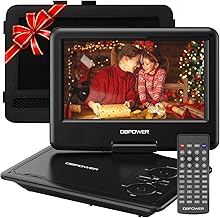
Best for: Families and passengers who want a portable movie player with several media options. The listing specifies a 9-inch screen that swivels 270 degrees and flips 180 degrees, plus a headrest-mounting option for in-car viewing.
The built-in 2,500 mAh battery is listed for up to five hours of video playback. The player also includes a car charger and AC adapter, so it can be powered in more than one setting. Supported media listed includes DVDs, CDs, USB drives, and SD cards up to 32GB, as well as several audio, image, and video formats.
Why it was selected: It combines a swivel screen, stated battery runtime, car power, and broad disc and file support in one option. It is a better fit for passengers watching movies than for drivers seeking navigation or a modern smartphone interface.
Limitation: The listing says it does not play Blu-ray discs. Check the supported formats and media capacity before buying for a particular collection.
SUNPIN 11.5-Inch Portable DVD Player

Best for: Passengers who want a larger swivel display and the option to listen privately. The product listing describes an 11.5-inch portable DVD player with a screen that rotates 270 degrees and folds 180 degrees, which can help accommodate different viewing positions.
The player is described as suitable for car use and as mountable to a headrest. Its battery is listed for up to five hours of playback. Stereo speakers and a headphone jack provide a choice between shared audio and private listening, making it relevant for children or adults on trips.
Why it was selected: It focuses on portable movie viewing, with a swivel screen, headrest mounting, and a headphone connection. Choose it if passenger entertainment is the main goal and private listening is useful.
Limitation: The supplied product details do not specify support for USB or SD-card playback, so do not assume it can play files from those sources. Confirm disc and format support for your intended media.
Coby Portable CD Player

Best for: Drivers or passengers who want to play audio CDs, MP3 discs, or audiobooks on disc rather than watch video. The Coby supports CD, CD-R, CD-RW, and MP3 discs, and includes stereo earbuds according to its listing.
Its listed 60-second anti-skip protection is intended to help maintain playback during movement. Power options include two AA batteries or a USB power cable, giving users a choice between battery operation and a USB power source. Simple buttons and a clear LCD are also listed features.
Why it was selected: It is the most directly focused option here for portable disc-based audio. Choose it if you already have CDs or MP3 discs and do not need a video screen or smartphone functions.
Limitation: The listing describes USB power, but does not establish how the player connects to a vehicle’s sound system. Check the included connection options and your car’s audio inputs before expecting playback through the car speakers.
PASLDA 7-Inch Portable CarPlay Screen

Best for: Drivers who want smartphone-based maps, calls, messages, and music on a separate touchscreen. The listing says the 7-inch screen supports both wireless and wired Apple CarPlay and Android Auto, with voice-assistant control.
For installation, the product includes a rotatable suction-cup mount and a self-adhesive bracket. Its stated operating voltage is DC 12V to 24V, and the listing identifies cars, RVs, trucks, vans, and other vehicle types as intended settings. Audio options include Bluetooth connection to car speakers, AUX, FM transmission, and a built-in speaker.
Why it was selected: It is a better match than a DVD or CD player for drivers who want navigation and smartphone access. Multiple listed audio-output options give buyers alternatives for routing sound.
Limitation: This is not a disc-based movie player. Check your phone’s support for CarPlay or Android Auto and confirm that the mount and audio connection suit your vehicle.
FUNAURORE 7-Inch CarPlay Screen
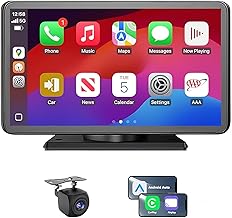
Best for: Drivers looking for a portable touchscreen with wireless smartphone integration and several ways to send audio to the car. The listing says it connects to a phone using Bluetooth and Wi-Fi for wireless CarPlay and Android Auto, with a 7-inch touch display.
Voice control through Siri or Google Assistant is listed, along with access to navigation, messages, music, and other phone features. The screen comes with a rotatable suction-cup mount and a self-adhesive bracket. Audio can be sent through Bluetooth to car speakers, AUX, or FM transmission, or played through the built-in speaker.
Why it was selected: It offers a similar smartphone-focused alternative to the PASLDA model. Compare the stated wireless connection, mount, and audio choices when deciding which feature set better suits your setup.
Limitation: The product details do not describe disc playback. Verify phone support, vehicle power access, and the preferred audio connection before purchasing.
Buying Guide: How To Choose A Portable Player For A Car
Do you want movies, music discs, or smartphone features?
Start with the content you plan to use. A portable DVD player is intended for passengers watching movies and may also support CDs or digital files, depending on the model. A portable CD player suits people with audio discs and audiobooks. A CarPlay or Android Auto screen is for smartphone-based navigation, calls, messages, and music rather than physical media.
These categories are not interchangeable. A touchscreen CarPlay display does not replace a DVD player for disc movies, and a basic CD player does not provide smartphone navigation. Choose according to the main job you need the device to do.
How important are screen size and viewing position?
For passenger movie viewing, check the actual screen specification, swivel range, and mounting method. The DBPOWER listing describes a 9-inch screen with a rotating and flipping design, while SUNPIN describes an 11.5-inch swivel screen. The stated measurements and screen specifications differ, so compare the exact display details rather than relying only on the product name.
Consider where passengers will sit and whether the screen can be positioned for them. Check that a headrest mount is suitable for your seat and does not obstruct the driver’s view. A portable screen should be positioned so it does not distract the driver.
Will the player run long enough for your trip?
For battery-powered viewing, compare the stated runtime with the length of a typical trip. DBPOWER and SUNPIN list up to five hours of battery playback. Actual runtime can depend on use, so plan for a vehicle charger or another listed power option if continuous playback is important.
The Coby CD player uses two AA batteries or USB power according to its product details. The CarPlay screens list vehicle power requirements, so consider how the screen will receive power and whether the cable can be routed safely.
Which media and audio connections do you need?
Check support for the exact discs and files you own. DBPOWER lists DVD, CD, USB, and SD-card playback, with a stated USB and SD capacity limit of up to 32GB. Its listing excludes Blu-ray. SUNPIN’s supplied details emphasize DVD viewing and do not specify USB or SD support. Coby lists CD, CD-R, CD-RW, and MP3 discs.
For sound, determine whether you need built-in speakers, headphones, or playback through the vehicle speakers. The Coby listing includes earbuds, while the SUNPIN listing specifies a headphone jack. PASLDA and FUNAURORE list Bluetooth, AUX, and FM transmission options. Confirm which connection your vehicle can use and check whether any required cable is included.
Should you choose a CarPlay screen or a built-in stereo replacement?
A portable screen is designed to mount on the dashboard using the supplied mount described in its listing. This can be useful when a buyer wants a separate display rather than replacing the existing stereo. Before choosing one, check the mounting space, power arrangement, phone requirements, and method for routing audio through the car.
Wireless and wired phone connections are not identical conveniences. PASLDA lists both connection types, while FUNAURORE describes wireless connection using Bluetooth and Wi-Fi. Review the instructions and your phone’s compatibility before relying on a particular connection method.
What should you check before a road trip?
- Confirm the player supports your discs, files, phone, or audio sources.
- Check battery runtime, vehicle power options, and cable placement.
- Verify that a mount fits the intended position and stays clear of the driver’s view.
- Test the sound route, such as headphones, Bluetooth, AUX, or FM transmission, before leaving.
- Use screens responsibly: passengers can watch video, but the driver should not be distracted by viewing content while driving.
Frequently Asked Questions
What is the best type of portable player for car movies?
A portable DVD player is the most direct choice for disc-based movies. Compare screen positioning, battery runtime, car power, and supported disc formats. The DBPOWER and SUNPIN models in this list are aimed at passenger viewing.
Can I use a portable CD player through my car speakers?
It depends on the player’s audio outputs and the vehicle’s available inputs. The Coby listing specifies USB power and included earbuds, but does not establish a particular car-speaker connection. Check the product details and car stereo inputs before buying.
Do portable CarPlay screens play DVDs?
The PASLDA and FUNAURORE listings describe smartphone integration and audio features, not DVD playback. Choose a dedicated portable DVD player if physical movie discs are required.
Are the DVD players suitable for headrest mounting?
DBPOWER and SUNPIN describe headrest mounting or car headrest use in their listings. Confirm the mounting arrangement and fit for your vehicle before installation.
What is the difference between a portable CarPlay screen and a portable DVD player?
A CarPlay screen displays supported smartphone features such as maps, calls, messages, and music. A portable DVD player is designed to play video discs and, depending on the model, other media. The best choice depends on whether you want driving-related smartphone features or passenger entertainment.
Can a passenger watch video while the car is moving?
These products are intended for portable entertainment, but screen placement and use should never distract the driver. Keep video viewing for passengers and position screens so they do not interfere with safe driving.