
The right audio converter cable depends on signal direction: an ADC converts analog audio to digital, while a DAC converts digital audio to analog. Among these options, the PROZOR 3.5mm-to-SPDIF model is the listed analog-to-digital choice; the other four are digital-to-analog converters. Choose the PROZOR ADC for an analog source that needs optical output, or select a DAC when connecting an optical digital source to RCA or 3.5mm analog audio equipment.
| Product | Direction | Best For |
|---|---|---|
| PROZOR 3.5mm to SPDIF Converter | Analog to digital | 3.5mm input to optical output |
| PROZOR Optical to RCA/3.5mm DAC | Digital to analog | Optical output to RCA or 3.5mm input |
| PROZOR 7ft Optical to RCA DAC | Digital to analog | Optical source to RCA equipment with a 7-foot cable |
| AUTOUTLET 7ft Optical to RCA DAC | Digital to analog | Plug-and-play optical-to-RCA setup |
| DAC Optical to RCA with Coaxial Cable | Digital to analog | Digital-to-analog connections with optical or coaxial input options |
PROZOR 3.5mm To SPDIF Converter

This is the most directly relevant option for someone searching specifically for an analog-to-digital converter cable. Its stated signal path is from a 3.5mm analog connection to Toslink optical output. That makes it different from the other products in this list, which convert digital audio into analog output.
- Best for: A setup that needs to send audio from a 3.5mm analog source to a device with optical SPDIF input.
- Why it was selected: The product name explicitly identifies it as an analog-to-digital converter and describes its 3.5mm-to-optical direction.
- Listed uses: Gaming consoles, computers, and projectors.
Check the source device’s output and the receiving device’s input before choosing it. The product name identifies 3.5mm input and optical output, so it is not the right direction for connecting an optical TV output to RCA speakers. The listing does not specify additional supported formats or sample rates.
PROZOR Optical To RCA And 3.5mm DAC

This PROZOR converter changes digital optical audio into analog left-and-right RCA output or a 3.5mm connection, according to its product name. It is a DAC, not an ADC. The stated 192 kHz capability is part of the product title, and the listing identifies an aluminum-alloy enclosure.
- Best for: A buyer connecting an optical digital source to equipment with analog RCA or 3.5mm inputs.
- Why it was selected: It offers two named analog output options, giving a buyer a choice between RCA and 3.5mm connections.
- Listed uses: PS3, HD DVD, PS4, amplifiers, Apple TV, and home cinema systems.
Choose this if your source sends optical digital audio and your destination accepts one of the stated analog outputs. Avoid it if you need 3.5mm analog audio converted into optical digital audio; that requires an ADC instead. Confirm the available output on your source and input on your receiving equipment before ordering.
PROZOR 7-Foot Optical To RCA DAC
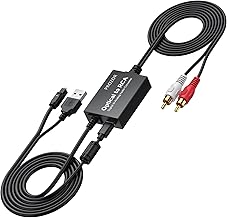
This PROZOR model is a digital-to-analog converter with an optical input and RCA output. Its name specifies a 7-foot (2.1-meter) cable and a built-in audio amplifier chip. It is intended for connecting sources such as HDTVs, Blu-ray players, DVD players, and game consoles to equipment with RCA audio input.
- Best for: Buyers who need an optical-to-RCA connection and want the listed 7-foot cable included in the setup.
- Why it was selected: Its cable length and RCA output are clearly specified, which helps buyers compare connection reach and destination type.
- Listed uses: HDTV, amplifier, Blu-ray, DVD, PS3, and PS4 setups.
Choose this if your digital source has optical output and your receiving device has RCA input. The named 7-foot length may not suit a setup that needs a longer run. The listing describes a built-in amplifier chip, but does not provide enough information here to determine whether it replaces a separate amplifier for every speaker or headphone setup.
AUTOUTLET 7-Foot Optical To RCA DAC

The AUTOUTLET is a digital-to-analog converter with Toslink optical input and RCA male output. Its product title lists 192 kHz, 24-bit conversion, a 7-foot (2.1-meter) cable, and plug-and-play operation. It is described for HDTV, DVD, Blu-ray players, and game consoles.
- Best for: A buyer looking for a stated 7-foot optical-to-RCA cable with plug-and-play setup.
- Why it was selected: Its product information identifies the conversion direction, connectors, cable length, and supported source categories.
- Listed format detail: 192 kHz and 24-bit, as stated in the product name.
Choose this if the source has optical digital audio output and the destination accepts RCA analog audio. Avoid it if your source is analog and needs optical output, because this product converts in the opposite direction. The product name does not detail every supported audio format or the settings required on a source device, so check those details for your particular setup.
DAC Optical To RCA With Coaxial Cable

This product is a digital-to-analog converter described as supporting optical-to-RCA conversion. Its name also mentions a coaxial cable and a Toslink optical-to-3.5mm adapter. It is listed for PS4, HD DVD, and home cinema systems. Because the product name references multiple connection types, buyers should verify the exact included inputs and outputs in the current listing before purchase.
- Best for: Buyers comparing DAC options who may need an optical or coaxial digital connection and analog output.
- Why it was selected: It names multiple digital connection types and analog RCA or 3.5mm connections.
- Listed uses: PS4, HD DVD, and home cinema systems.
Choose this only after confirming the connector layout matches your equipment. The title alone does not clarify every port’s role or whether each cable is included, so it is less straightforward to assess than products that specify a single input-output path. It is a DAC, not the analog-to-digital option in this roundup.
Buying Guide: How To Choose An Audio Converter Cable
Do you need an ADC or a DAC?
Start by identifying the direction audio must travel. An ADC converts an analog signal into digital audio. A DAC converts digital audio into an analog signal. These terms describe opposite functions, so a cable or converter labeled “digital to analog” will not perform the same job as one labeled “analog to digital.”
For example, a 3.5mm analog source going to a device that accepts optical digital input needs an ADC. An optical digital source going to an amplifier or other equipment with RCA analog inputs needs a DAC. Match the source’s output to the converter’s input, then match its output to the destination’s input.
Which connectors should you check?
Look at the ports on both devices rather than relying only on product category names. Common connector labels in this group include:
- Toslink or optical: A digital audio connection used as an input or output, depending on the device.
- RCA: The familiar left-and-right analog audio connectors, often marked L and R.
- 3.5mm: A small analog audio connector on some sources and receiving devices.
- Coaxial: Another type of digital audio connection referenced by one product in this list.
Connector shape alone does not confirm signal direction. Check whether the source port is an input or output and whether the receiving port expects analog or digital audio. A converter cannot correct a mismatch if its input and output are reversed relative to the system.
How much cable length do you need?
Two DACs in this selection identify a 7-foot (2.1-meter) cable. Measure the route between the source and destination, allowing enough slack to connect the devices without pulling on the ports. A built-in cable can simplify a short run, but it may be limiting if your devices are farther apart. The other product descriptions do not specify a cable length, so check the listing before purchase.
What audio format details matter?
Some product titles state 192 kHz, and the AUTOUTLET title also states 24-bit. Those specifications should not be treated as proof that every source format or output setting is supported. Confirm the converter’s listed format support and check whether the source device lets you select a compatible digital audio output. This is particularly important when a setup produces no sound despite having the correct connector direction.
Do you need a separate power supply?
The provided product descriptions do not give consistent power-supply details. Check the current product listing for how the converter is powered and whether any required cable or adapter is included. Do not assume that a converter draws power from the optical, RCA, or 3.5mm audio connection.
How should you compare the options?
For a true analog-to-digital connection, the PROZOR 3.5mm-to-SPDIF converter is the specifically identified ADC here. For digital optical audio to RCA or 3.5mm analog, compare the PROZOR compact DAC with RCA and 3.5mm outputs. For a stated 7-foot optical-to-RCA cable, compare the PROZOR and AUTOUTLET models. The DAC that mentions coaxial and several connector types may suit a broader connection search, but its exact port configuration should be verified.
Frequently Asked Questions
What is an analog-to-digital converter cable?
It is a converter that changes analog audio into a digital signal for a compatible digital input. In this selection, the PROZOR 3.5mm-to-SPDIF product is the one explicitly described as an ADC.
Is an optical-to-RCA cable analog to digital?
No. An optical-to-RCA converter changes digital optical audio into analog RCA audio, so it is a DAC. It works in the reverse direction from a 3.5mm-to-optical ADC.
Can I connect a TV’s optical output to RCA audio equipment?
Use a DAC with optical input and RCA output, provided the TV has optical audio output and the receiving equipment has RCA audio input. Check the product’s supported audio formats and the TV’s output settings if needed.
Can I use a DAC as an ADC?
No. A DAC and an ADC convert in opposite directions. Choose a converter that accepts the source’s signal type and outputs the signal type required by the destination.
What should I verify before buying?
Confirm conversion direction, input and output connectors, cable length, power requirements, and supported audio formats. Check the exact port configuration in the current product listing, especially for models whose names mention several connector types.