
The best tape-to-CD device depends on whether you want to digitize cassettes on a computer or record audio directly to removable storage. Most cassette converters create MP3 files rather than CDs; you can then use a computer with a CD burner to make a disc. The DIGITNOW and Reshow models are suited to USB-based computer conversion, the KLIM K7 is a portable option that saves to an included SD card, and the HopCentury recorder captures audio without requiring a computer.
| Product | Best For | Conversion Approach |
|---|---|---|
| DIGITNOW Cassette Converter | Computer-based cassette conversion | USB connection and software |
| KLIM K7 with 32GB SD Card | Portable conversion and storage | MP3 files on SD card |
| Reshow Cassette Player | Conversion plus cassette playback | USB connection to a computer |
| Tinxumb Cassette Converter | USB conversion and flexible listening | MP3 files through USB |
| HopCentury Music Digitizer | Recording without a computer | MP3 files on USB drive or SD card |
DIGITNOW Cassette Tape To MP3 Converter
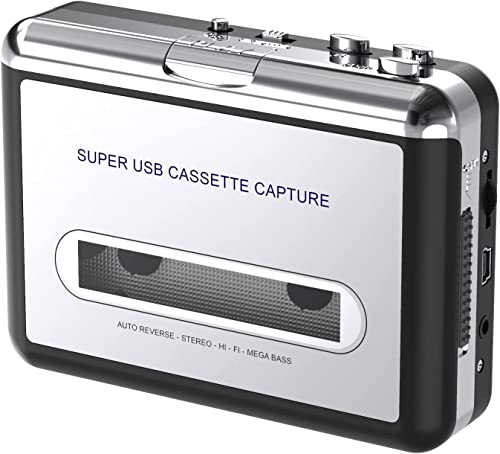
The DIGITNOW cassette converter connects to a laptop or personal computer by USB and transfers cassette audio to MP3 format. The listed features specify that the resulting files can be played on compatible digital players or burned to a CD using a computer. This makes it a relevant choice for people whose goal is to preserve tapes as files before creating discs.
Best for: Buyers who want a compact cassette player for computer-based conversion. It is selected because it combines cassette playback, USB transfer, and a stated path from MP3 files to a burned CD. A 3.5mm headphone jack and included earphones also provide a way to listen while using the player.
The product description says Audacity software is used to convert cassette audio and also says no installation or drivers are required. Check the supplied instructions for the specific software workflow before beginning a large transfer. This is not described as a standalone CD burner, so a computer and CD-writing capability are still needed to make a physical disc.
KLIM K7 Cassette Converter With 32GB SD Card

The KLIM K7 converts cassette recordings to MP3 files stored on an included 32GB SD card. Its product details say conversion can be performed without an additional device or app download by following the user manual. The player also works with SD-card music, and the package includes an SD card reader, earphones, and a rechargeable battery.
Best for: People who want to digitize tapes away from a computer and listen on a portable player. The built-in speaker and microphone add uses beyond cassette conversion, including playing music aloud and recording audio directly to the SD card. The listing states that the microphone can be used for thoughts, meetings, or music sessions.
Choose this model if you value a self-contained SD-card workflow and included storage. It is not a direct-to-CD recorder: MP3 files must be transferred to a computer or other suitable device before burning a CD. The listing also notes that it does not record onto cassette tapes.
Reshow Portable Cassette To Digital Converter

The Reshow portable cassette player transfers cassette audio to MP3 through a USB cable connected to a laptop or personal computer. The product information says it works with laptop CD burners, making it a practical option for a two-stage process: capture the cassette as a digital file, then use a computer to write that file to a CD.
Best for: Buyers who want a simple portable cassette player that can also feed audio into a computer. Its compact, lightweight design supports standard cassette playback, while the 3.5mm connection can be used with headphones, earbuds, or compatible AUX inputs such as a car stereo.
Choose this model if you want both everyday tape playback and computer-based digitizing. The product listing does not describe an included SD card or standalone recording to removable storage, so expect to use a computer for the conversion process. A separate CD-writing step is also necessary for a physical CD.
Tinxumb Cassette Tape Player And MP3 Converter

The Tinxumb cassette player transfers tape audio to MP3 files through a USB cable. Its listed features describe using the files on modern devices or burning them to a CD with a laptop. It also has a 3.5mm connection for earbuds, headphones, or a compatible car stereo input.
Best for: Buyers who want a USB-based converter with multiple listening connection options. It is selected because the listing explicitly connects cassette conversion with the ability to burn files to CD using a laptop. The 3.5mm output offers an additional way to listen without relying only on the computer.
The product description claims crisp sound with minimal noise, but actual results can depend on the condition of the tapes and playback equipment. The listing describes USB transfer to a computer, not direct CD recording or conversion to an included SD card. Plan to use a computer for file management and disc creation.
HopCentury Music Digitizer And Audio Recorder

The HopCentury music digitizer records audio from devices with 3.5mm or RCA outputs and saves it as MP3 files on a USB flash drive or SD card. The listing says a computer is not required for recording. It supports audio sources such as cassette players, phonographs, DVD players, game consoles, and other equipment with the specified output connections.
Best for: Buyers who already have a cassette player and want to capture its audio without connecting a computer during recording. The device has a record button, line-out listening, and playback for checking MP3 files with earphones. Its broad input options make it more flexible than a cassette-only USB player when digitizing audio from multiple sources.
This is an audio capture recorder, not a cassette player, so you need a separate cassette deck or player with a suitable audio output. The listing specifies MP3 recording at 128 Kbps and 44.1 kHz dual-mono. It also says to format the storage before use, supports up to 32GB with FAT32, does not support NTFS, and advises against inserting an SD card and USB drive at the same time.
Buying Guide: How To Choose A Tape To CD Device
A “tape to CD device” can mean either a cassette player that transfers music to a computer or a recorder that saves audio as a digital file. These products generally create MP3 files; they do not write directly to a blank CD. To make a physical disc, you typically need to transfer the files to a computer with a CD burner and suitable disc-writing software.
Do You Need A Computer To Convert Cassette Tapes?
Choose a USB cassette converter such as the DIGITNOW, Reshow, or Tinxumb when you want to connect a cassette player to a computer and create digital files there. This approach places file capture and file management on the computer. It can be useful if you also plan to edit, organize, or burn the files using computer software.
If you prefer recording without a computer at the time of capture, consider a device that saves MP3 files to removable storage. The KLIM K7 records to its included SD card. The HopCentury digitizer also records to storage media, but it requires a separate audio source such as a cassette player with a compatible output.
Are You Looking For A Cassette Player Or An Audio Recorder?
A cassette-to-USB player combines tape playback with a connection for digital capture. It is the more direct fit if you need a device to play the tapes as well as convert them. A standalone audio digitizer, such as the HopCentury, captures audio from a connected source but does not itself play cassette tapes.
Before choosing a recorder, check the output ports on your cassette player. The HopCentury supports 3.5mm and RCA inputs, and the listing notes that an RCA extension cable may be needed. Input matching matters: the recorder and cassette player must be connected through compatible audio ports.
Which Storage Format Fits Your Workflow?
MP3 is the stated output format for these products. Computer-based converters send audio to a computer, while the KLIM K7 and HopCentury save recordings to removable storage. Consider where you want to organize and back up the files before buying. For an eventual CD, you can use the computer to move the MP3 files to a disc-writing program, provided the computer has the required CD-writing hardware.
Storage requirements also differ. The KLIM K7 listing includes a 32GB SD card. The HopCentury listing specifies support for an SD card or USB flash drive up to 32GB and requires FAT32 formatting. It cautions against using both storage types simultaneously. Follow the individual manual for setup and supported media.
What Audio Connections Should You Check?
Look for the ports that match your intended listening and recording setup. A 3.5mm jack is useful for compatible headphones or AUX connections. RCA connections are common on some audio equipment, but the product details should confirm whether the device accepts or outputs that connection. A USB cable may be for transferring audio to a computer rather than connecting headphones or speakers.
For portable listening, the KLIM K7 includes a speaker, earphones, and a 3.5mm earphone jack. The Reshow and DIGITNOW models also list headphone or 3.5mm listening options. These features support playback, but they do not replace the separate steps needed to create a CD.
How Can You Prepare Tapes For Better Transfers?
Check that the cassette is in playable condition and that the tape moves normally before starting a long recording. Make a short test transfer first, then listen to the resulting file. This can help identify connection problems or an unsuitable recording level before you digitize an entire collection.
Keep a separate backup of important files before making edits or burning a disc. A CD is one possible copy, but retaining the digital MP3 files gives you another way to preserve and organize the recordings. The converter itself cannot restore audio that is missing or damaged on the original tape.
Frequently Asked Questions
Can A Cassette Converter Burn Music Directly To CD?
The products covered here are described as creating MP3 files, not writing audio directly to a CD. To make a physical CD, transfer the files to a computer with a CD burner and use compatible disc-writing software.
What Is The Difference Between USB And SD Card Conversion?
USB cassette converters send audio to a connected computer for capture. An SD-card converter, such as the KLIM K7, stores MP3 files on the card. The best option depends on whether you prefer computer-based file handling or recording to removable storage.
Can The HopCentury Digitizer Play Cassette Tapes?
The HopCentury is an audio capture recorder, not a cassette player. It records sound from a connected source, so you need a separate cassette player or other device with a compatible 3.5mm or RCA audio output.
Do I Need Special Software To Convert Cassette Audio?
Software needs depend on the product and workflow. The DIGITNOW listing refers to Audacity, while other products describe conversion through their own process or manual. Check the product instructions and your computer’s supported software before starting.
Can I Use These Devices To Digitize Vinyl Records?
The HopCentury and DigitalLife capture devices in the product listings are described for broader analog audio sources, including phonographs or vinyl-related equipment when connected through supported inputs. The cassette-player converters are primarily described for cassette tapes.
Which Option Is Best If I Do Not Want To Use A Computer While Recording?
The KLIM K7 is designed to convert cassette audio to MP3 files on its included SD card without requiring another device during conversion. The HopCentury also records to removable storage without a computer, but it needs a separate audio source, such as a cassette player.