
The best portable CD player with USB playback depends on where you listen: the MEGATEK RX/TX suits listeners who want USB-file playback and Bluetooth, the POSSPO is designed for compatible car stereos, and the Gueray works well as a desktop player with speakers. Sunoony adds a rechargeable battery and car connection options, while ENVYCLOUD focuses on connecting a CD player to a vehicle or other USB- or AUX-equipped devices. Check the connection type and supported formats before choosing.
| Product | Best for | USB use |
|---|---|---|
| MEGATEK Portable CD Player with Bluetooth RX/TX | Portable listening and digital files | Plays music from a USB flash drive |
| Gueray Desktop CD Player | Home or desk listening | Plays music from a USB flash drive |
| Sunoony Portable CD Player | Rechargeable portable use and car listening | Plays music from a USB flash drive |
| POSSPO Jupiter USB CD Player | Compatible car stereos | Connects the CD player to a car USB port |
| ENVYCLOUD Portable Car CD Player | Vehicle and multi-device connection | Connects to a car USB port; also has AUX |
MEGATEK Portable CD Player With Bluetooth RX/TX

Best for: Buyers who want one portable player for CDs, USB audio files, and Bluetooth headphones or speakers. It is a strong match when USB means playing files stored on a flash drive, rather than connecting the player to a car through USB.
The MEGATEK plays CD, CD-R/RW, CD-G, MP3 CDs, and audiobook CDs. It supports MP3, WMA, and WAV files. Playback options include resume, shuffle, repeat, program, and introductory playback, giving listeners more ways to navigate music and spoken audio.
Its USB port plays audio files from a flash drive up to 128GB formatted as FAT32. Bluetooth works in two directions: the player can receive audio from a phone or tablet, or transmit CD and USB audio to Bluetooth headphones or speakers.
Limitation: The USB port is for music playback only and does not charge devices. The Bluetooth feature is not compatible with Bluetooth car stereos, so choose a different connection method for a vehicle.
Gueray Desktop CD Player With USB Playback

Best for: Home listeners who want a CD player that can also work as a desktop speaker and USB flash-drive player. Its freestanding design and built-in display make it more suited to a desk or room than to use as a small personal player on the move.
This multi-function unit supports CDs, CD-R, CD-RW, MP3, and WMA. It also plays music from a TF card or USB flash drive, receives Bluetooth audio, and includes FM radio and a 3.5mm audio connection. Built-in dual Bluetooth speakers provide an option for listening without pairing an external speaker.
The device also supports Bluetooth transmission, allowing it to send audio to Bluetooth headphones or a speaker. Its LCD shows the track number, play time, and current mode. The desktop case is designed to stand on a desk without assembly or a separate support.
Limitation: This is a desktop-style player, not a compact disc Walkman. Choose it for a fixed listening area; avoid it if your priority is a small player for walking or commuting.
Sunoony Portable CD Player With Bluetooth
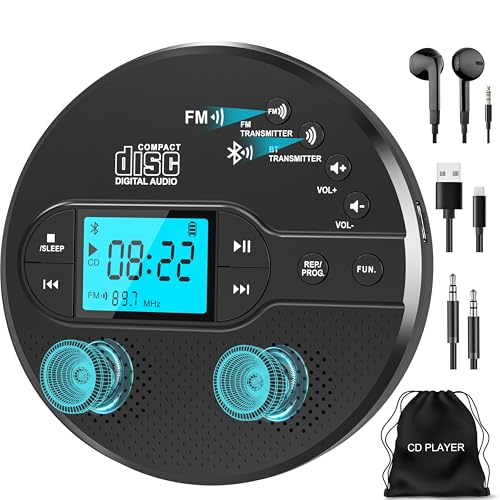
Best for: Listeners who want a rechargeable portable CD player with USB flash-drive playback and several ways to use it in a car. It combines Bluetooth transmitting and receiving with an FM transmitter and AUX connection.
The player supports two-way Bluetooth: it can transmit CD or USB audio to Bluetooth headphones and speakers, and receive audio from devices such as a phone, tablet, or laptop. For a vehicle, the listing describes FM transmitter use or connection through the supplied AUX cable. Its Bluetooth transmitter does not connect to a car stereo.
A built-in 2,000 mAh rechargeable battery is listed for up to nine hours of playback, with charging through a Type-C-to-USB cable. The product also specifies anti-skip protection of up to 60 seconds for CDs and 120 seconds for MP3s.
Limitation: The USB port plays files from a flash drive; it does not provide USB audio output to a vehicle. For car use, plan on FM transmission or AUX rather than USB audio or Bluetooth transmission to the car stereo.
POSSPO Jupiter USB CD Player For Cars

Best for: Drivers whose car stereo has a USB port and supports WAV music files. This model is intended to add CD playback to a compatible vehicle system, rather than to serve as a standalone portable player with its own speakers.
To use it, connect the player to the car stereo’s USB port, insert a CD, and select the drive through the stereo’s USB interface. The listing says the tracks appear on the car stereo for selection. A USB extension cable allows placement in locations such as a center console, dashboard, or glove box.
The product is described as compatible with Android and non-Android car stereos that can play WAV files. It includes a USB-A-to-USB-C adapter, which gives buyers a choice of connection plug where the vehicle has one of those port types.
Limitation: A USB port alone does not guarantee compatibility. Check that the car stereo can play WAV files before choosing this model; it is not the right choice if you need a standalone player with built-in speakers.
ENVYCLOUD Portable Car CD Player With USB And AUX
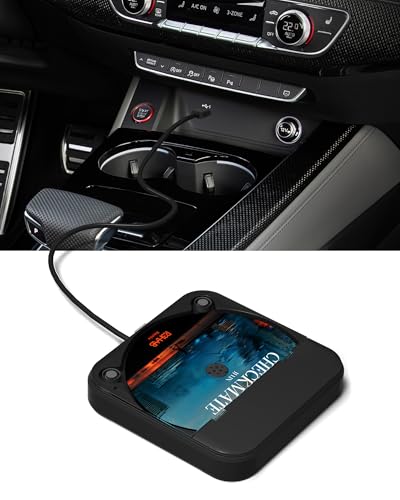
Best for: Buyers looking for an external CD player described for use with a car radio, computer, laptop, or TV. It is a connection-focused choice for people who want to use an existing device’s system rather than rely on a built-in speaker.
The listing describes a plug-and-play connection to a car’s USB or AUX port. It also identifies computers, laptops, and TVs as possible connected devices. The compact case is described as being about the size of a CD and a few inches thick, which can make storage easier in a vehicle.
For car listening, the product is positioned as an add-on for vehicles without a built-in CD player. The listing also says it supports touchscreen and steering-wheel controls when connected to a compatible vehicle system.
Limitation: The product description does not specify supported disc or audio-file formats. Confirm the connection and format requirements for your particular car stereo or device before buying.
Buying Guide: How to Choose a Portable CD Player With USB
Does “USB” mean playing files or connecting to a car?
USB can describe two different functions, so check the product details carefully. A USB playback port reads supported music files from a flash drive. A USB connection port may instead connect an external CD player to a car stereo. These functions are not interchangeable.
- For flash-drive music: Look for stated file formats and storage limits. The MEGATEK, for example, lists MP3, WMA, and WAV files and specifies a FAT32 flash drive up to 128GB.
- For car connection: Check whether the product connects to the vehicle by USB, AUX, or FM transmission. Also verify that the car stereo can recognize and play the format required by the CD player.
- For both: Read the port description rather than assuming that a USB socket supports both playback and connection to a vehicle.
Where will you use the player most?
For a desk or room, a desktop model with built-in speakers can reduce the need for separate audio equipment. The Gueray is designed for this kind of setup and adds radio, USB, TF-card, Bluetooth, and wired audio functions.
For travel or personal listening, prioritize a portable form and consider how you will power the player. The Sunoony includes a rechargeable battery, while its Bluetooth and anti-skip features address common portable-listening needs. Check the listing for the power method and included accessories for any model you are considering.
For a car without a CD player, start with the stereo’s available ports and supported audio formats. The POSSPO is specifically described for car stereos that play WAV files through USB. The ENVYCLOUD listing describes USB and AUX connections, but does not provide the same detail about supported formats.
Which disc and file formats should you check?
Disc support can vary even when two products are both called CD players. Look for clear mention of the discs in your collection, such as standard CDs, CD-R, CD-RW, audiobook discs, or MP3 CDs. File support matters separately: a player that accepts MP3 files from a flash drive may not support every disc or file type.
The MEGATEK lists CD, CD-R/RW, CD-G, MP3 CDs, and audiobook CDs, along with MP3, WMA, and WAV files. The Gueray lists CD, CD-R, CD-RW, MP3, and WMA support. If you own specialized discs or rely on a particular format, confirm that exact format in the product specifications.
Do you need Bluetooth, AUX, or FM transmission?
Bluetooth can serve as either a receiver or a transmitter. A receiver plays audio sent from a phone through the player’s speakers or audio output. A transmitter sends CD audio to Bluetooth headphones or speakers. Look for the direction you need rather than relying on the word “Bluetooth” alone.
AUX is a wired option when both devices have compatible 3.5mm connections. FM transmission sends audio through a radio frequency for reception by a car radio. These methods can be useful when a car stereo does not accept Bluetooth audio from the CD player, but connection behavior varies by product.
What matters for portable listening?
For use while walking or commuting, consider battery power, size, controls, and anti-skip protection. Anti-skip specifications describe a product feature, but they are not a guarantee that every disc will remain uninterrupted in every situation. The Sunoony lists up to 60 seconds of protection for CDs and up to 120 seconds for MP3s.
For home use, screen readability and accessible controls may matter more than battery life. The Gueray has an LCD for track, time, and mode information. The MEGATEK boombox product in the list has large buttons, top dials, and a backlit LCD, but it is not one of the USB-playback selections above.
How can you avoid a compatibility mismatch?
Before ordering, identify the exact connection on the device you plan to use: USB-A, USB-C, AUX, or Bluetooth. For a car, check the owner’s manual or stereo specifications for supported file types and whether the USB port accepts an external CD player. A charging-only USB port may not support audio playback.
Also check what the player’s USB port is designed to do. Some ports play flash-drive files but do not charge other devices or send audio to a car. If the listing does not clearly state a feature you need, treat that as an unanswered compatibility question and confirm it before purchase.
Frequently Asked Questions
Can a portable CD player play music from a USB flash drive?
Some models can. Check that the product specifically says USB flash-drive playback and lists the audio formats it supports. The MEGATEK and Gueray products selected here include USB playback features.
Can I connect any USB CD player to my car stereo?
No. The car stereo and player must support compatible connection methods and audio formats. For example, the POSSPO listing calls for a car stereo that can play WAV files. Confirm your vehicle’s capabilities before choosing a USB-connected model.
Does a CD player’s USB port charge a phone?
Not necessarily. USB ports may be intended only for reading music files. The MEGATEK listing explicitly says its USB port is for music playback and not charging.
What is the difference between Bluetooth receiving and transmitting?
Bluetooth receiving lets a CD player accept audio from a phone or tablet. Bluetooth transmitting sends the player’s CD or USB audio to wireless headphones or speakers. Check which direction a model supports and whether it has both functions.
What should I check before using a portable CD player in a car?
Check whether the car has USB or AUX, whether its stereo supports the required audio format, and whether the player uses a wired connection or FM transmission. Do not assume Bluetooth transmission to a car stereo is supported; the Sunoony and MEGATEK product details describe limitations for car Bluetooth use.
Is a USB flash-drive player the same as an external USB CD drive?
No. A flash-drive player reads digital music files stored on a USB stick. An external USB CD drive connects to another device, such as a computer or car stereo, to provide access to discs. Check the product’s intended use and connection requirements.