
The right Bluetooth receiver depends on what you want to connect: a USB adapter adds Bluetooth to a computer, while a stereo receiver sends phone audio to a sound system. The TP-Link Bluetooth 5.4 adapter is best for a newer Bluetooth standard, the UGREEN adapter is best for connecting several device types on supported Windows PCs, and the TP-Link long-range model is best for shoppers prioritizing its advertised coverage. A KAIY stereo receiver is the distinct option for home audio, but its listed product information provides few details to compare.
| Product | Best suited for | Key distinction |
|---|---|---|
| TP-Link Bluetooth 5.4 USB Adapter | PC users seeking a newer Bluetooth version | Bluetooth 5.4, EDR, and BLE |
| TP-Link Bluetooth 5.3 Long-Range Adapter | PC users prioritizing advertised coverage | Bluetooth 5.3 and EDR |
| UGREEN Bluetooth 5.3 Adapter | Supported Windows users with multiple peripherals | Up to five different Bluetooth devices |
| KAIY Home Stereo Bluetooth Receiver | Listeners connecting Bluetooth audio to a stereo | AUX and RCA are named in the product title |
| Long-Range Bluetooth 5.4 PC Adapter | PC users considering a long-range USB adapter | Product title identifies Bluetooth 5.4 and USB |
TP-Link Bluetooth 5.4 USB Adapter
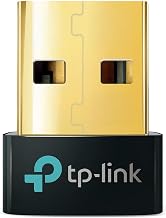
This USB Bluetooth adapter is designed to add Bluetooth connectivity to a PC. Its listed features include Bluetooth 5.4, EDR, and Bluetooth Low Energy (BLE). It is backward compatible with versions 5.3, 5.0, 4.2, 4.0, 3.0, 2.1, 2.0, and 1.1, which may be useful when connecting older Bluetooth devices.
Best for: PC owners who want a USB adapter with a newer Bluetooth version and broad version compatibility. The listing also claims up to twice the data-transfer speed and four times the coverage compared with Bluetooth 4.0. Those are product claims, not a guarantee of the same results in every computer or environment.
Why it stands out: EDR is intended to improve data transfer, while BLE supports lower-power Bluetooth operation. Those stated technologies make this a flexible choice for a range of compatible peripherals.
Limitation: This is a computer adapter, not a standalone receiver for sending phone audio directly to a home stereo. Check the computer’s operating-system requirements before buying; the supplied product details do not specify them.
TP-Link Bluetooth 5.3 Long-Range Adapter

The TP-Link UB500 Plus is a USB Bluetooth adapter for a desktop or laptop that does not have Bluetooth. The supplied features identify Bluetooth 5.3 with EDR and backward compatibility with Bluetooth versions 4.2, 4.0, 3.0, 2.1, 2.0, and 1.1. It also includes BLE technology.
Best for: PC users who want a TP-Link adapter and place particular importance on the listing’s extended-coverage claim. The product information states up to twice the speed and four times the coverage compared with Bluetooth 4.0. Actual connection performance can depend on the computer, connected device, obstacles, and surroundings.
Why it stands out: Its stated Bluetooth 5.3 support and backward compatibility give buyers a clearly identified version range for pairing with newer and older Bluetooth devices. EDR and BLE are included in the feature list.
Limitation: The supplied details do not identify supported operating systems or explain a specific measured range. Confirm system support and placement needs before choosing it for a connection across rooms or through obstructions.
UGREEN Bluetooth 5.3 USB Adapter

This UGREEN adapter uses Bluetooth 5.3 BR+EDR technology. Its listing says it can connect up to five different types of Bluetooth devices at the same time, including examples such as a mouse, keyboard, mobile phone, and headphones. That can help a computer user who wants to pair several categories of peripherals through one adapter.
Best for: Windows 11, Windows 10, or Windows 8.1 users who need to connect several different Bluetooth device types. The product listing says no driver installation is required on those Windows versions.
Why it stands out: The stated five-device capacity is a useful comparison point for buyers with multiple peripherals. The listing also says the updated Bluetooth technology is intended to improve connection stability and transfer speed while reducing the possibility of interruptions and power consumption.
Limitation: The operating-system restriction is important: the listing says it does not support macOS, Linux, or Windows 7. It also says only one Bluetooth audio device of the same type, such as a speaker or headphones, can play music at a time. Do not assume that pairing several audio devices means simultaneous playback.
KAIY Home Stereo Bluetooth Receiver

The KAIY product is a different type of device from the USB Bluetooth adapters above. Its title identifies it as a Bluetooth receiver for home stereo and names AUX and RCA connections. That makes it the most directly relevant option here for shoppers looking to add Bluetooth audio reception to a stereo system rather than add Bluetooth to a computer.
Best for: Home-audio buyers who need a Bluetooth receiver with AUX or RCA identified as connection types in the product name. Before ordering, compare those named outputs with the available inputs on the stereo.
Why it stands out: It addresses the other common meaning of “Bluetooth receiver to USB”: a device for receiving wireless audio and routing it to existing equipment. It is not interchangeable with a computer USB Bluetooth dongle.
Limitation: No feature list was provided for this product. Its Bluetooth version, power method, included cables, supported codecs, operating range, and detailed connection instructions cannot be confirmed from the supplied information. Verify those details on the product listing before purchase.
Long-Range Bluetooth 5.4 PC Adapter

This product’s name describes a long-range Bluetooth 5.4 adapter for a PC and identifies it as a wireless USB receiver. That makes it relevant to buyers searching for a USB Bluetooth device, but the supplied product data contains no detailed feature list to substantiate its performance or describe setup.
Best for: Shoppers comparing USB adapters who want to investigate a product advertised by name as long-range and Bluetooth 5.4. It may merit consideration when those terms match the search, provided the full listing confirms the required details.
Why it stands out: The title explicitly identifies both USB use and Bluetooth 5.4, which are useful first-pass criteria for a PC adapter. This is not enough information to establish its operating-system compatibility or compare its measured range with the TP-Link models.
Limitation: No listed features were supplied beyond the product name. Verify supported operating systems, Bluetooth version details, device compatibility, and range information before choosing it over products with fuller specifications.
Buying Guide: How to Choose a Bluetooth Receiver to USB
Do you need Bluetooth for a computer or a stereo?
Start by identifying which device needs to receive or use Bluetooth. A USB Bluetooth adapter is generally intended to add Bluetooth capability to a computer through its USB port. It lets the computer connect with compatible Bluetooth devices, such as peripherals. A stereo Bluetooth receiver serves a different purpose: it receives audio wirelessly from a phone or another source and sends that audio to a sound system through an audio connection.
Do not assume that a USB adapter for a PC will turn a stereo’s USB port into a Bluetooth audio input. A USB port can have different functions, and the listed computer adapters are described as PC accessories. For a home stereo, check the exact audio inputs named by the receiver and compare them with the system’s available inputs.
Which Bluetooth version should you look for?
Compare the version stated in the product details with the devices you plan to connect. The products here list Bluetooth 5.3 or 5.4, and some state backward compatibility with older Bluetooth versions. Version compatibility can help a newer adapter connect to older devices, but it does not by itself confirm compatibility with every computer, accessory, or operating system.
Also distinguish product claims from guaranteed results. The TP-Link listings describe speed and coverage improvements compared with Bluetooth 4.0. Actual performance may vary with the connected devices, computer placement, nearby wireless activity, and physical obstructions. If distance matters, look for specific range details in the current product listing rather than relying on “long range” alone.
How many devices do you plan to connect?
If you want several computer peripherals connected at once, check the stated device limit and what the limit means. UGREEN specifies up to five different types of Bluetooth devices, but its listing clarifies that only one audio device of the same type can play music at a time. Pairing capacity and simultaneous playback are not the same feature.
For a single keyboard, mouse, or headset, a multi-device capacity may be less important than operating-system support. For multiple accessories, verify the adapter’s stated capacity and whether your intended mix of devices fits the manufacturer’s description.
Will the adapter work with your operating system?
Check the operating-system requirements before purchasing a PC dongle. UGREEN specifically lists support for Windows 11, Windows 10, and Windows 8.1 without driver installation, and says it does not support Windows 7, Linux, or macOS. The supplied details for the TP-Link options do not specify their supported operating systems, so confirm those requirements on the product page.
“Plug and play” or a simple USB form factor does not establish universal compatibility. The computer’s operating system, available USB port, and Bluetooth software can all affect setup. Check the adapter’s documentation for your exact system version.
What should you check for a home stereo receiver?
Match the receiver’s audio outputs to your stereo’s inputs. The KAIY title names AUX and RCA, but the supplied information does not state its complete specifications or included accessories. Confirm the connection type, power method, pairing instructions, and supported Bluetooth details in the full listing before buying. If the stereo has only a different input type, verify that the receiver can connect to it or that an appropriate solution is specified.
For a computer, consider whether the USB adapter will be used for audio, input devices, or several types of peripherals. For a stereo, prioritize audio connections and the receiver’s intended role. These are different purchase requirements even when both searches include the words “Bluetooth” and “USB.”
Frequently Asked Questions
Is a USB Bluetooth adapter the same as a Bluetooth audio receiver?
No. A USB Bluetooth adapter adds Bluetooth connectivity to a computer. A Bluetooth audio receiver takes wireless audio from a source device and sends it to an audio system through a compatible audio connection. Check the product’s intended use before buying.
Can I plug a PC Bluetooth dongle into a stereo USB port?
The listed PC adapters are described for computers, not as stereo audio receivers. A stereo USB port may not support a computer Bluetooth dongle. Use a product specifically described as a stereo Bluetooth receiver and confirm its connection requirements.
Does a newer Bluetooth version guarantee a longer connection range?
No. Bluetooth version alone does not guarantee a specific range. Product claims, connected-device capabilities, surroundings, and obstacles can affect the connection. Look for stated range details and treat comparative claims as product claims rather than universal results.
Can one adapter connect multiple Bluetooth devices?
It depends on the adapter and the device types. UGREEN states support for up to five different types of connected Bluetooth devices, but only one audio device of the same type can play music at a time. Check the specific product’s limits for your intended setup.
What does EDR mean in a Bluetooth adapter listing?
EDR stands for Enhanced Data Rate. The TP-Link product information describes it as a technology associated with improved data-transfer speed. It does not, by itself, confirm operating-system compatibility or guarantee a particular connection speed in every setup.
Which product is the clearest choice for macOS?
The supplied information does not confirm macOS support for the TP-Link adapters or the long-range Bluetooth 5.4 adapter. UGREEN specifically says its adapter does not support macOS. Check the current specifications for any adapter before choosing it for a Mac.