
The QFX RETRO-39BT is the clearest choice for recording from a line-in source or other audio inputs, while the JENSEN offers an auxiliary input for multi-source recording. The PROSCAN, Coby, and TOMASHI are better suited to straightforward voice recording and cassette playback; their listed features do not establish line-in recording. Compare the input types carefully, because an auxiliary or line-in jack is not included on every cassette recorder.
| Recorder | Best For | Input And Recording Highlights |
|---|---|---|
| QFX RETRO-39BT | Multiple recording sources | Line-in, Bluetooth, FM, microphone, USB-to-cassette |
| JENSEN Portable Recorder | Recording from an auxiliary source | Auxiliary input and one-touch recording |
| PROSCAN Cassette Recorder | Voice notes and interviews | Built-in and external microphone |
| Coby Cassette Recorder | Basic portable recording | Built-in microphone; battery or AC power |
| TOMASHI Portable Recorder | Compact cassette listening and voice recording | Built-in microphone and speaker |
QFX RETRO-39BT Multi-Input Cassette Recorder
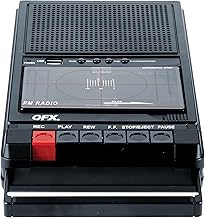
Best for: Buyers who need more than a basic microphone cassette recorder and want several listed recording sources. The QFX RETRO-39BT is the strongest match here for a line-in cassette recorder because its features explicitly include a line-in connection and recording from line-in to USB.
The unit also supports USB-to-cassette recording. Its listed source options include cassette, Bluetooth, FM radio, microphone, and line-in for recording to USB. Playback is available through its built-in 3.5-inch speaker, and the connections include USB input, line-in/out jacks, and external microphone support.
- Choose this if you want several input options and a stated line-in connection.
- It stands out because the features describe both USB-to-cassette recording and recording from multiple sources to USB.
- Limitation: The listed features do not specify which cables are included or identify compatible line-in source devices.
JENSEN Portable Cassette Player And Recorder

Best for: Buyers who want one-touch recording and an auxiliary input for connecting another audio source. JENSEN describes the auxiliary input as a way to connect smartphones, tablets, or other audio sources, making this a useful option for people seeking more than microphone-only recording.
The recorder also has a built-in condenser microphone and automatic level control, which adjusts recording volume according to the product information. One-touch recording is intended to make it easier to capture lectures, music, or personal notes. It plays and records cassettes, so it can serve as both a tape player and a recording device.
- Better for buyers who prioritize an auxiliary source connection and simple recording controls.
- Why it was selected: Its listed auxiliary input and recorder function make it a relevant alternative to the QFX for multi-source use.
- Limitation: The supplied features do not detail the input connector type or state whether any connection cable is included.
PROSCAN Cassette Recorder With Microphone

Best for: Buyers recording interviews, classes, conferences, and other spoken audio. The PROSCAN combines cassette playback and recording with one-touch recording, a free-standing microphone, and an external microphone jack.
Its automatic level control is listed as a feature for managing recording levels. That makes the product more relevant to basic voice capture than to buyers specifically seeking a line-in recorder. Although the product name lists an auxiliary input, the supplied features do not explain whether that input can be used to record audio onto cassette. Buyers who need line-in recording should confirm that function before choosing it.
- Choose this if you mainly need a cassette recorder with microphone options for spoken material.
- Why it was selected: Its one-touch recording and built-in and external microphone options provide a straightforward alternative to multi-input models.
- Limitation: The listed information does not confirm auxiliary-input recording to cassette.
Coby Cassette Recorder With Built-In Microphone
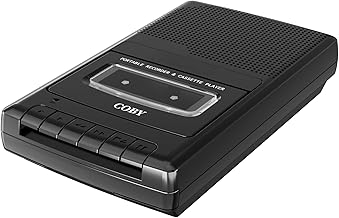
Best for: Buyers who want a simple cassette player and recorder with a built-in microphone and flexible power options. Coby describes the device as supporting cassette playback and recording, with the microphone available for voice notes, lectures, or interviews.
Its battery-or-AC power arrangement is useful for people who expect to use the recorder in different settings. The built-in microphone means no external microphone is needed for basic voice capture, according to the product features. However, the supplied information does not list a line-in or auxiliary input, so it is not the best-supported choice for recording from a separate audio source.
- Better for basic voice recording and cassette playback than for line-in recording.
- Why it was selected: It combines playback, recording, a built-in microphone, and two stated power options.
- Limitation: No line-in or auxiliary connection is specified in the provided features.
TOMASHI Compact Cassette Player And Recorder

Best for: Buyers looking for a compact cassette player and recorder with a built-in speaker and microphone. TOMASHI lists a small body measuring 4.57 by 3.54 by 1.38 inches, plus controls for rewind, fast-forward, stop, play, and record.
The device supports speaker listening or headphone listening and can record through its built-in microphone. Its automatic stop system releases the play button when a tape ends, which the product information says is intended to help prevent unnecessary tape and mechanism wear. The listed features focus on cassette playback and microphone recording rather than recording through a line-in connection.
- Choose this if compact size, built-in-speaker playback, and simple voice recording matter most.
- Why it was selected: It provides a portable cassette recorder option with clear playback and recording controls.
- Limitation: The supplied features do not list a line-in or auxiliary input.
Buying Guide: How To Choose A Line-In Cassette Recorder
Do you need line-in recording or microphone recording?
Start by identifying the sound source. A built-in microphone records nearby sound, such as speech in a room. A line-in connection is intended for an external audio source connected by cable. These are different recording methods. If your goal is to copy audio from another device to cassette, look for an explicit line-in input and confirmation that it records to tape. In this group, QFX lists a line-in connection, and JENSEN lists an auxiliary input with multi-source recording options.
Do not assume that every jack described as auxiliary, headphone, or microphone input can perform the same job. Product descriptions may list a connection without explaining its recording direction or function. Confirm the manual or seller’s specifications if a specific source connection is essential.
Which input options should you compare?
Compare the exact sources each recorder lists. The QFX offers the broadest stated selection here: line-in, Bluetooth, FM radio, microphone, and USB-related recording functions. JENSEN lists an auxiliary input for an external audio source. The PROSCAN lists an auxiliary input in its product name, but its supplied feature details focus on microphone recording and do not confirm recording from that input to cassette.
The Coby and TOMASHI descriptions emphasize built-in microphone recording. They may suit voice notes or spoken material, but the provided features do not establish line-in recording. Choose based on the connection you actually need rather than the general label “cassette recorder.”
How important are one-touch controls and recording levels?
One-touch recording can simplify starting a recording, especially for lectures, interviews, or quick notes. Both the JENSEN and PROSCAN list one-touch recording. JENSEN and PROSCAN also describe automatic level control. The Coby, QFX, and TOMASHI feature summaries provide other functions but do not state the same level-control details.
Automatic level control may be useful when the sound source changes in loudness, but check the model’s instructions for how to start recording and set up the microphone or input. Simple controls do not replace checking the source connection and cassette setup.
Will you listen through a speaker or headphones?
For speaker playback, the QFX lists a built-in 3.5-inch speaker, and TOMASHI lists a built-in speaker as well as headphone listening. The PROSCAN product name lists a headphone jack. The supplied Coby and JENSEN features do not specify speaker or headphone details, so verify those requirements before purchase if private or speaker-based listening matters.
Where will you use the recorder?
Power and portability can affect which cassette recorder is practical. Coby explicitly lists battery or AC power, offering two stated power methods. TOMASHI provides its dimensions and describes a compact design. QFX is presented as a portable shoebox-style recorder, while JENSEN includes a retractable built-in handle in its product name. Check the full product details for power requirements and included accessories rather than assuming a battery, cable, or microphone is supplied.
What should you verify before buying?
- Confirm that the recorder can record from the input you plan to use, not just play audio through it.
- Check the connector type and whether you need a separate cable.
- Decide whether you need a built-in microphone, an external microphone jack, or a line-in source.
- Check playback options, such as a built-in speaker or headphone connection.
- Review stated power options and physical dimensions for your intended setting.
- For cassette-to-digital or digital-to-cassette tasks, confirm the exact direction of the transfer feature.
Frequently Asked Questions
What is a line-in cassette recorder?
A line-in cassette recorder accepts audio from an external source through a line-level input and records it onto cassette. Confirm that the input is specified for recording, because a device may have other audio jacks that serve different purposes.
Which recorder in this list most clearly supports line-in?
The QFX RETRO-39BT is the clearest match because its listed connections include line-in/out jacks and its features describe recording from line-in to USB. It also lists USB-to-cassette recording.
Can I record audio from a phone onto cassette?
The JENSEN lists an auxiliary input for connecting smartphones, tablets, or other audio sources, and describes the product as a multi-source audio recorder. Check the product instructions for the required connection and recording procedure before use.
Is a built-in microphone the same as line-in?
No. A built-in microphone captures sound in its surroundings. Line-in recording uses a wired connection from an external audio source. Choose the method that matches your source and recording goal.
Which models are better suited to voice notes?
The PROSCAN, Coby, JENSEN, and TOMASHI list built-in microphone recording features. PROSCAN and JENSEN also list one-touch recording; PROSCAN and JENSEN describe automatic level control.
Does every recorder here confirm recording from an external source to cassette?
No. The supplied features explicitly describe USB-to-cassette recording for QFX. JENSEN lists an auxiliary input and multi-source recording, while the other product details emphasize microphone or cassette functions. Verify the recording path for any model before buying.