
For dual-input computer speakers, the Logitech Z207 is the clearest fit if you want Bluetooth and a 3.5mm audio connection. The Creative Pebble V3 combines Bluetooth with USB-C audio, while the FUNLOGY speaker uses USB for power and a 3.5mm cable for audio. These options suit different desks and devices. The OHAYO speakers and Amazon Basics set are included as alternatives, but their listed features do not confirm two audio inputs, so check the product details before choosing them for a strict dual-input requirement.
| Product | Listed connection options | Best for |
|---|---|---|
| Logitech Z207 | Bluetooth and 3.5mm cable | Switching between wired and wireless devices |
| Creative Pebble V3 | Bluetooth and USB-C audio | Compact USB-C desktop audio with Bluetooth |
| FUNLOGY Speaker | USB power and 3.5mm audio | Simple wired desktop setup |
| OHAYO 60W Speakers | Bluetooth listed; second audio input not specified | Buyers prioritizing larger speaker output |
| Amazon Basics Stereo 2.0 | USB power and 3.5mm aux audio | Basic wired computer audio |
Logitech Z207 Bluetooth Computer Speakers

The Logitech Z207 is the best match for buyers who want both a wireless and a wired audio connection. Its listed options include Bluetooth and a 3.5mm cable, making it suitable for a computer connected by cable and another Bluetooth-capable device. Easy-Switch technology lets users move between audio devices by pausing playback on one and starting it on the other.
Each speaker has an active, powered driver for full-range audio and a passive radiator for bass extension. This 2.0 arrangement avoids a separate subwoofer and keeps the setup relatively simple. Choose this model if switching between devices matters more than having USB audio or a dedicated subwoofer.
- Best for: Desks where a computer and a Bluetooth device share speakers.
- Why it stands out: Both Bluetooth and 3.5mm connectivity are explicitly listed, along with a device-switching feature.
- Limitation: The provided features do not specify USB audio or a separate subwoofer.
Creative Pebble V3 USB-C Speakers

The Creative Pebble V3 is a better fit for buyers who want USB-C audio and Bluetooth in a compact desktop speaker set. Its listed USB-C connection supports plug-and-play USB audio, and Bluetooth 5.0 provides a wireless alternative. The included USB-C-to-USB-A converter is intended for older computers with USB-A ports.
Creative lists 2.25-inch full-range drivers, 8W RMS output, and peak power up to 16W. A gain switch can provide amplified audio when connected to a 10W USB-C or USB-A port. Clear Dialog processing is designed to make spoken dialogue more intelligible without requiring an unnecessary volume increase.
- Best for: Compact desks, USB-C computers, and listeners who often watch dialogue-heavy video.
- Why it stands out: It combines USB audio, Bluetooth, a gain switch, and dialogue processing.
- Limitation: The amplified gain feature requires a 10W USB-C or USB-A port, according to the listed details.
FUNLOGY Compact USB-Powered Speakers

The FUNLOGY speaker is best for buyers who want a straightforward wired setup using USB power and a 3.5mm audio cable. These are separate roles: USB supplies power, while the 3.5mm connection carries audio. The listing describes compatibility with desktop PCs, laptops, monitors, smartphones, and gaming consoles, without requiring driver installation or Bluetooth pairing.
The compact speaker uses dual 48mm full-range drivers and passive radiators, with 14W total output. Its 30-degree upward tilt is designed to direct sound toward a seated listener while taking up less desk space. Choose it if you prefer simple cable connections over wireless pairing.
- Best for: Buyers seeking compact, wired speakers with a volume dial.
- Why it stands out: Its USB-and-3.5mm setup is described as simple, and its angled design is intended for desktop listening.
- Limitation: Bluetooth is not listed, and the speaker requires cable connections.
OHAYO 60W Bluetooth Stereo Speakers
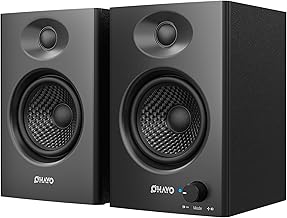
The OHAYO set is best for buyers who prioritize a larger bookshelf-style speaker design and listed 60W total output over a clearly documented dual-input setup. The product features describe Bluetooth 5.3, a 0.75-inch carbon-fiber silk-dome tweeter, a 3-inch carbon-fiber full-range driver, and a rear bass port. Its MDF enclosure is described as helping reduce box resonance.
A front-panel volume knob provides direct adjustment. The manufacturer also lists an independent sound card and describes the speakers as suitable for desktops, home offices, and gaming stations. Choose this option if those speaker and enclosure details matter to you, but confirm its available wired inputs before buying for a two-input requirement.
- Best for: Buyers seeking compact bookshelf-style speakers with Bluetooth and a front volume control.
- Why it stands out: It lists 30W per channel, a rear bass port, and a wood enclosure.
- Limitation: The supplied features do not identify a second audio input, so dual-input capability is unconfirmed.
Amazon Basics Stereo 2.0 Speakers

The Amazon Basics set is a simple wired choice for PC or laptop audio. Its listing specifies a 3.5mm aux input for audio and USB power from a computer or laptop. USB is the power connection, not a second listed audio input, so this set is not the best choice if you specifically need two audio sources.
An in-line volume control makes it possible to adjust listening level without relying only on computer settings. Choose this model if you want a basic 2.0 speaker pair with a direct aux connection and USB power. It may suit a buyer who values straightforward setup over Bluetooth or advanced connection switching.
- Best for: Basic PC or laptop audio with accessible in-line volume control.
- Why it stands out: The listing clearly identifies USB power and a 3.5mm aux audio input.
- Limitation: Bluetooth and a second audio input are not listed.
Buying Guide: How To Choose Dual Input Computer Speakers
What counts as a dual input?
Check whether a product offers two ways to send audio to the speakers. Examples include Bluetooth plus a 3.5mm audio input, or Bluetooth plus USB audio. A USB power cable does not automatically count as a second audio input. Some speakers use USB only to receive power, while a separate cable carries the audio signal.
Read the connection descriptions carefully. Look for explicit terms such as “Bluetooth audio,” “USB audio,” or “3.5mm input.” If a listing names Bluetooth but does not specify a wired audio input, do not assume one is included. The OHAYO details provided here list Bluetooth but do not identify another audio input.
Should you choose Bluetooth plus 3.5mm or Bluetooth plus USB?
Bluetooth plus 3.5mm is a useful combination when you want a wireless connection for one device and a familiar analog cable for another. The Logitech Z207 explicitly lists both and includes a feature for switching between devices. A 3.5mm connection can also be practical for a computer or other source with a headphone-style audio output.
Bluetooth plus USB audio may suit a desk where the computer has a suitable USB port and you want a direct digital connection. The Creative Pebble V3 lists USB-C audio and Bluetooth. Check the computer’s ports and the product’s power requirements, especially if you want to use the gain switch.
How much desk space do the speakers need?
Compact speakers can leave more room for a keyboard, mouse, or monitor stand. The Creative Pebble V3 and FUNLOGY speaker are described as compact options. The OHAYO model has a bookshelf-style design, so check its dimensions and your available desk space before choosing it. Product dimensions were not included in the supplied information.
Also consider where the speakers will sit. The FUNLOGY set has a 30-degree upward tilt intended to direct sound toward the listener. The OHAYO model has a front-panel volume control, which may be convenient if the speakers sit within reach. These design details affect placement and daily use, not just sound.
Do power ratings tell you which speakers sound best?
Power figures can help compare listed output, but they do not describe every aspect of sound quality or guarantee a preferred listening experience. The supplied products report different specifications and do not all use the same measurement details. Compare driver design, connection options, intended placement, and features such as dialogue processing alongside the stated power.
For example, Creative lists 8W RMS and up to 16W peak, while FUNLOGY lists 14W total output and OHAYO lists 30W per channel. These figures are presented as stated in the product details; they should not be treated as directly equivalent measurements.
Which controls and listening features matter?
A physical volume knob or in-line control can make quick adjustments easier than navigating computer settings. The OHAYO speakers list a front-panel knob, and Amazon Basics lists an in-line volume control. The Logitech Z207 emphasizes switching between devices, while Creative highlights Clear Dialog processing for spoken content.
Choose based on your main use. For video and dialogue, consider whether a product specifically lists dialogue processing. For alternating between a computer and a phone, look for explicit wireless and wired inputs plus a stated switching method. For a basic setup, prioritize an easy-to-reach volume control and connections that match your existing devices.
What should you verify before ordering?
- Confirm that the listing names two actual audio inputs, not just one input plus a power connection.
- Check whether your computer has USB-C, USB-A, Bluetooth, or a 3.5mm audio output.
- Verify whether required cables or adapters are included; the Creative Pebble V3 listing specifies a USB-C-to-USB-A converter.
- Consider whether you need Bluetooth device switching, a wired connection, or both.
- Check the speaker dimensions and cable arrangement against your desk setup.
- Review the full product listing for current connection details before purchasing.
Frequently Asked Questions
What are dual input computer speakers?
Dual input computer speakers accept audio through two connection methods or sources, such as Bluetooth and a 3.5mm cable. Check that both connections carry audio; a USB cable used only for power does not count as a second audio input.
Which listed speakers have two clearly described audio connections?
The Logitech Z207 lists Bluetooth and a 3.5mm cable. The Creative Pebble V3 lists Bluetooth and USB-C audio. These are the clearest matches in this selection for buyers seeking two audio connection methods.
Does USB-powered mean a speaker has USB audio?
No. USB can supply power without carrying audio. The FUNLOGY and Amazon Basics listings describe USB power alongside a 3.5mm audio cable or input. Confirm the USB function in the product details before treating it as an audio connection.
Can I connect two devices to Logitech Z207 speakers?
The listed features describe Bluetooth and 3.5mm cable connectivity, plus Easy-Switch technology for moving between audio devices. The feature description says to pause audio on one device and press play on the other to switch playback.
Which option is best for a compact wired desktop setup?
The FUNLOGY speaker is a strong fit for a compact wired setup because it is described as palm-sized and uses USB for power with a 3.5mm cable for audio. Its listing also specifies a 30-degree tilt design and a volume dial.
Are the OHAYO speakers confirmed to have two audio inputs?
Not from the supplied feature information. Bluetooth 5.3 is listed, but a second audio input is not specified. Confirm the available inputs in the current product listing if dual-input capability is essential.