
The best digital interface for recording depends mainly on how many microphones or instruments you need to connect at once. The M-Audio M-Track Solo is best for a simple one-person setup, while the M-Track Duo and Focusrite Scarlett 2i2 suit two-source recording. The Synido offers flexible monitoring modes, and the Scarlett Solo is a focused choice for one vocalist or guitarist.
| Interface | Best For | Key Feature |
|---|---|---|
| M-Audio M-Track Solo | Solo recording on a simple setup | One combo input and one instrument input |
| M-Audio M-Track Duo | Recording two sources | Two combo inputs |
| Synido USB-C Audio Interface | Recording and streaming workflows | Three monitoring modes |
| Focusrite Scarlett Solo 4th Gen | One vocalist or guitarist | Air mode and 120 dB dynamic range |
| Focusrite Scarlett 2i2 4th Gen | Two-input recording with level assistance | Auto Gain and Clip Safe |
M-Audio M-Track Solo
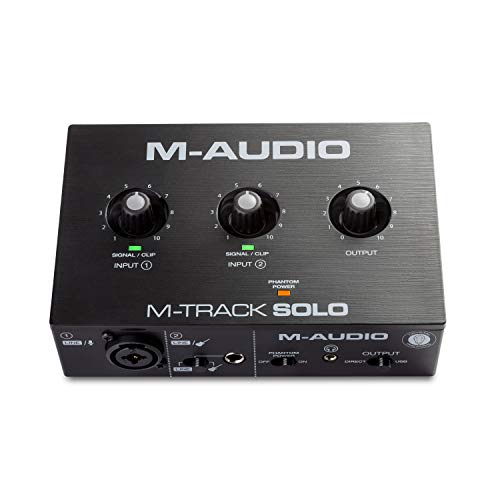
The M-Audio M-Track Solo is a compact USB interface for recording one main microphone or line source alongside an instrument. It supports recording, podcasting, and live streaming, with 48 kHz audio resolution. Its combination of input types makes it useful for a basic home recording setup without requiring a larger two-combo-input unit.
- One combo XLR/line input with phantom power.
- One line/instrument input for a guitar or compatible line-level source.
- A 1/8-inch headphone output, stereo RCA outputs, and a USB/Direct switch for zero-latency monitoring.
Best for: A solo creator who needs one microphone input and a separate instrument input. It was selected for its straightforward input layout and monitoring options. Choose it if you want to record vocals or a line source while connecting an instrument. A limitation is that it has only one combo XLR/line input, so it is not the best fit for recording two XLR microphones at once.
M-Audio M-Track Duo
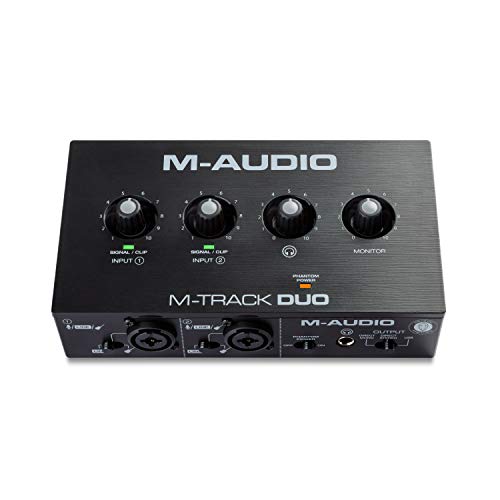
The M-Track Duo provides two combo inputs, making it a more flexible choice than the Solo for recording multiple sources at the same time. Each input accepts XLR, line, or instrument signals and offers phantom power. The interface records at 48 kHz and includes a USB/Direct switch for monitoring without latency.
- Two combo XLR/line/instrument inputs with phantom power.
- A 1/4-inch headphone output and stereo 1/4-inch outputs.
- Designed for recording, podcasting, and live streaming.
Best for: Two-person podcasts, two-microphone sessions, or a musician recording a microphone and instrument together. It was selected because its two combo inputs support more simultaneous source combinations than a one-input model. Choose this over the M-Track Solo when you need two inputs of the same type. Its listed recording resolution is 48 kHz, so buyers who specifically need a higher stated sample rate should compare other options.
Synido USB-C Audio Interface

The Synido is a two-channel interface for recording music, streaming, and podcasting. Its listed audio specification is 24-bit depth at a 48 kHz sampling rate. The key distinction is its three monitoring modes, which let users select input monitoring, a mix of input and computer audio, or computer audio alone.
- Two-channel design with 24-bit/48 kHz recording support.
- Stereo, Mix, and USB monitoring modes for different recording and playback tasks.
- LED level indicators and a switch for line-in or instrument input.
- The listed XLR connection also supports 6.35 mm connections.
Best for: Creators who move between recording, live broadcasting, and computer-based audio work. It was selected for its distinctly configurable monitoring options and visible level indicators. The Mix mode is relevant when you need to monitor input alongside computer audio. A limitation is that its stated sampling rate is 48 kHz; buyers prioritizing a higher listed rate may prefer an interface with a different specification.
Focusrite Scarlett Solo 4th Gen

The Focusrite Scarlett Solo 4th Gen is designed for a vocalist, guitarist, or producer who needs a compact recording interface. Focusrite lists a 120 dB dynamic range and converters from the same generation as those used in its flagship interfaces. Its Air mode is intended to add presence and harmonic drive to vocal and guitar recordings.
- Made for connecting a microphone and guitar.
- 120 dB dynamic range, according to the product information.
- Air mode for adding musical presence to vocals and guitars.
- Includes recording software, as described in the product listing.
Best for: A solo musician who wants a focused interface with a vocal-and-guitar-oriented feature set. It was selected for its stated dynamic range and Air mode, which differentiate it from simpler entry-level models. Choose this if one main performer is your typical recording setup. The supplied information does not specify the full input and output layout, so check the product details if you need a particular connection type or simultaneous input arrangement.
Focusrite Scarlett 2i2 4th Gen
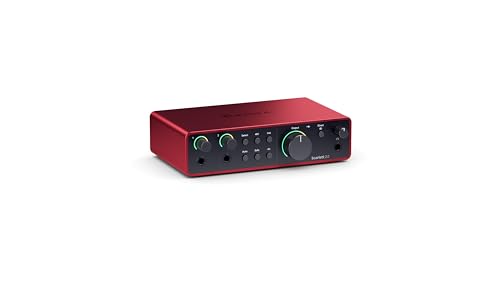
The Scarlett 2i2 4th Gen is a two-input option for recording, songwriting, streaming, and podcasting. It shares the listed 120 dB dynamic range and converter generation with the Scarlett Solo. Its defining features include Auto Gain, which sets a level for a microphone or guitar, and Clip Safe, which is intended to help prevent clipping.
- Two-input interface for microphone and guitar recording.
- Auto Gain helps set input levels for a mic or guitar.
- Clip Safe is designed to help prevent clipping during a take.
- Includes recording software, according to the product listing.
Best for: Creators who want two inputs and level-setting features for recording sessions. It was selected because it combines a two-input workflow with Auto Gain and Clip Safe. Choose it over the Scarlett Solo when your setup calls for two sources or you want added level-management assistance. The provided features do not specify every connection detail, so verify the exact input and output arrangement before purchase if your equipment requires a specific connector.
Buying Guide: How To Choose A Recording Interface
How many inputs do you need?
Count the sources you need to record at the same time, not just the instruments you own. One microphone or instrument at a time may work with a single-input-focused model such as the M-Track Solo or Scarlett Solo. Two microphones, or a microphone and instrument recorded simultaneously, point toward a two-input option such as the M-Track Duo, Synido, or Scarlett 2i2.
Also check what each input accepts. A combo input can accommodate more than one connection type, but the specific supported signals vary by product. Confirm that the interface has the right input for your microphone, guitar, or line-level equipment before choosing.
Do you need phantom power?
Phantom power is relevant when your microphone requires it. The M-Track Solo and M-Track Duo list phantom power, as does the Synido. The supplied Scarlett product details do not state this feature, so check their full specifications if phantom power is essential to your setup. Do not assume that all microphones require the same power or connection.
Which recording resolution matters?
Compare the listed sample rate and bit depth rather than relying on broad labels such as “studio quality.” The M-Audio models list 48 kHz recording. The Synido specifies 24-bit/48 kHz, while the CIXUN listing states 24-bit/192 kHz. Higher numbers alone do not determine how suitable an interface is for a specific project; input count, connections, monitoring, and software workflow also matter.
What monitoring features will help?
Direct or low-latency monitoring lets you hear a live input without relying solely on the delayed signal passing through recording software. Both M-Audio models list a USB/Direct switch for zero-latency monitoring. The Synido has Stereo, Mix, and USB modes, which offer different ways to monitor input and computer audio. If you record live, stream, or overdub, consider how you want to hear both the performer and playback.
Should you choose a basic or assisted workflow?
A simple interface can be enough if you are comfortable setting input levels and monitoring your recording. The Scarlett 2i2 adds Auto Gain and Clip Safe, which may suit users who want help managing levels. The Synido’s LED indicators provide a visual indication of volume status. These features address different needs: level adjustment, clipping prevention, and at-a-glance monitoring are not interchangeable.
What should you check for computer setup?
Confirm the interface’s connection type and compatibility with your computer and recording software. The M-Audio product descriptions identify Mac or PC use, while the CIXUN listing describes USB-C connection and Mac, PC, or mobile-device compatibility. The Synido product name specifies USB-C. Check your device’s available ports and any included cable requirements before ordering, because the supplied product details do not establish every cable or operating-system requirement.
Frequently Asked Questions
What does a digital recording interface do?
A digital recording interface connects microphones, instruments, or other audio sources to a computer or compatible device. It also provides a way to route recorded or computer audio to headphones or speakers, depending on its outputs.
Is one input enough for recording music?
One input can be enough when you record one source at a time, such as a solo vocal or guitar. Choose a two-input interface if you need to record two sources simultaneously, such as two microphones or a vocal and instrument.
What is direct monitoring?
Direct monitoring lets you hear an input signal without monitoring only through the computer’s recording software. This can help avoid the audible delay that may occur in a software-monitoring path. Check the interface features for a direct-monitor switch or monitoring modes.
Do I need phantom power for a microphone?
Only if the microphone requires phantom power. Check the microphone’s specifications and confirm that the interface provides the required power. The M-Track Solo, M-Track Duo, and Synido list phantom power in their supplied features.
Is a higher sample rate always better?
Not necessarily. A higher listed sample rate may matter for particular production workflows, but it does not replace practical considerations such as input count, microphone support, monitoring, and computer connections. Compare the complete specification with your recording needs.