
The best external sound card with multiple inputs depends on whether you need separate microphone connections, line-in recording, or surround-sound outputs. The Cubilux CB5 is best suited to recording and streaming with several input types, while the StarTech adapter offers multiple connections alongside up to 7.1-channel playback. The other picks provide 5.1 or 7.1 audio options, or a basic microphone-and-headphone connection. Check the input types and recording needs before choosing: multiple output channels do not necessarily mean multiple recording inputs.
| Product | Best suited for | Input highlights |
|---|---|---|
| Cubilux CB5 | Recording and streaming | Two stereo microphone jacks and line-in |
| StarTech ICUSBAUDIO7D | Multiple audio connections and surround playback | Line-in and stereo microphone inputs |
| Optimal Shop 6 Channel | Analog or digital 5.1 audio | Analog and S/PDIF recording options |
| Vantec USB 7.1 Adapter | Basic multichannel audio | Input details are limited |
| SABRENT AU-MMSA | One microphone and stereo output | Single mono microphone input |
Cubilux CB5 USB Audio Interface

Best for: Buyers who need more than one recording input type for streaming, podcasting, or other computer audio work. This is the clearest match in the list for an external sound card with multiple inputs.
The CB5 turns a computer USB port into two stereo microphone jacks, one line-in jack, one line-out jack, and one headphone jack. Its independent device names are intended to make multi-track recording easier to configure. The listed audio specification is up to 96 kHz and 24-bit.
Why it was selected: Unlike adapters that mainly add surround playback, the CB5 lists multiple microphone connections and a separate line input. It is specified for Windows and Mac OS.
Limitation: The line-out and headphone output cannot be used simultaneously. Confirm that your microphone or instrument connection matches the listed jack type before buying.
StarTech 7.1 USB Audio Adapter
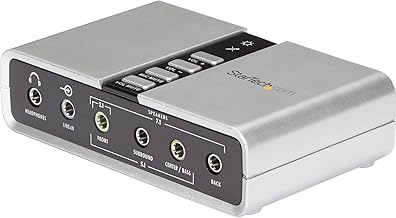
Best for: Desktop or laptop users who want several audio connections and multichannel playback, with line-in and stereo microphone inputs available for recording.
The StarTech adapter supports 7.1-, 5.1-, and two-channel output through 3.5 mm connections. Its listed connections include a headphone port, line-in, and stereo microphone inputs, along with digital audio output. It is bus-powered and includes a one-meter USB cable.
For analog playback and recording, the product supports 44.1 kHz and 48 kHz sampling rates. The SPDIF digital output supports 48 kHz playback; optical input passthrough is specified for up to two-channel audio at 48 kHz.
Why it was selected: It combines input connections with a broad range of playback options. It is a better fit than a simple stereo adapter when both recording access and surround output matter.
Limitation: The listing does not describe this as a multi-track recording interface. Choose it for its stated connections and channel support, not as a substitute for a dedicated studio interface.
Optimal Shop 6-Channel USB Sound Card

Best for: Buyers seeking 5.1-channel analog playback plus digital audio recording and playback options.
This USB adapter is described as a six-channel, 5.1 external sound card for a PC or laptop. Its feature list covers analog playback and recording as well as S/PDIF digital input and output. For analog playback, it supports six-channel audio. The digital recording mode accepts S/PDIF input and sends the audio to the computer through USB.
The listed sampling rates vary by mode: digital recording supports 32 kHz, 44.1 kHz, and 48 kHz, while analog recording is specified at a fixed 48 kHz. Some stated sampling rates require driver or application support.
Why it was selected: It offers both analog and digital audio paths, which can suit users who need more than a basic headphone-and-microphone adapter.
Limitation: Its feature list names older Windows versions and does not clearly establish support for newer operating systems. Verify current system and software requirements before purchase.
Vantec USB External 7.1 Audio Adapter

Best for: Buyers who want a straightforward USB adapter for multichannel playback and recording at the supported sampling rates.
The Vantec adapter provides 7.1-channel surround sound through USB 2.0 and is described as backward compatible with USB 1.1. Its listed feature set supports 44.1 kHz and 48 kHz sampling rates for both playback and recording.
Why it was selected: It is a compact option for shoppers whose priority is adding multichannel audio through USB, rather than choosing a product with a more detailed list of recording jacks.
Limitation: The supplied product information does not specify the number or type of physical recording inputs. Do not assume that 7.1-channel support means seven recording inputs; check the product’s connection layout if you need multiple microphones or line-level sources.
SABRENT USB Stereo Sound Card Adapter

Best for: Buyers who need one basic microphone input and a separate stereo headphone or powered-speaker output.
This bus-powered USB Type-A adapter has a 3.5 mm stereo output and a separate 3.5 mm mono microphone input. The manufacturer describes it as a plug-and-play, class-compliant USB audio device for supported Windows, Mac, and Linux systems.
Why it was selected: It is a simple way to add a separate microphone connection to a computer, and its two-jack layout is easy to distinguish: green is stereo out and pink is mono microphone in.
Limitation: It has only one microphone input and is a stereo, two-channel adapter, so it is not suitable for capturing multiple sources independently. It also does not support a four-pole headset using a single combo plug or passive speakers.
Buying Guide: How To Choose An External Sound Card With Multiple Inputs
How many recording sources do you need to connect?
Count the sources you plan to record at the same time, then identify the connection each source uses. A microphone jack, line-in jack, and digital optical input serve different purposes. A product with several playback jacks may still have only one recording input.
For multiple microphone connections and a separate line input, the Cubilux CB5 lists the broadest range of relevant inputs in this selection. For one microphone and one line-in alongside multichannel playback, the StarTech adapter is a different option. Check whether each source needs its own separately addressable recording channel; a physical jack alone does not confirm independent multi-track recording.
Do you need multiple inputs or surround-sound outputs?
Input and output channel counts describe different capabilities. The StarTech and Vantec products list up to 7.1-channel output, while the Optimal Shop product is described as six-channel 5.1 audio. These figures do not mean the adapters can record that many microphones at once.
If your priority is surround playback, compare the supported output formats and the number of physical connections. If your priority is recording, focus instead on microphone, line-in, or digital input connections and whether the computer can access them as separate sources.
Which connector type does your equipment use?
Check the plugs on your microphones, instruments, speakers, and headphones before selecting an adapter. A 3.5 mm microphone connection is not the same as a line-level input or an optical digital connection. Also check whether you have a headset with a combined plug: the SABRENT adapter specifically does not support a four-pole combo headset connection.
For digital audio, confirm whether the product’s S/PDIF connection is an input, output, or passthrough. These functions are not interchangeable. The Optimal Shop listing describes digital recording through S/PDIF input, while StarTech lists digital output and optical input passthrough with stated channel and sampling-rate limits.
Will it work with your computer and recording software?
Check the product’s operating-system information and the requirements of your recording application. The SABRENT listing describes class-compliant USB audio for supported Windows, Mac, and Linux systems. The Cubilux listing names Windows and Mac OS. The supplied Optimal Shop feature list names older Windows versions, so users of newer systems should verify compatibility before purchase.
Some audio modes or sampling rates may require software or driver support. The Optimal Shop feature list specifically notes that certain rates need driver or application support. Do not assume that every mode is available automatically after plugging in the adapter.
What does multi-track recording mean for your setup?
Multi-track recording usually means capturing sources as separate tracks rather than combining them into one mix. The Cubilux CB5 listing says its interfaces can be assigned independent device names to make multi-track recording easier. Confirm that your operating system and recording software can select the inputs as needed.
If you need synchronized, independent recordings from several microphones, look for explicit channel and software-routing details. The product information here does not establish that every adapter supports several independent microphone tracks, even when it lists multichannel audio or multiple jacks.
Frequently Asked Questions
Does 7.1-channel sound mean a sound card has seven recording inputs?
No. A 7.1-channel specification generally describes playback channels. Check the product’s input list separately to find out how many microphones or other sources it can record.
Which listed sound card has the most clearly specified input connections?
The Cubilux CB5 lists two stereo microphone jacks and one line-in jack, as well as separate line-out and headphone connections. Its listing also describes support for multi-track recording through independent device names.
Can I connect a microphone and headphones to the SABRENT adapter?
Yes. It has a separate 3.5 mm mono microphone input and a 3.5 mm stereo output for headphones or powered speakers. It does not support a four-pole headset using one combined plug.
Can I use line-in to connect another microphone?
Not necessarily. Line-in is intended for line-level audio sources, while a microphone input is designed for a microphone connection. Check the source’s output level and the sound card’s stated input type before connecting them.
Should I choose an external sound card or an audio interface?
For basic headset audio or adding a few computer connections, a USB sound adapter may be sufficient. For recording multiple sources independently, prioritize a device that explicitly describes its recording inputs and multi-track or channel-routing capabilities, such as the Cubilux CB5 in this selection.