
To add audio to an HDMI setup, use an HDMI audio extractor or an ARC/eARC audio converter that matches your source, TV, and speaker connections. The VPFET is best for setups needing optical or 3.5mm output; the HDMI-to-3.5mm splitter is a straightforward analog option; and the ARC/eARC converters are better for extracting sound from a TV. Compare the outputs and supported audio formats before choosing, because these products serve different connection paths.
| Product | Best suited for | Listed audio outputs |
|---|---|---|
| VPFET HDMI Audio Extractor | HDMI sources connecting to optical or 3.5mm audio | Optical, 3.5mm AUX |
| HDMI-to-3.5mm Audio Extractor | HDMI sources connecting to an analog audio system | 3.5mm |
| HDMI ARC Adapter | TV ARC audio connecting to stereo equipment | 3.5mm, L/R stereo |
| J-Tech Digital JTDAT5CH | HDMI sources needing optical or RCA stereo output | SPDIF, RCA stereo |
| 192KHz HDMI eARC/ARC Converter | ARC/eARC TVs connecting to optical or coaxial audio gear | Optical, coaxial |
VPFET HDMI Audio Extractor
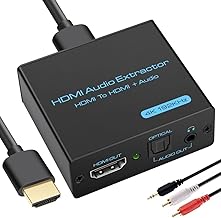
This HDMI audio extractor is best for a source device that sends video over HDMI while a separate audio system needs an optical or 3.5mm AUX connection. The product name lists 4K support and identifies optical and 3.5mm outputs, giving buyers two distinct ways to route sound from an HDMI connection.
The listing also names HDCP, DTS 5.1, and PCM support. Those format references may be useful when checking whether the extractor aligns with the source and receiving audio equipment. Confirm the desired audio format and connection type across every device before buying; an extractor cannot make an incompatible speaker input fit without the appropriate connection.
- Best for: Buyers who need both optical and 3.5mm audio output options.
- Why it was selected: Its listed connections and audio-format references suit common HDMI-to-separate-audio routing needs.
- Check first: The listing name does not specify a 4K refresh rate, so verify video requirements if refresh rate matters.
HDMI-to-3.5mm Audio Extractor

This model is best for a buyer whose audio equipment accepts a 3.5mm connection and whose video source connects through HDMI. Its name lists 4K by 2K at 30Hz and 3D, plus compatibility references for TVs, PCs, sound systems, Xbox, Switch, PS3, PS4, and PS5. Those are listing claims; confirm the exact source, display mode, and audio connection for your setup.
Choose this option when a compact analog audio route is the priority and optical or coaxial output is not needed. The 3.5mm connection is the key differentiator, while the listed 30Hz rate is an important video detail to compare against the display mode you intend to use.
- Best for: Setups that need HDMI video and 3.5mm audio output.
- Why it was selected: Its listing identifies the analog output and names multiple source-device categories.
- Check first: The listed 4K specification is 30Hz; avoid assuming it supports a higher 4K refresh rate.
HDMI ARC Adapter With Stereo Outputs

This adapter is best for extracting audio from a television’s HDMI ARC connection and sending it to a soundbar, speaker, or amplifier with 3.5mm or left/right stereo inputs. Unlike a standard source-side HDMI extractor, its name specifically identifies ARC, so it is aimed at a TV audio-return setup.
The product name lists 4K at 60Hz and describes 3.5mm and L/R stereo audio outputs. That combination may suit buyers whose audio equipment uses analog stereo inputs. Check that the TV has an ARC connection and that the receiving equipment accepts the listed output type. The supplied information does not list supported audio formats, so buyers who need a particular format should verify it before purchase.
- Best for: TV-to-speaker or TV-to-amplifier connections using ARC and analog stereo.
- Why it was selected: It is specifically described as an ARC extractor and lists two stereo output choices.
- Check first: ARC is required for the described TV audio path; do not assume it works as a regular HDMI source extractor.
J-Tech Digital HDMI Audio Extractor

The J-Tech Digital JTDAT5CH is best for a buyer who wants to pass HDMI video through while routing sound to either SPDIF or RCA stereo audio equipment. Its name specifies HDMI-to-HDMI plus audio extraction and lists 4K at 30Hz. Having both a digital SPDIF output and analog RCA stereo output makes it a flexible choice when matching older or separate audio components.
Choose this model if your receiving equipment has one of those listed audio inputs and the stated video specification suits your display. Its name does not identify a 4K 60Hz capability or specify audio formats, so check those details against your system’s needs rather than assuming broader support.
- Best for: HDMI systems that need SPDIF or RCA stereo audio output.
- Why it was selected: The listed output choices cover both digital and analog audio connections.
- Check first: The named video rate is 4K at 30Hz, and no audio-format details were provided.
192KHz HDMI eARC/ARC Audio Converter

This converter is best for a TV with an HDMI ARC or eARC audio connection that needs to send sound to an audio system with optical or coaxial input. The listing says it converts the TV’s eARC/ARC audio channel to digital optical or coaxial output and is intended to address TVs without those outputs.
Its listed features include 24-bit/192kHz audio sampling, CEC volume control, and support for PCM 2.0, Dolby 5.1, and DTS 5.1. The setup instructions say to enable the TV’s CEC function, select the ARC device as the audio output, and set the TV audio format to a supported option. This product is not the best fit when a buyer needs 3.5mm or RCA output.
- Best for: ARC/eARC TV audio going to optical- or coaxial-input speakers or amplifiers.
- Why it was selected: Its listed conversion path, formats, and setup requirements are explicit.
- Check first: The TV must have an ARC/eARC connection and the audio system must accept optical or coaxial input.
Buying Guide: How To Choose an HDMI Audio Extractor
Are you extracting audio from a source or a TV?
First identify where the audio begins. A standard HDMI audio extractor is generally selected to separate audio from an HDMI source connection while video continues to a display. An ARC/eARC adapter is intended for sound traveling from a television through its HDMI ARC or eARC connection. These are different signal paths, so an ARC converter is not automatically a substitute for a source-side extractor.
For example, a game console or media player connected to a display may call for a source-side extractor. A television sending its own audio to an external amplifier may call for an ARC/eARC device. Match the product’s stated input path to the connection that carries sound in your setup.
Which audio output does your speaker or receiver accept?
Check the input sockets on the audio equipment, not just the HDMI ports on the video device. The products in this list offer different output choices: 3.5mm AUX, RCA stereo, optical SPDIF, or coaxial digital audio. Select a device whose output directly matches an available input on the speaker, soundbar, or amplifier.
- 3.5mm: Consider the VPFET, HDMI-to-3.5mm extractor, or ARC adapter when the receiving system has a matching analog input.
- RCA stereo: The J-Tech Digital listing identifies RCA stereo output.
- Optical: The VPFET, J-Tech Digital, and eARC/ARC converter list an optical or SPDIF option.
- Coaxial: The 192KHz eARC/ARC converter is the listed option with coaxial output.
Do not treat different connectors as interchangeable. A cable or converter may be required when the source output and receiving input do not match, and the products listed here do not all provide the same outputs.
What video resolution and refresh rate do you need?
Compare the extractor’s stated video specification with the source and display. The HDMI-to-3.5mm model lists 4K by 2K at 30Hz, and the J-Tech Digital model lists 4K at 30Hz. The ARC adapter lists 4K at 60Hz. The VPFET listing name mentions 4K but does not provide a refresh rate in the supplied information.
If your setup requires a particular resolution, refresh rate, or 3D mode, verify that the product supports that exact combination. A product name that says “4K” alone does not establish support for every 4K refresh rate.
Does the audio format match your equipment?
Audio formats matter when the source, extractor, and receiver must all handle the same signal. The VPFET name mentions DTS 5.1 and PCM, while the eARC/ARC converter listing identifies PCM 2.0, Dolby 5.1, and DTS 5.1. The provided names for the other products do not specify audio formats. Confirm what the TV or source outputs and what the receiver accepts before choosing.
If a product’s setup instructions call for a particular TV audio setting, follow that requirement. The eARC/ARC converter listing, for example, says to enable CEC, select the ARC device as the TV audio output, and choose PCM 2.0 or Dolby/DTS 5.1 as appropriate.
Will you need audio control through the TV?
CEC can be relevant when the TV and audio device are connected through an ARC/eARC path. The 192KHz converter listing specifically mentions CEC volume control and instructs buyers to enable the TV’s CEC function. Do not assume that every HDMI extractor includes this feature; check the device details if controlling volume with the TV remote is important.
What should you check before ordering?
- Identify whether the audio comes from an HDMI source or from the TV’s ARC/eARC channel.
- Confirm the exact audio input on your soundbar, amplifier, or speaker.
- Match the listed video resolution and refresh rate to your display requirements.
- Check support for the audio format you intend to use.
- Review whether the TV requires ARC/eARC, CEC, or a specific audio-output setting.
- Confirm that the product has the output connector you need; these five models are not interchangeable in every setup.
Frequently Asked Questions
How do I add audio to an HDMI connection?
Use an HDMI audio extractor to send sound from an HDMI source to a separate audio output, such as optical, 3.5mm, or RCA. If the sound comes from a TV through HDMI ARC or eARC, choose an ARC/eARC audio converter instead.
Can an HDMI audio extractor send video to the TV at the same time?
The listed products are described as extractors or converters for HDMI audio setups, and some names specify HDMI-to-HDMI plus audio. Check the exact product’s video pass-through specification and supported resolution before relying on simultaneous video and audio routing.
Can I use an ARC adapter with a game console?
An ARC adapter is intended for audio traveling through a TV’s ARC connection. A console connected directly by HDMI may require a source-side HDMI audio extractor instead. Choose based on the actual direction of the audio signal.
Which output should I choose: optical, 3.5mm, RCA, or coaxial?
Choose the output that matches an available input on your speaker, soundbar, or amplifier. Optical and coaxial are digital connections; 3.5mm and RCA stereo are analog connections. Check both ends before buying.
Does every HDMI audio extractor support surround sound?
No. Support depends on the specific device and the connected equipment. The product information provided here explicitly names certain formats for the VPFET and the 192KHz ARC/eARC converter, but does not list format details for every model.