
The best WiFi hotspot for your car depends on how you want to power it, where you travel, and how many devices need internet. The BNBDE is best for drivers seeking a battery-free design, while the Generic 4G/5G router suits buyers who want a SIM card slot and rechargeable battery. For SIM-free options, consider the STATELINKER S2, FIRSTNUM, or USB-C-powered Solis Tag. Check network coverage and data terms before choosing.
| Hotspot | Best for | Key distinction |
|---|---|---|
| BNBDE | Vehicle installation | Battery-free design; supports up to 16 devices |
| Generic 4G/5G router | SIM-card flexibility | SIM slot and stated battery life over 10 hours |
| STATELINKER S2 | North American travel | No physical SIM; up to 15 hours of use |
| FIRSTNUM | Small groups | No SIM card; supports up to 10 devices |
| Solis Tag | USB-C power access | Plugs into a car USB-C port; no built-in battery required |
BNBDE Battery-Free Vehicle Hotspot

The BNBDE hotspot is designed for car, truck, and RV use, with a battery-free design intended for longer-term vehicle installation. It uses vSIM technology rather than a physical SIM card and is described as supporting connectivity in more than 150 countries. The listing includes 10GB of USA data.
It supports 4G LTE Cat4 and WiFi 6, and can share a connection with up to 16 devices. That makes it the best fit in this selection for drivers who want a hotspot that can remain in a vehicle and serve several passengers or devices.
Choose this if you prioritize a battery-free design and multi-device sharing. A limitation is that the listed 10GB USA data is finite; confirm current data availability and terms before relying on it for frequent streaming or long trips.
Generic SIM-Slot 4G/5G Hotspot
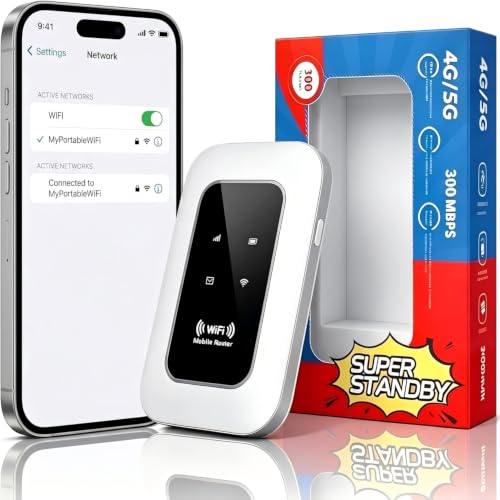
This portable router has a SIM card slot, a USB-C interface, and a built-in 2,100mAh battery. The product listing states that the battery provides over 10 hours of use and can be charged from a computer, power bank, or car USB charger. It is described as supporting up to 16 connected devices.
Best for: buyers who want to choose a physical SIM and data plan rather than use a hotspot that relies on a built-in virtual SIM service. The listed LTE Cat4 speed is up to 300Mbps, but actual service depends on the network and coverage available where you drive.
Consider this limitation: the listing calls the device “4G/5G,” but also specifies LTE Cat4. Check the supported cellular bands and carrier compatibility before buying; the supplied information does not identify specific compatible carriers.
STATELINKER S2 North America Hotspot

The STATELINKER S2 is described as a North America-focused 4G hotspot that does not require a physical SIM card. Its listing includes 10GB of free USA data and describes service without a contract or roaming fees. It supports WiFi 6 and up to eight connected devices.
The device weighs 100 grams, according to the product information, and is listed with up to 15 hours of continuous use per charge. It is a practical choice for a family or small group that wants a rechargeable, pocket-sized hotspot for road trips and stops away from the car.
Best for: North American travelers who prefer a SIM-free setup and need to connect several devices, but not more than the stated eight-device limit. Limitation: the listed free data is limited to 10GB, and the product is positioned for North America rather than worldwide use. Verify service coverage along your route.
FIRSTNUM SIM-Free Travel Hotspot

The FIRSTNUM hotspot uses eSIM connectivity, so the listed setup does not require a physical SIM card or a long-term contract. The product information says it can connect to major U.S. carriers and Mexico networks, switching to the strongest available 4G LTE signal. It includes 5GB of free U.S. data.
It supports up to 10 devices, making it a better match for a small group than for a large vehicle full of connected passengers. The listing also presents it as useful in crowded locations and areas where phone service struggles, but hotspot performance still depends on available cellular coverage.
Choose this if you want a SIM-free hotspot for a U.S. road trip that may include travel in Mexico. Limitation: the included 5GB is a modest data allowance for multiple users, so check how additional data is obtained and what it costs before a long journey.
Solis Tag USB-C Hotspot

The Solis Tag is a compact hotspot that plugs into a USB-C port instead of relying on a built-in battery. The product listing names a car USB-C port, computer, laptop, or power bank as possible power sources. It uses vSIM technology and is described as connecting through more than 300 mobile carriers in over 140 countries.
The bundle includes 1GB of data per month and a separate 30GB global data pack, according to the listing. This makes the device worth considering for drivers whose vehicle has an accessible USB-C power source and who also want a hotspot for travel outside the United States.
Best for: buyers who want a plug-in device without battery charging. Limitation: it depends on a USB-C power source, and the included data amounts are defined rather than unlimited. Confirm the bundle’s coverage and data conditions before travel.
Buying Guide: How To Choose A Car WiFi Hotspot
Do you want a built-in battery, a vehicle-powered device, or a SIM slot?
Power design affects how you use a hotspot between drives. A battery-powered model can be carried away from the vehicle, but it needs charging. A battery-free device such as the BNBDE is intended for vehicle use, while the Solis Tag requires a USB-C power source. A SIM-slot router gives you more control over which SIM and data plan to use, subject to device and carrier compatibility.
For any device powered through the car, check your vehicle’s ports and how they behave when the ignition is off. Do not assume a USB port provides power continuously or that a hotspot is suitable for permanent installation simply because it is described for vehicle use.
How much data will your passengers use?
Maps, email, and basic browsing usually use less data than video streaming, large downloads, or video calls. Compare the included data with the way your passengers actually use the internet. The listed bundles in this selection range from 5GB to 10GB in the United States for several products, while the Solis Tag has separate monthly and global data allowances. Check what happens when included data runs out.
How many devices need to connect?
Compare the device limit with the number of phones, tablets, laptops, and other equipment that will use the hotspot at once. The BNBDE and Generic router list support for up to 16 devices; the FIRSTNUM lists up to 10, and the STATELINKER S2 lists up to eight. A higher connection limit does not guarantee that every device will receive fast service, especially when the cellular signal is weak or many users are active.
Will it work on your route?
A hotspot needs access to a compatible cellular network or another stated connection method. Check the provider’s coverage map for your route, including rural highways and destinations, and confirm the device’s network compatibility. “Multi-carrier,” “global,” or “5G” wording alone does not guarantee service everywhere. The product listings do not provide complete carrier-band details for every model, so seek those details before purchase when compatibility is essential.
Do you need SIM-free service or a physical SIM?
SIM-free and vSIM devices can simplify setup because they do not require you to insert a physical SIM. However, service depends on the device’s supported data options and coverage. A SIM-slot hotspot lets you supply a SIM, but you must confirm that the SIM and cellular bands work with the router. Compare setup requirements, data expiration, recharge options, and roaming terms as well as the device itself.
Is WiFi 6 or a stated speed the deciding factor?
WiFi 6 describes the hotspot’s local wireless connection to devices; it does not create cellular coverage or guarantee a particular internet speed. Cellular technology, signal strength, congestion, data-plan conditions, and location all affect real-world performance. Treat maximum speeds in product descriptions as specifications rather than guaranteed speeds while driving. Passengers should use connected devices safely and avoid distracting the driver.
Frequently Asked Questions
Can I use a portable WiFi hotspot in my car?
Yes, if the device has power and cellular service where you drive. Depending on the model, it may use a built-in battery, a car charger, or a vehicle USB-C port. Check the device’s power requirements and network compatibility first.
Does a car hotspot need a SIM card?
Not always. Some models use a physical SIM card, while others use vSIM or eSIM technology. Check how the specific hotspot connects and how its data service is activated.
Can a car WiFi hotspot work without a data plan?
A cellular hotspot needs an active data option to provide internet access. A device may include a limited data bundle, but additional service may require another plan or data purchase. Review the product’s current data terms.
How many devices can connect to a car hotspot?
The limit varies by model. In this selection, listed limits range from eight devices for the STATELINKER S2 to 16 for the BNBDE and Generic router. Actual performance can vary with signal and simultaneous use.
Is a hotspot better than using my phone as a hotspot?
A dedicated hotspot can provide a separate connection for passengers and other devices, and some models offer features such as a SIM slot or battery-free vehicle use. A phone hotspot avoids carrying another device. The better option depends on your data plan, coverage, power needs, and how often you share internet.