
The Behringer S16 is the clearest fit here for buyers seeking a true digital audio snake: it has 16 programmable mic preamps, eight analog XLR outputs, and AES50 network ports. The other listed products are analog XLR snakes or cable extenders, not complete digital stage-box systems. Choose the S16 for digital networked audio, the Seismic Audio compact snake for a short analog run, or the Tisino extender when you need to carry four XLR channels over Ethernet cabling.
| Product | Best suited for | Type |
|---|---|---|
| Behringer S16 | Digital stage I/O and networked audio | Digital snake |
| Seismic Audio SAHB-6x2x30 | Compact analog stage connections | Analog XLR sub snake |
| Tisino 4-Channel XLR Extender | Four XLR channels over Ethernet cabling | Analog audio extender |
| Jamesin 4-Channel XLR Cable | Short, organized analog connections | Analog cable snake |
| Seismic Audio 24-Channel Splitter | Analog signal splitting for stage or studio | Analog splitter snake |
Behringer S16 16-Channel Digital Snake

Best for: Live sound users who need a digital stage box with multiple microphone inputs and analog outputs. It is the most direct match for a digital audio snake in this selection because its listed features include AES50 network ports and 16 programmable mic preamps.
The S16 provides 16 MIDAS-designed, fully programmable mic preamps and eight analog, servo-balanced XLR outputs. Its AES50 ports use KLARK TEKNIK SuperMAC networking capability, which the product description identifies as supporting ultra-low jitter and latency. Those details make it more suitable than a passive XLR snake when the intended setup requires networked digital audio and remote input connections.
Why it was selected: Unlike the other products listed, the S16 is explicitly identified as a digital snake and includes network ports alongside analog I/O. Before choosing it, verify that your intended audio system supports the connection and workflow you plan to use; compatibility details are not provided in the supplied product information.
Limitation: The listed description does not specify a complete channel-routing workflow, cable length, or compatibility with a particular mixer. Confirm those requirements before purchase.
Seismic Audio 6-Channel Compact XLR Sub Snake
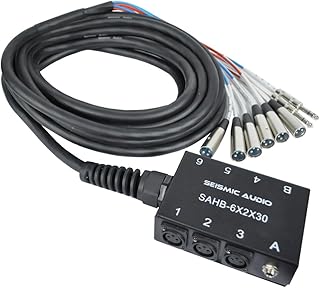
Best for: Small analog stage or studio setups that need six XLR channels over a 30-foot run, with two stereo feeds also indicated in the product name. This is a compact analog sub snake, not a digital audio network stage box.
Its channel count and stated 30-foot length suit users who want to bring several analog connections together rather than run separate cables across a short distance. It may be a better fit than the S16 when the equipment already uses direct XLR connections and networked audio conversion is not required.
Why it was selected: It is a relevant alternative for shoppers searching broadly for an audio snake, especially when the actual requirement is cable organization rather than digital transmission. Limitation: The listed product information does not describe digital networking or detailed connector specifications for the stereo feeds. Avoid it if you specifically need a digital stage box.
Tisino 4-Channel XLR Ethernet Extender

Best for: Users who want to extend four XLR audio channels using an Ethernet network cable as the link between the included pair. The product name identifies it as a 4-channel XLR snake over Ethernet, making it a practical cable-routing option for a specific analog connection need.
This item is not automatically a digital audio snake simply because it uses Ethernet cabling. The listing describes XLR audio extension, not an AES50, Dante, or other digital audio networking protocol. Choose it when your goal is to send four XLR channels through a single Ethernet cable path, and confirm the connection method against your equipment and the product’s full specifications.
Why it was selected: It provides a channel-count option between a short multi-cable snake and a larger stage box. Limitation: The supplied information does not state cable length, supported network protocol, or additional channel capacity. Avoid treating it as a network audio interface without verification.
Jamesin 4-Channel 6-Foot XLR Cable Snake

Best for: Short analog connections in a stage, recording studio, or equipment area. Its listed features include four XLR channels, a six-foot length, male-to-female connectors, digital labeling, and color coding.
The color-coded and labeled channels can help users identify individual lines when several microphone or audio connections run together. At six feet, this cable snake is better for nearby equipment than for a long stage-to-mixer run. The product name says it can be used with any device, but buyers should still check connector types and signal needs for their particular setup.
Why it was selected: It offers a simple way to organize four short analog XLR connections. Limitation: It is not a digital network stage box, and its stated six-foot length may be too short for larger venues or distant equipment.
Seismic Audio 24-Channel XLR Splitter Snake

Best for: Larger analog setups that need a 24-channel XLR send splitter, such as stage, studio, or road applications described in the product name. The listing also specifies two trunks with 15-foot fantails each.
This option is better for splitting and routing multiple analog XLR signals than for creating a digital audio network. Its 24-channel count is substantially larger than the four- and six-channel cable snakes in this selection. Consider it when the system needs a splitter arrangement and the trunk and fantail configuration suits the physical layout.
Why it was selected: It addresses a different but related live-sound need: distributing many analog signals between destinations. Limitation: The supplied details do not describe the splitter’s exact output arrangement or digital capabilities. Check the connector layout and signal-routing requirements before selecting it; do not treat it as a digital snake.
Buying Guide: How To Choose A Digital Audio Snake System
A digital audio snake moves audio between stage-side equipment and a mixing position using a supported digital network connection. A passive XLR snake instead carries analog signals through dedicated audio lines. The two products may both be called “snakes,” but they solve different connection problems. Start by identifying whether your mixer and stage equipment exchange audio digitally or require direct analog XLR wiring.
Do you need a digital stage box or an analog snake?
Choose a digital stage box when you need networked audio transport and the device supports the protocol used by the rest of your system. The Behringer S16 is the only listed product explicitly described as a digital snake, with AES50 ports, 16 mic preamps, and eight analog XLR outputs. Choose an analog snake when you simply need to gather several XLR connections into one cable run.
Do not assume that a cable with an Ethernet-style connection carries digital network audio. The Tisino product is described as an XLR extender over Ethernet cabling, but the supplied details do not identify it as an audio network interface or specify a digital protocol. Check the product’s technical documentation and the requirements of your mixer before connecting it.
How many inputs and outputs do you need?
Count the microphones, instruments, and other sources that must reach the mixer, then separately count outputs needed for monitors, returns, or other destinations. Compare those needs with the stated channel and I/O counts rather than relying only on a product’s broad “snake” label.
- 16 inputs and eight analog outputs: The listed S16 specifications provide this combination, along with AES50 network ports.
- Six analog channels: The Seismic Audio compact sub snake is named as a six-channel, 30-foot product and also mentions two stereo feeds.
- Four channels: The Tisino extender and Jamesin cable snake both specify four channels, but their connection methods and purposes differ.
- 24 channels: The Seismic Audio splitter is aimed at higher-count analog signal splitting and has two 15-foot fantails.
Input and output counts are not interchangeable. Check whether a listing means inputs, sends, returns, or duplicated split outputs, and confirm the connector genders and routing arrangement from the manufacturer’s specifications.
Which connection method fits your equipment?
For a digital system, verify the exact audio networking standard, port type, and supported equipment on both ends of the connection. AES50 is identified in the S16 product details, but the other supplied details do not establish that the S16 will work with a particular mixer. Confirm compatibility before building a system around it.
For analog systems, compare the XLR connector arrangement, channel count, and whether the product is a normal snake, an extender, or a splitter. A splitter snake serves a different purpose from a simple run of cables. If you need the same signal delivered to separate destinations, investigate the precise split design rather than assuming any multi-channel snake will do it.
How long should the cable run be?
Measure the actual route from the stage or source equipment to the mixer, including the path around obstacles and the distance needed for safe placement. The listed Seismic Audio compact snake is 30 feet, while the Jamesin cable snake is six feet. The 24-channel splitter has 15-foot fantails, but the supplied description does not state its trunk length. The Tisino listing details provided here do not state a supported distance.
For a digital link, use the cable type and maximum run length specified for the audio network and hardware. Do not infer a reliable digital audio distance from the use of Ethernet cabling alone. For analog cabling, ensure the whole run reaches the equipment without putting connectors under strain or creating trip hazards.
What should you verify before ordering?
- Confirm whether you need digital audio networking, analog XLR wiring, extension, or signal splitting.
- Match the channel count to the number and direction of signals in your setup.
- Check connector types, genders, and the product’s exact input/output arrangement.
- Verify the audio network protocol and equipment compatibility for a digital stage box.
- Measure the full cable route and check the listed length for each section.
- For an Ethernet-cable XLR extender, confirm its intended cable and connection requirements from the full product documentation.
Frequently Asked Questions
What is a digital audio snake?
A digital audio snake transports multiple audio channels between equipment over a digital connection, commonly linking a stage-side I/O unit with a compatible mixer. The connection standard and device compatibility must match on both ends.
Is an XLR snake the same as a digital snake?
No. A conventional XLR snake carries analog audio over individual audio lines. A digital snake uses a supported digital audio connection to transport multiple channels. Both can simplify stage wiring, but they are not interchangeable without suitable equipment.
Is the Behringer S16 a digital snake?
Yes. The supplied product information identifies the Behringer S16 as a 16-channel digital snake and lists AES50 network ports, 16 programmable mic preamps, and eight analog XLR outputs. Confirm compatibility with your mixer and other equipment before buying.
Does an XLR-over-Ethernet extender carry digital audio?
Not necessarily. The Tisino listing describes a four-channel XLR extender that uses Ethernet network cabling. The supplied details do not identify a digital audio protocol, so verify its purpose and system requirements before treating it as a digital snake.
How many channels should a live sound snake have?
Choose enough channels for all sources and returns that need to travel between the stage and mixing position. Count inputs and outputs separately, allow for the signal routing you actually use, and check whether the product’s stated channel count refers to channels, sends, or split outputs.