
The best portable LCD TV for a car depends on whether you need a battery-powered screen, a DVD player, or a permanent-style rear-seat entertainment system. The Tyler 7-inch TV is best for travelers who want a built-in tuner and varied inputs; the FANGOR is better for playing DVDs on two screens. For app-based entertainment, consider the Android headrest systems, while the NORTHING is a compact option for portable viewing beyond the car.
| Product | Best For | Key Difference |
|---|---|---|
| NORTHING 10.7-inch IPS TV | Portable viewing in different settings | Compact design and IPS screen |
| 15.6-inch Android headrest monitors | Large paired rear-seat displays | Wireless mirroring and Android 14 listed in the name |
| FANGOR 7.5-inch dual DVD player | Families with DVD collections | Two screens and rechargeable DVD playback |
| Tyler 7-inch portable TV | TV reception and flexible connections | Digital tuner, battery, and multiple inputs |
| AINAVITO 13.5-inch headrest monitors | App-based and independent viewing | Two Android screens with listed storage |
NORTHING 10.7-Inch IPS Portable TV

The NORTHING portable TV is best for people who want a compact screen that can move between a vehicle, campsite, and other locations. Its listed features include a 10.7-inch IPS display, rechargeable power, and a lightweight portable design. The manufacturer says the IPS screen provides wider viewing angles and helps maintain color and brightness when viewed from different positions.
Choose this model if screen portability and flexible placement matter more than a built-in DVD player or a dedicated headrest installation. It is also a reasonable option for passengers who may watch from different seats or angles. The product information does not specify the TV tuner standard, exact battery runtime, or supported video inputs, so confirm those details if you need broadcast reception or a particular connection.
15.6-Inch Android Headrest Monitor Pair

This pair is best for buyers seeking large screens mounted for rear-seat viewing. The product name lists 15.6-inch displays, Android 14, 4K video decoding, wireless phone mirroring, touchscreens, Wi-Fi, Bluetooth, HDMI, USB, and video playback. Two screens can suit a vehicle with multiple rear passengers, while wireless mirroring may be useful for displaying compatible phone content.
Choose this system if a headrest-style setup and a broad set of connection options fit your needs better than a handheld, battery-powered television. Before buying, check the installation method, the vehicle’s headrest dimensions, and how the system receives power. The supplied product details do not specify battery operation or provide further installation and app-compatibility information, so do not assume it works as a standalone portable TV.
FANGOR 7.5-Inch Dual Car DVD Player

The FANGOR is best for families who want disc playback on a road trip without relying on streaming. The set includes one main DVD player and one secondary LCD screen. Its listed features include USB and SD support, AV input and output, last-memory playback, and a rechargeable battery rated for about five hours on the main player. When both screens are connected, the listed runtime is about 2.5 hours.
Choose this model if two passengers should be able to watch the same movie, or if you want the option to connect the main player to a larger TV or projector through AV output. Its main advantage over a basic portable TV is its built-in disc playback. The limitation is that connected dual-screen use reduces the stated battery runtime, and the screens are smaller than the 13.5- and 15.6-inch headrest options.
Tyler 7-Inch Rechargeable Portable TV
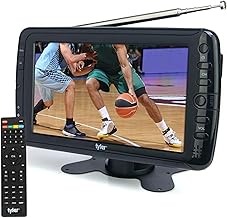
The Tyler is best for buyers who want a small screen with both television reception features and several wired inputs. Its listed specifications include a full-band digital TV tuner, USB and HDMI inputs, dual AV inputs, a headphone jack, built-in speaker, remote control, stand, and car charger. The rechargeable battery is stated to provide more than four hours of playback.
Choose this portable TV if you value the built-in tuner and want to connect devices such as a DVD player or game system through the listed inputs. The built-in stand can be useful when the screen is placed on a stable surface rather than mounted. Its 7-inch size is comparatively small for shared viewing, and receiving over-the-air television depends on signal availability and the required antenna setup; confirm what is included if reception is essential.
AINAVITO 13.5-Inch Android Monitor Pair
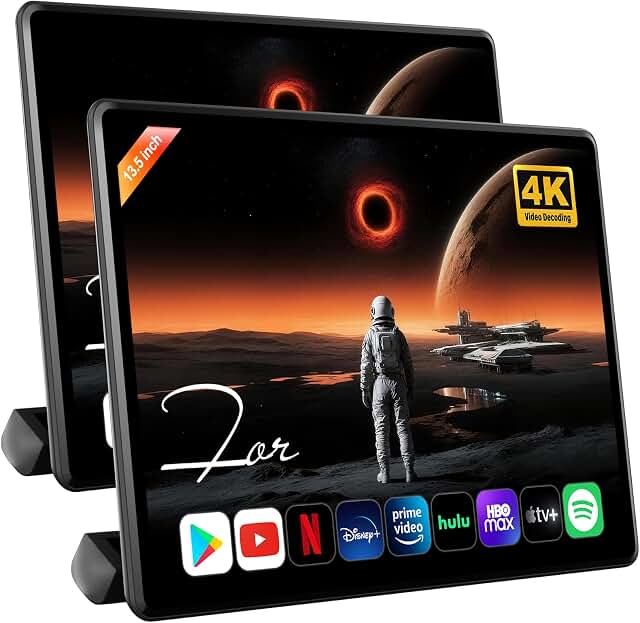
The AINAVITO pair is best for rear-seat passengers who want separate viewing choices or app-based entertainment. The listed features include two Android 13 monitors, 4GB RAM and 64GB storage per screen, Wi-Fi, Bluetooth, HDMI input and output, AirPlay mirroring, and parental control. The product description says passengers can use the screens independently or connect them to synchronize a movie. It also identifies anti-glare IPS displays with 1920-by-1280 resolution.
Choose this system if two passengers may want different content or if you want listed onboard storage for downloaded media. The description notes that Wi-Fi is used to download movies for offline viewing, which may help when cellular service is unavailable. It is a headrest entertainment system rather than a conventional battery-powered portable TV. Check mounting fit, power requirements, and the availability of specific apps before purchase.
Buying Guide: How To Choose A Portable LCD TV For A Car
Do you need a portable television or a headrest system?
A portable television is designed to be carried and placed where viewing is convenient. The NORTHING and Tyler models fit this category based on their portable form and rechargeable power. A headrest monitor is intended for rear-seat entertainment installed or mounted in the vehicle. The 15.6-inch and AINAVITO products are better matches for buyers who want dedicated screens for passengers, rather than a screen to move between different settings.
Think about who will use the display and where it will sit. A small portable TV can be moved between a car and a campsite, but it may need a stable surface and a safe way to secure it during travel. A headrest system keeps viewing positions consistent, but installation, vehicle fit, and power connections matter. Check product details for mounting hardware and dimensions instead of assuming a universal fit.
Should you choose a DVD player, TV tuner, or streaming features?
Choose a DVD player if you already have discs and want entertainment that does not depend on internet access. The FANGOR combines a DVD player with a second screen and rechargeable operation. A tuner is more relevant if you want to receive broadcast television; the Tyler lists a full-band digital TV tuner. Reception still depends on signal conditions, so a tuner alone does not guarantee a usable channel in every location.
For app-based entertainment, the Android headrest systems list Wi-Fi and phone-mirroring features. An internet connection may be needed to stream content, while the AINAVITO description specifically mentions downloading movies for offline use. Confirm app availability, account requirements, and whether content can be downloaded before relying on it for a long trip.
How much screen size and how many displays do passengers need?
A 7-inch screen takes less space and may work for one passenger, but text and details will appear smaller than on a larger display. The 10.7-inch NORTHING offers a middle-sized portable format. The 13.5- and 15.6-inch headrest options provide larger viewing areas, which can be easier to see from a rear seat, but require more room and a suitable mounting position.
For two passengers, consider whether they need the same program or separate content. The FANGOR is described as syncing the same movie to its second screen. The AINAVITO system lists independent viewing or HDMI synchronization. The 15.6-inch product is sold as two sets, but the provided details do not explain whether the screens operate independently, so verify that capability if it is important.
What should you check about power and connections?
Compare stated battery life with the length of your trips. The Tyler lists more than four hours, and the FANGOR lists about five hours for the main player or about 2.5 hours when both screens are connected. The NORTHING is described as rechargeable, but no runtime is provided. Do not treat rechargeable operation as proof that a screen will last for a full journey.
Also check the available power accessories and connection types. HDMI, USB, AV, and wireless mirroring serve different purposes, and a device needs the right input or output for the source you plan to use. A car charger can be useful, but confirm that it is included and suited to your vehicle. For headrest systems, check how they receive power and whether the cable routing works for your cabin.
How can you plan safer, more comfortable viewing?
Place screens so they do not block the driver’s view, distract the driver, or interfere with vehicle controls. Rear-seat entertainment is generally intended for passengers, not the person operating the vehicle. Secure portable devices before driving; a loose screen or cable can shift during a sudden stop. Follow the vehicle and device instructions for mounting and power connections.
For children, consider headphones or volume controls if available, and agree on content before departure. A larger screen is not automatically the best choice if it is difficult to position securely. The most practical system balances screen visibility, passenger needs, power access, and a setup that does not create a distraction for the driver.
Frequently Asked Questions
Can a portable LCD TV work in a car without Wi-Fi?
Yes, depending on the TV and the content source. A tuner may receive broadcast channels where a signal is available, while a DVD player can play discs without Wi-Fi. Stored files on supported media may also work. Streaming and many mirroring features may require an internet connection or a compatible device.
Which option is best for watching DVDs in the car?
The FANGOR is the clearest choice in this group for DVD playback because it is a portable DVD player with a main screen and a secondary screen. Its listed runtime is about five hours for the main player and about 2.5 hours when both displays are connected.
Which listed model has the longest stated battery runtime?
The FANGOR lists about five hours of playback for its main player. The Tyler lists more than four hours. Runtime can vary with operating conditions, and the FANGOR’s stated time is shorter when both screens are connected.
Can a car headrest monitor be used as a handheld TV?
Not necessarily. Headrest monitors are designed for rear-seat installation or mounting and may depend on vehicle power. Check the product’s power and mounting details before buying if you need a screen that can be carried and used away from the car.
Does a built-in TV tuner guarantee reception on a road trip?
No. A tuner can receive compatible broadcast signals, but reception depends on location, signal strength, antenna setup, and travel conditions. Check what antenna or accessories are included and consider whether offline video or DVD playback is a more dependable option for your route.