
A digital audio recorder with line in needs a dedicated input for an external audio signal, such as a mixer, receiver, or other audio source. The product details provided for these five recorders do not confirm a line-in jack, so none can be verified as a true line-in model from the listed features alone. They may suit voice recording, but check the product’s input specifications with the seller before buying for line-level recording.
| Recorder | Best For | Line-In Details Provided |
|---|---|---|
| Tonfarb 136GB | Long sessions and large recording libraries | Not specified |
| Tonfarb 64GB | Simple recording with PCM support | Not specified |
| EVISTR L357 64GB | Adjustable gain and playback controls | Not specified |
| EVIDA 128GB | Multiple recording formats and voice activation | Not specified |
| Comu Action Pro | AI transcription and meeting documents | Not specified |
What Counts As A Line-In Recorder?
A line-in recorder accepts audio from an external device through a physical audio input. This is different from recording sound through built-in microphones. A recorder’s USB connection is generally described for charging or transferring files; it should not be assumed to function as an audio input unless the manufacturer explicitly says so.
For a reliable match, look for the words “line input” or “line in” in the manual or specifications. Check the connector type, supported input level, and whether the device records the external signal in the format you need. A product page that only mentions microphones, noise reduction, playback, or USB transfer does not establish that the recorder has line-in capability.
Tonfarb 136GB Recorder
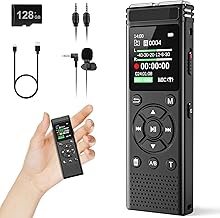
The Tonfarb recorder is best for buyers who need long recording sessions and substantial storage for voice recordings. Its listed package includes 8GB of built-in storage and a 128GB TF card, and the product description states capacity of up to 9,775 hours in MP3 format. It also lists up to 68 hours of continuous recording on a charge.
Features include 1536 kbps PCM recording, dual noise-reduction microphones, voice activation, one-click recording and saving, and USB-C file transfer. These specifications make it a candidate for lectures, interviews, or other microphone-based recording when storage and battery duration matter.
Line-in limitation: The supplied features do not mention a line-in jack or external audio input. Choose this only if its voice-recording features fit your needs and the seller confirms the input connection you require.
Tonfarb 64GB Recorder

The Tonfarb 64GB model is best for buyers seeking straightforward operation and a smaller storage capacity than the 136GB version. The product description lists a built-in 64GB TF card, up to 4,600 hours of recordings, and up to 48 hours of continuous use at MP3 32 kbps.
It supports WAV recording up to 1536 kbps PCM and includes automatic noise reduction, one-click recording and saving, and playback. The listed features suit voice notes, interviews, lectures, or similar recordings where quick controls are useful.
Line-in limitation: Its listed noise reduction and PCM support do not prove that it accepts an external line-level source. The product details provided do not specify a line-in connector, so verify this before purchasing for music or equipment capture.
EVISTR L357 64GB Recorder

The EVISTR L357 is best for buyers who want adjustable recording gain and more playback controls. Its listed features include seven gain levels, PCM noise reduction, stereo recording up to 1536 kbps, and WAV or MP3 format options. It also supports playback, A-B repeat, rewind, and variable-speed playback.
The product details describe 64GB of storage, up to 4,660 hours at 32 kbps, and up to 32 hours of continuous recording. Two-button recording and saving may also appeal to buyers who want quick operation without navigating a complex control system.
Line-in limitation: Adjustable gain refers to recording level control, but the provided description does not say that an external line signal can be connected. Confirm the physical input and supported signal type before treating it as a line-in recorder.
EVIDA 128GB Voice Recorder

The EVIDA is best for buyers who want a high-capacity recorder with several stated recording formats. Its product details list 128GB of storage, up to 54 hours of continuous recording, and MP3 options at 128 or 192 kbps alongside WAV at 1536 kbps.
It also lists a noise-cancelling microphone, playback, and voice activation with six selectable sound-level settings. These features are relevant to spoken-word recording, particularly when the user wants to reduce silent sections or choose between file formats.
Line-in limitation: The listed microphone and voice-activation features describe microphone recording, not an external line input. No line-in connection is identified in the supplied information. Verify the hardware details if connecting a mixer, instrument, or playback device is essential.
Comu Action Pro AI Recorder

The Comu Action Pro is best for buyers focused on meetings, transcripts, and AI-generated documents rather than conventional standalone audio capture. Its listed features include six microphones, transcription and summaries in 113 languages, translation, and tools that can turn conversations into editable slides, emails, reminders, and action items.
The product details describe an app and website workflow for searchable transcripts and structured summaries. That makes it a different type of option from the storage-focused voice recorders above, especially for people who need meeting documentation.
Line-in limitation: The supplied features do not identify a physical line input or external audio recording connection. Its AI features should not be treated as evidence of line-in support. It is less directly suited to buyers seeking a traditional recorder for a wired audio source.
Buying Guide: How To Choose A Digital Recorder With Line In
Does The Recorder Have A Dedicated Line Input?
Start with the input list in the product manual or technical specifications. Look for an explicit “line in” designation. A microphone input, built-in microphone, headphone jack, or USB port is not automatically a line input. If the listing is unclear, ask the manufacturer or seller to identify the input and compatible signal level.
What Will You Connect To The Recorder?
Identify the source before choosing a device. A mixer, stereo receiver, instrument, phone, or computer may use different output connectors and signal levels. Check both ends of the connection and confirm whether the recorder expects a line-level signal or a microphone-level signal. Using the wrong input type can result in poor recording levels or distortion.
Do You Need Stereo Recording?
For a music source or stereo program, verify that the recorder accepts and preserves stereo input. A specification for stereo microphones does not necessarily confirm stereo line-in recording. Check the number and type of input channels and whether the desired recording format supports them.
Which Recording Format And Quality Fit The Job?
WAV and PCM are commonly used when buyers want less-compressed recordings, while MP3 can reduce file sizes and simplify storage. A high stated bitrate alone does not confirm line-input capability or guarantee a particular result. Choose a format based on your editing, archiving, and file-sharing needs, then confirm the recorder can use that format with the external input.
How Much Storage And Battery Life Do You Need?
Long events and unattended sessions place more demand on storage and battery capacity. Compare the manufacturer’s stated continuous recording time and storage, while noting that advertised recording-hour totals can depend on format and bitrate. The five products above list substantial storage or battery figures, but those details do not establish line-in support.
Will You Monitor Audio While Recording?
If you need to hear the source or check levels during capture, confirm whether the recorder offers headphone monitoring or another suitable way to monitor input. Do not assume that a playback function means live input monitoring. The supplied product descriptions do not confirm this capability for the models listed.
When Is A Voice Recorder A Better Fit?
A voice recorder with built-in microphones can be a practical choice for lectures, interviews, dictation, and meetings. Features such as voice activation, quick-start controls, noise reduction, and playback can help with those tasks. For recording a wired source, however, prioritize a clearly documented line input over general voice-recorder features.
Frequently Asked Questions
Can I Use A USB Port As Line In?
Not unless the manufacturer explicitly documents USB audio input for recording. In the products listed here, USB is described for connection or file transfer, not as a confirmed line-in input.
Is A Microphone Input The Same As Line In?
No. Microphone and line inputs can be designed for different signal levels. Check the recorder’s documentation and the output specifications of the source before connecting them.
Do Any Of These Five Products Confirm Line-In Support?
No. The supplied feature descriptions do not identify a dedicated line-in jack or external line-level recording. Confirm directly with the seller or manufacturer before buying one for that purpose.
Can PCM Recording Confirm That A Recorder Has Line In?
No. PCM describes a recording format or encoding method. It does not identify the physical input used to capture audio.
What Should I Ask The Seller Before Buying?
Ask whether the recorder has a dedicated line input, what connector it uses, whether it accepts your source’s signal level, and whether it records that input in the format and number of channels you need.