
The best iPod docking station depends on the device connector and the features you need: the iClassic is best for an alarm clock and radio, while the Bose SoundDock models are better suited to buyers prioritizing a speaker dock. This comparison covers five available listings, including a portable Bose model and different Series II versions. Check your iPod or iPhone connector before choosing: several products use a 30-pin dock, and Lightning-equipped devices may require an adapter.
| Product | Best For | Key Difference |
|---|---|---|
| iClassic Docking Speakers Alarm AM/FM Station | Alarm and radio functions | 20 radio presets and selectable alarm sources |
| Bose SoundDock Series II (Renewed) | Buyers considering a renewed dock | Renewed listing with 30-pin docking |
| Bose SoundDock Portable | Portable speaker-dock shoppers | Listed as a portable model |
| Bose SoundDock Series II (Black) | Black Series II option | Standard black listing |
| Bose SoundDock Series II (Silver) | Silver Series II option | Silver finish |
iClassic Docking Speakers Alarm AM/FM Station

Best for: Buyers who want an older 30-pin iPod or iPhone dock combined with bedside alarm and radio functions. This listing stands apart from the Bose speaker docks because it explicitly includes an AM/FM tuner, preset stations, and a snooze alarm.
The listed features include charging and docking for iPod players, digital AM/FM radio, and 20 total station presets: 10 FM and 10 AM. The alarm source can be set to an iPod, buzzer, or AM/FM radio. Those options make it a more suitable choice for someone who wants a single device for docking, radio listening, and waking up.
Why it was selected: It is the clearest match for buyers searching for a functional alarm-clock docking station rather than a speaker dock alone. Its listed controls address several common bedside needs without requiring a separate radio or alarm device.
Limitation: The listing specifies 30-pin-era iPod support but does not identify newer connector compatibility. Confirm the connector on your device before buying, and do not assume an adapter will provide every feature.
Bose SoundDock Series II (Renewed)

Best for: Buyers considering a renewed Bose Series II dock for a kitchen, bedroom, or living room. The listing describes Bose proprietary audio technology and a sleeker updated design. It also identifies the model as renewed, which distinguishes this option from the standard black and silver listings below.
The dock uses a 30-pin connector and is described as working with many iPhone and iPod models. The listing specifically notes that an Apple Lightning to 30-pin adapter is required for an iPhone 5 and other iPod or iPhone models with a Lightning connector. That is an important compatibility detail for anyone using a later Apple device.
Why it was selected: It gives shoppers a Series II option that is explicitly identified as renewed, while retaining the listed Bose speaker-dock features. Choose it if the renewed condition is acceptable and you want the black version.
Limitation: The product information does not specify the renewed unit’s cosmetic condition or included accessories. Check the current listing details before ordering, and factor the adapter requirement into your compatibility decision.
Bose SoundDock Portable Speaker Dock
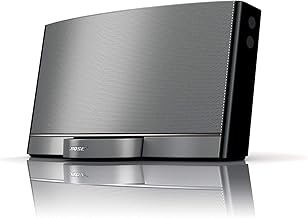
Best for: Shoppers specifically looking for a portable SoundDock-style product. The listing names it as a portable iPod and iPhone speaker dock, setting it apart from the three Series II products in this comparison.
The supplied product name identifies a 30-pin model and lists 8W, one port, and compatibility with iPhone and iPod. It also mentions both 30-pin and Lightning in the title, but the provided product details do not explain how Lightning devices connect. Because the connector description is not fully clear, verify the exact connection method in the current listing before making a purchase.
Why it was selected: It is the only product in this group explicitly described as portable. It may be a better starting point for buyers comparing a portable dock with stationary alarm-clock or Series II speaker options.
Limitation: The provided features do not explain battery operation, charging behavior, or the Lightning connection method. Do not infer portability details or device compatibility beyond what the full listing confirms.
Bose SoundDock Series II (Black)

Best for: Buyers who want the listed black Series II speaker dock and do not need an alarm clock or radio. The product information describes Bose proprietary technology for use in a kitchen, bedroom, or living room, as well as an updated, sleeker design.
This model uses a 30-pin dock and is described as compatible with many iPhone and iPod models. For an iPhone 5 or another Lightning-equipped iPod or iPhone, the listing says an Apple Lightning to 30-pin adapter is required. This makes connector checking essential, particularly if you plan to dock a device directly.
Why it was selected: It offers a straightforward black Series II choice for shoppers comparing finish and model type. Choose this version if the listed Bose speaker-dock design suits your room and a black finish is preferred.
Limitation: The supplied features do not include a radio, alarm, or other bedside functions. It may be a poor fit if those are essential, and Lightning users need to account for the stated adapter requirement.
Bose SoundDock Series II (Silver)

Best for: Buyers who want the Series II dock in the listed silver finish. Its stated functions and connector guidance match the black Series II listing: Bose proprietary audio technology, a 30-pin dock, and compatibility with many iPhone and iPod models.
The listing describes an updated, sleeker design intended for spaces such as a kitchen, bedroom, or living room. It also says that an Apple Lightning to 30-pin adapter is required when using an iPhone 5 or another iPod or iPhone with a Lightning connector. The supplied product data does not identify other differences from the black version.
Why it was selected: It provides a direct finish alternative for shoppers who have already decided that a Series II dock fits their needs. Compare the silver and black listings by appearance and by the details shown on their current product pages.
Limitation: The provided information does not establish a performance difference between the silver and black versions. Choose based on verified listing details and finish preference rather than assuming one color has different features.
Buying Guide: How to Choose an iPod Docking Station
Which connector does your iPod or iPhone use?
Start by identifying the connector on the device you plan to dock. The iClassic and Bose Series II listings specify 30-pin docking. The Bose Series II descriptions say that Lightning-equipped iPhone and iPod models require an Apple Lightning to 30-pin adapter. Check the exact device model and the current product listing before buying.
A physical adapter can address a connector mismatch, but the supplied product information does not establish that every device feature will work through one. Confirm whether the dock supports the intended device and use case. If a product title mentions both 30-pin and Lightning but gives no connection explanation, such as the portable Bose listing, seek clarification in the full listing.
Do you need an alarm clock and radio?
Choose the iClassic if an alarm and AM/FM radio are central requirements. Its listed features include 20 radio presets, a snooze function, and three alarm-source choices: iPod, buzzer, or AM/FM. The supplied details for the Bose Series II products focus on speaker docking and do not list comparable radio or alarm functions.
If you already own a separate alarm clock or radio, a speaker dock may be a better fit. Avoid choosing a product based only on the word “docking station”; compare the actual functions listed for each model.
Is portability more important than room placement?
The Bose SoundDock Portable is the only option in this set identified as portable. Its product name also lists 8W and one port, but the supplied information does not explain battery operation or runtime. Confirm those details before treating it as a battery-powered option or planning to use it away from an outlet.
The Series II products are presented as speaker docks for rooms such as a kitchen, bedroom, or living room. The provided feature information does not describe them as portable. Choose based on the intended location and verified power requirements rather than assuming all docks can be moved and used in the same way.
Which Bose Series II version should you compare?
The renewed black, standard black, and silver Series II listings share the same supplied feature statements about the 30-pin connector, many iPod and iPhone models, the Lightning adapter requirement, and the design. The clear distinctions in the supplied data are the renewed condition of one listing and the finish named by each product.
Do not assume that color variants have different sound or functions unless the product information says so. For a renewed item, review the current listing for condition and included items because those specifics were not provided here.
What should you verify before ordering?
- Confirm that your device’s connector matches the dock or that the required adapter is available.
- Check whether the product offers the functions you need, such as radio presets, an alarm, or a portable design.
- Review the current listing for included accessories and any condition details, especially for renewed products.
- For unclear product descriptions, verify how the device connects and whether the intended use is supported.
- Compare the exact model name and finish so you do not confuse the portable model with a Series II dock.
Frequently Asked Questions
Do these iPod docking stations use a 30-pin connector?
The iClassic and Bose SoundDock Series II listings specify a 30-pin connection. The portable Bose product name also identifies 30-pin, but its supplied information does not fully explain Lightning connectivity.
Can I use a Lightning iPhone with a Bose SoundDock Series II?
The Series II listings state that an Apple Lightning to 30-pin adapter is required for an iPhone 5 and other Lightning-equipped iPod or iPhone models. Verify the exact device and connection requirements before purchasing.
Which product includes an alarm and radio?
The iClassic listing includes a snooze alarm, digital AM/FM radio, 20 presets, and selectable iPod, buzzer, or radio alarm sources.
Which product is identified as portable?
The Bose SoundDock Portable is explicitly identified as portable in its product name. The supplied information does not confirm its battery operation or runtime, so check the full listing for those details.
Are the silver and black Bose Series II docks functionally different?
The supplied product descriptions list the same core features for both finishes. They do not establish a functional difference, so compare the current listings for any additional model-specific details.
Does the renewed Bose listing include an adapter?
The supplied product information says an adapter is required for Lightning devices but does not state whether one is included. Check the current listing’s included-items details before ordering.