
If you want to connect a computer’s USB port to an optical digital audio system, a USB-to-TOSLINK adapter is the most relevant choice. The Cubilux model is best for users who need higher listed sample-rate support, while the USB-to-optical adapter for Windows and macOS offers a straightforward option with Linux support also listed. For converting older analog video to a computer file, choose the capture card instead; it performs a different task.
| Product | Best For | Signal Direction |
|---|---|---|
| Cubilux USB A to TOSLINK Adapter | Higher listed audio sample rates | USB to optical digital audio |
| USB to Optical SPDIF Adapter | Windows, macOS, and Linux computers | USB to optical digital audio |
| DNXB 10FT USB to TOSLINK Cable | Longer cable reach | USB to optical digital audio |
| Oassuose VHS to Digital Converter | Capturing analog video and audio | RCA/S-Video to USB |
| PROZOR Optical to RCA Converter | Connecting optical digital audio to RCA inputs | Optical digital to analog RCA |
Cubilux USB A To TOSLINK Adapter

The Cubilux adapter sends audio from a USB Type-A computer or listed gaming console to a S/PDIF optical audio system. It is a one-way converter, so it is intended for USB audio output to an optical input, not for sending optical audio into a computer’s USB port.
It is best for buyers who want a simple computer-to-optical connection and value the product’s listed support for 48, 96, and 192 kHz audio at 24-bit. The features also describe plug-and-play use without an external power supply or driver, with Windows and Mac OS computers listed.
- Choose this if: Your source has USB Type-A and your audio system accepts TOSLINK or S/PDIF optical input.
- Why it was selected: It directly matches the common request for USB audio output to an optical digital sound system.
- Limitation: The listing says it is for computers and PS5/4 only, and not for TVs or other devices. Check your source device before buying.
USB To Optical SPDIF Adapter

This adapter converts a computer’s USB Type-A audio connection to optical S/PDIF for a compatible sound bar, home audio system, DAC, amplifier, or speaker. Its stated maximum audio support is 96 kHz at 24-bit.
It is best for buyers who need a basic USB-to-optical connection and whose computer runs Windows, macOS, or Linux. The product features describe driver-free operation and no external power requirement. These details make it a useful alternative to the Cubilux option when Linux support or a 96 kHz maximum is sufficient.
- Choose this if: Your computer has USB Type-A and your receiving audio equipment has an optical input.
- Why it was selected: It supports the same practical connection direction as the other USB-to-TOSLINK options, with Linux included in its listed operating systems.
- Limitation: The listed maximum is 96 kHz, lower than the 192 kHz maximum stated for the Cubilux adapter.
DNXB 10FT USB To TOSLINK Cable

The DNXB cable is a unidirectional USB Type-A-to-S/PDIF optical audio converter with a stated 10-foot length. It is designed to send audio from a computer, laptop, or listed gaming console to a home audio system, sound bar, amplifier, external DAC, speaker, or preamp.
It is best for buyers who need more physical reach between their USB source and optical audio equipment. The product features describe 24-bit audio, plug-and-play operation, and no external power or driver requirement. The 10-foot length may help when the source and receiving device are not close together.
- Choose this if: A longer cable is useful for your setup and your source has a USB Type-A port.
- Why it was selected: It provides the same USB-to-optical signal direction while clearly listing a 10-foot cable length.
- Limitation: The provided features do not specify a maximum sample rate, so buyers needing a particular rate should verify it with the seller.
Oassuose VHS To Digital Capture Card

This product does not convert computer USB audio to optical audio. Instead, it captures analog audio and video from sources such as VCRs, DVD players, Hi8 or DV tapes, and camcorders with RCA or S-Video connections, then sends the signal to a PC or Mac through USB-A or USB-C.
It is best for buyers digitizing older recordings rather than connecting a computer to a digital audio system. The listing describes 1080P/30fps output, synchronized audio and video capture, and driver-free connection. It also states that acquisition software is required.
- Choose this if: Your goal is to save analog video and audio to a computer.
- Why it was selected: It is relevant to searches about moving audio or other media into USB, although it is not a digital audio-out adapter.
- Limitation: The product requires acquisition software and accepts RCA or S-Video sources, not optical S/PDIF audio output.
PROZOR Optical To RCA Audio Converter
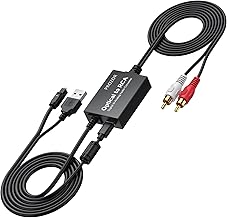
The PROZOR converter changes an optical S/PDIF digital audio signal into left and right analog RCA output. It does not convert digital audio to USB. It is included as a relevant alternative for buyers whose real need is to connect a device’s optical digital output to equipment with RCA inputs.
It is best for a setup with an optical audio source and an RCA-input amplifier or other analog audio equipment. The listed features include support for sampling rates up to 192 kHz, a built-in audio amplifier chip, and a 7-foot cable.
- Choose this if: You need optical digital audio converted to analog RCA.
- Why it was selected: It addresses a nearby but different “digital out” connection need that can be confused with USB conversion.
- Limitation: The listing says to set the source’s audio output to PCM and explicitly states that optical output is not supported as an output from this converter.
Buying Guide: How To Choose The Right Digital-To-USB Connection
Do you need USB to optical, or optical to USB?
First identify the direction of the signal. USB-to-optical adapters take audio from a USB source, such as a computer, and output it through TOSLINK or S/PDIF to an audio system. The Cubilux, USB-to-optical SPDIF, and DNXB products are in this category.
An optical-to-USB connection would do the reverse: accept optical audio and send it into a computer over USB. None of the three USB-to-optical products described here is listed for that direction. The PROZOR converter instead changes optical digital audio into analog RCA, while the Oassuose capture card digitizes analog video and audio over USB.
What ports are on your source and destination?
Check both devices before selecting an adapter. The USB-to-optical products require a USB Type-A source and an optical input on the receiving audio equipment. A USB-C-only computer may need an appropriate USB-C-to-USB-A connection, but the supplied product details do not establish compatibility for a particular adapter or computer.
For the PROZOR converter, the source needs optical S/PDIF output and the destination needs stereo RCA input. For the Oassuose capture card, the source must provide RCA or S-Video analog connections, and the computer must accept the stated USB-A or USB-C connection.
Which operating system and setup features matter?
The Cubilux listing names Windows and Mac OS computers and describes plug-and-play operation without a driver or external power. The second USB-to-optical adapter lists Windows, macOS, and Linux. The DNXB features also describe driver-free, unpowered operation, but do not name the same detailed operating-system list.
Do not assume that “plug and play” guarantees support for every computer, console, or application. Check the product’s stated source-device limits and operating-system details, particularly if you plan to use a console or a device other than a computer.
How much audio specification do you need?
For the listed USB-to-optical choices, the Cubilux adapter specifies 48, 96, and 192 kHz at 24-bit. The second adapter states support up to 96 kHz at 24-bit. DNXB specifies 24-bit audio but does not provide a maximum sample rate in the supplied details.
Higher stated sample-rate support is only useful if the source, receiving equipment, and audio content also support the format. Compare the stated specifications with your equipment instead of choosing solely by the largest number.
Do you need a cable or a compact connection?
The DNXB product explicitly lists a 10-foot length, making it the clearest option in this group when the source and audio system are farther apart. The other USB-to-optical product details do not state a cable length. Measure the route and consider where the computer and audio equipment will sit before buying.
Are you digitizing old recordings?
For VHS, DVD, camcorder, or tape sources with RCA or S-Video connections, the Oassuose capture card is more relevant than an optical audio adapter. It sends captured audio and video to a PC or Mac and requires acquisition software. Confirm that your source has one of its listed analog interfaces before choosing it.
Frequently Asked Questions
Can a USB-to-TOSLINK adapter send computer audio to a sound bar?
Yes, if the computer has a compatible USB Type-A port and the sound bar has an optical input. These adapters send audio from USB to optical; they do not work in the reverse direction based on the provided product details.
Can I connect an optical audio output to a computer’s USB port with these adapters?
The three USB-to-optical products listed here are described as USB input to optical output. They are not specified for optical input to USB output. The PROZOR model converts optical audio to analog RCA, not USB.
Which listed USB-to-optical adapter supports the highest sample rate?
The Cubilux adapter lists support up to 192 kHz at 24-bit. The second adapter lists up to 96 kHz at 24-bit, while the DNXB listing states 24-bit support without specifying a maximum sample rate.
Does the Oassuose capture card convert optical audio?
No. Its listed inputs are analog RCA or S-Video for capturing video and audio to a computer. It is intended for analog media sources, and the listing says acquisition software is required.
What does the PROZOR converter connect?
It converts optical S/PDIF digital audio into left and right analog RCA output. It is for connecting an optical digital source to RCA-input equipment, not for connecting optical audio to USB.