
The best recording and playback device depends on how much audio you need to store and how you plan to review it. The Tonfarb is best for long recording sessions and large file capacity, while the Sunlan is suited to buyers who want simple button controls and A-B playback. The EVIDA offers adjustable voice activation, and the HoTiyan is a compact-capacity option with stated recording and earphone playback times. The Comu Action Pro focuses on AI transcription and meeting documents; its listed features do not specify audio playback.
| Device | Best For | Standout Listed Feature |
|---|---|---|
| Tonfarb 136GB Recorder | Long sessions and high storage needs | One-click recording and USB-C file transfer |
| Sunlan 16GB Recorder | Simple recording and replay | Dedicated REC, STOP, PLAY, and A-B controls |
| HoTiyan 8GB Recorder | Basic portable recording | Up to 20 hours of continuous recording |
| Comu Action Pro | AI meeting notes and summaries | Transcription and summaries in 113 languages |
| EVIDA 128GB Recorder | High storage and adjustable voice activation | Three listed recording formats and six voice levels |
Tonfarb 136GB Digital Voice Recorder
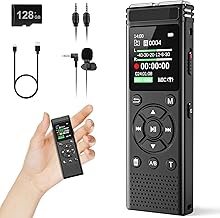
Best for: Students, interviewers, and meeting attendees who need substantial storage and extended recording time. The listed 8GB built-in memory and included 128GB TF card provide a stated total capacity of 136GB.
This recorder supports PCM recording at 1536 kbps, dual noise-reduction microphones, and voice-activated recording. Its one-click recording control is designed to start recording from a powered-off state, while the control can also save a recording. The manufacturer lists up to 68 hours of continuous recording on a charge and USB-C transfer for moving files to a computer.
- Why it stands out: High stated capacity, long listed recording time, and quick-start controls suit users capturing repeated or lengthy sessions.
- Limitation: Its maximum stated storage time refers to MP3 recordings; actual capacity varies with recording format and settings.
Sunlan 16GB Voice Recorder

Best for: Buyers who value straightforward controls and the ability to replay selected audio. The listed controls are direct: press REC to begin, STOP to end, and PLAY to listen. Its A-B function lets users select a section to repeat, which can help with reviewing a lecture passage or interview answer.
The Sunlan recorder has 16GB of storage, a sensitive microphone, noise reduction, and voice-activated recording. It also lists playback through an internal speaker and support for external-speaker playback. Voice activation is intended to begin recording when sound is detected and enter standby when it is not, helping avoid recording some stretches of silence.
- Why it stands out: The labeled controls and A-B replay function make it a good fit for people who want to review recordings on the device.
- Limitation: The supplied features do not state a battery runtime or supported recording formats, so compare those details if they are essential.
HoTiyan 8GB Digital Voice Recorder

Best for: Buyers seeking a basic recorder with listed voice activation and clear capacity information. The product description specifies 8GB of storage and offers recording-time estimates for several bit rates: up to 560 hours at 32 kbps, 280 hours at 64 kbps, 140 hours at 128 kbps, and 128 hours at 192 kbps.
The device includes a higher-sensitivity microphone, a noise-reduction function, and a professional recording chip, according to the listing. Voice control can start or stop recording based on a selected sound threshold. The listing states up to 20 hours of continuous recording and up to eight hours of playback with earphones. It also describes the device as having a playback function.
- Why it stands out: It provides a compact storage option with specific bit-rate capacity estimates and stated playback time.
- Limitation: The listing says recordings are limited to 199 files, which may matter to users who save many short clips.
Comu Action Pro AI Voice Recorder

Best for: Professionals and teams who want recordings turned into searchable transcripts, summaries, and follow-up materials. The listing describes an adaptive six-microphone setup, with four omnidirectional microphones, one directional microphone, and one bone-conduction microphone. It also lists a motion sensor.
Through its app and website, the device is described as transcribing and summarizing meetings, conversations, interviews, and voice notes in 113 languages. Its AI features can generate editable presentation slides, email drafts, reminders, to-do lists, and action items. These workflows make it different from a conventional recorder focused primarily on saving and replaying audio.
- Why it stands out: Choose this if searchable notes and AI-generated meeting outputs are more useful than manual playback controls.
- Limitation: The provided product details do not specify a playback function, storage capacity, or the conditions behind its advertised battery life. Buyers who need on-device replay should confirm that feature before choosing it.
EVIDA 128GB Digital Voice Recorder

Best for: People recording lectures, meetings, or conversations who want high stated storage and adjustable voice activation. The product lists 128GB capacity, up to 54 hours of continuous recording per full battery, and a playback function.
The EVIDA recorder supports MP3 at 128 kbps or 192 kbps and WAV at 1536 kbps, according to its listing. Its voice-activation feature offers six sound-level settings. Adjusting the threshold can help users tailor when the device starts or stops recording, although the right setting depends on the sound level in the recording environment.
- Why it stands out: It combines multiple listed recording formats, high capacity, playback, and several voice-activation levels.
- Limitation: Higher-quality WAV files use more storage than lower-bit-rate MP3 files, so the stated maximum recording hours will depend on the selected format and settings.
Buying Guide: How To Choose A Recording And Playback Device
Start by deciding whether you need a conventional audio recorder, a transcription-focused tool, or both. A recorder with playback lets you review the original audio. An AI note taker may add searchable transcripts and summaries, but those features do not automatically mean it has on-device playback. Check the product details for the exact functions you need.
How much storage do you need?
Storage capacity affects how many recordings you can keep before transferring or deleting files. The products here list capacities from 8GB to 136GB. Capacity alone does not determine recording hours: audio format and bit rate also matter. Higher-quality settings can create larger files, while lower bit rates can store more hours but may not suit every recording purpose.
For frequent, long sessions, compare both internal memory and any included memory card. The Tonfarb lists 8GB built-in storage plus a 128GB TF card. The EVIDA lists 128GB capacity. The HoTiyan lists 8GB, with storage-hour estimates tied to specific bit rates. Confirm whether a capacity figure includes removable media and whether a card is included.
Do you need voice activation?
Voice-activated recording can reduce the amount of silence saved by starting or continuing when sound passes a selected threshold. The Tonfarb and EVIDA list voice activation, and the HoTiyan describes adjustable sound-level behavior. The Sunlan also lists voice-activated recording. This feature can be useful in meetings or lectures, but a threshold that is too high may miss quiet speech. Consider whether manual one-button recording is a better fit for important conversations.
Which audio quality and recording format should you choose?
WAV and high-bit-rate recording can be useful when preserving more audio detail is important, but files may take up more storage. Lower-bit-rate MP3 settings generally allow more recording time within the same storage space. The Tonfarb and EVIDA list 1536 kbps PCM or WAV recording. The HoTiyan provides several stated bit-rate capacity estimates. Match the format to your priorities rather than assuming the highest setting is always necessary.
What playback controls matter?
Look for the playback method that suits how you review audio. A built-in speaker can make quick checks convenient, while earphone playback may suit private listening. The Sunlan lists internal-speaker playback and an A-B repeat function for replaying a selected section. The HoTiyan lists playback with earphones. The EVIDA states that it has playback. Check for the specific speaker, headphone, or file-navigation features you want because listings do not all provide the same level of detail.
How important are battery life and file transfer?
For long sessions, compare stated continuous recording time rather than relying on a general claim of long battery life. The Tonfarb lists up to 68 hours, the EVIDA up to 54 hours, and the HoTiyan up to 20 hours. These are manufacturer-provided figures; actual use can depend on settings and conditions. If you regularly archive or transcribe recordings, also check how files transfer to a computer or companion service. The Tonfarb listing specifies USB-C transfer.
Do you want transcripts and meeting summaries?
Choose an AI-oriented device when the goal includes turning conversations into written work. The Comu Action Pro lists transcription and summaries in 113 languages, plus generated drafts and action items. Those capabilities differ from simply recording audio, and the supplied information does not establish its playback options, storage capacity, or service requirements. Confirm the workflow and features before relying on it for a particular meeting or team process.
Frequently Asked Questions
Which recorder is best for long recording sessions?
The Tonfarb lists up to 68 hours of continuous recording on a charge, while the EVIDA lists up to 54 hours. These are stated maximums; actual runtime can vary with use and settings.
Which device has the clearest playback controls?
The Sunlan lists separate REC, STOP, and PLAY controls, plus an A-B repeat function. It is a practical option for buyers who want direct controls for recording and reviewing selected sections.
Does voice activation guarantee that every word will be recorded?
No. Voice activation depends on sound thresholds and the recording environment. Quiet speech or distant speakers may be missed if the selected threshold is unsuitable, so manual recording may be preferable when capturing every word is critical.
What is the difference between a voice recorder and an AI note taker?
A voice recorder primarily captures audio for later listening or transfer. An AI note taker may also produce transcripts, summaries, or action items. The listed Comu Action Pro features emphasize those AI outputs rather than specifying audio playback.
Should I choose WAV or MP3?
Choose based on the balance between audio detail and storage. The listed WAV option uses a high bit rate, while MP3 options can provide more recording hours at lower bit rates. Check the device’s format settings and your intended use before recording.